Wireless bridge or a long cable to the outbuilding?
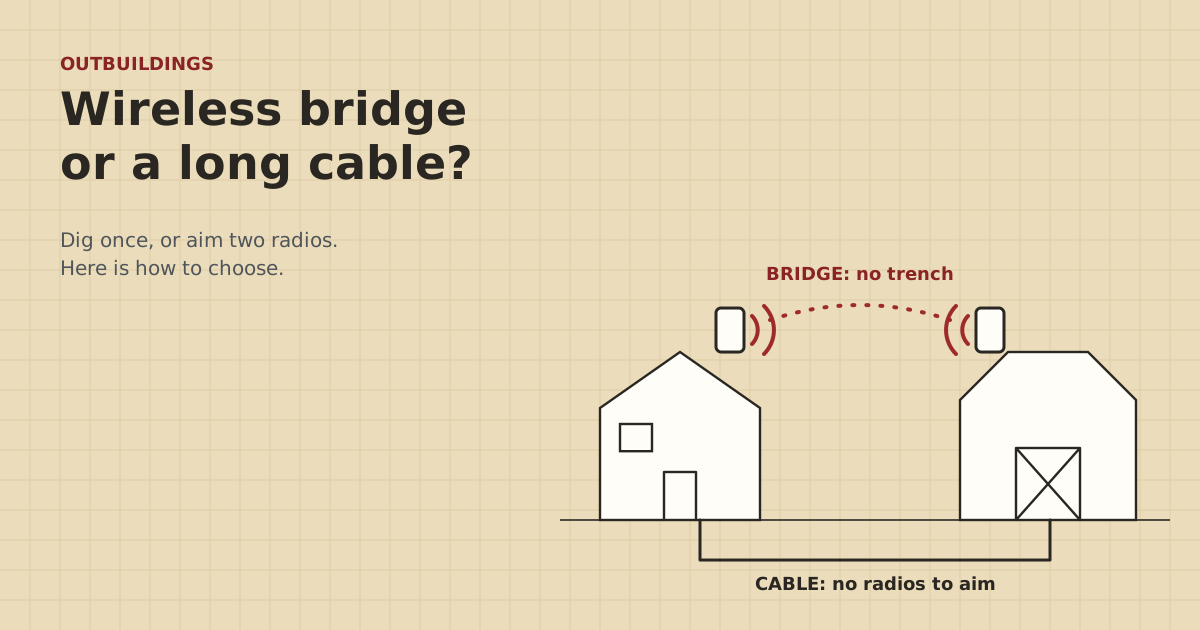
A cable is the most reliable link there is, if you can dig and the run is short enough. A bridge wins everywhere else, as long as the radios can see each other.
Research-based, not tested on a farmWorks with any internet provider at the house.
Key takeaways
- Pick buried Cat6 when the route is under 328 ft and you can dig all of it. Nothing beats it for reliability.
- Pick a wireless bridge when you can't dig, or the run is longer, and the two mount spots have clear air between them.
- Trees in leaf are the main thing that turns a good bridge into a bad one. Check the line in summer.
- A bridge leaves no copper between buildings, which helps with lightning. The masts and drop cables still need surge protection.
- Parts cost is close. The real costs are a trench on one side and mounting high on the other.
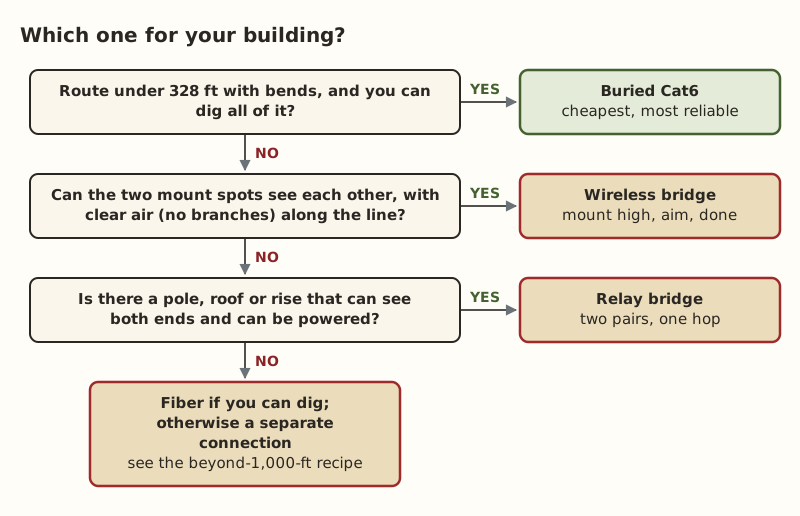
Run a cable if the route is under 328 ft and you can dig all of it. Buried Cat6 is cheap and fast, and once it’s in the ground you can forget about it. Use a wireless bridge if you can’t dig, or the run is longer than copper allows, and the two buildings can see each other through clear air. If neither fits, look at fiber or a relay bridge.
That’s the short answer. The rest of this post goes factor by factor, so you can see which one decides your case.
How each one works
Buried Ethernet is one cable, house to barn, in a trench. Plug one end into the house router or a switch, the other into a switch or access point in the barn. There are no radios to set up and no settings to change. Copper Ethernet is limited to 100 m (328 ft) end to end, and that includes the patch cords.
A point-to-point wireless bridge is a pair of directional radios. One mounts on the house, one on the barn, and they’re aimed at each other. Each radio gets its power and data over a single Ethernet cable from a PoE injector indoors. Once paired, the two act like an invisible cable. Your barn devices join the same home network.
Factor 1: Distance
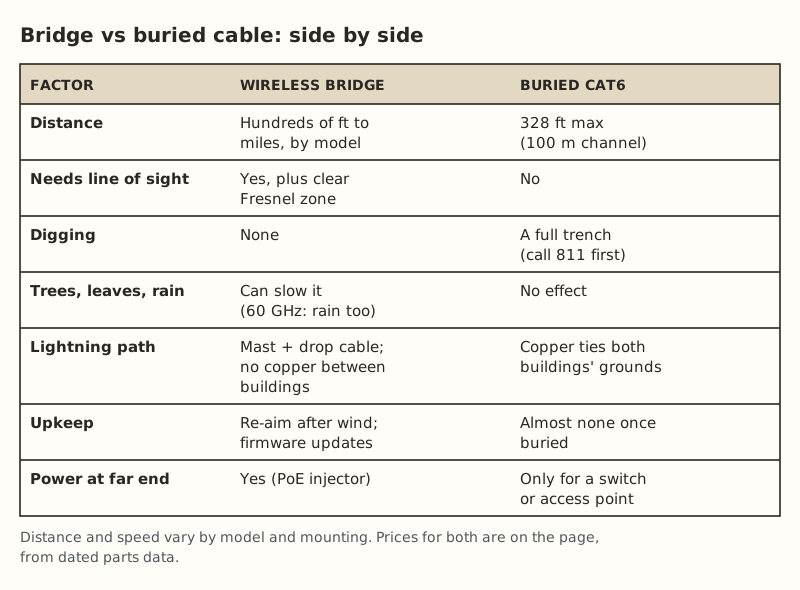
Under 300 ft, both work. Between 300 and 328 ft, cable works only if you measured the real route carefully. Past 328 ft, plain cable is out. You’d need a powered device midway, such as an outdoor PoE extender ($37.99 (checked Oct 5, 2026)), which adds up to another 100 m but needs PoE from the first segment and another weatherproof box in the field.
Bridges are sold by distance class. In our parts data:
- Short-range pair (5 GHz, a few hundred feet up to roughly 1,000 ft): $108–$139.99
- Long-range pair (higher-gain 5 GHz): $142–$218
Spec-sheet ranges are best-case numbers with a clear path. For a barn at 400–900 ft, a short-range pair is usually plenty. Go long-range when you’re near the top of that band or the path is tight.
Factor 2: Can you dig?
This is often the deciding factor. A trench is cheap in parts and expensive in effort. You’ll be digging around fences, drives, waterers and buried lines. Rock or ledge, a paved lane, a creek, a hayfield you can’t tear up in season, or someone else’s land in the way can make digging impossible.
We couldn’t confirm a trencher rental rate without a store location, so our data shows it as price not checked. Call a local rental yard.
Call 811 a few business days ahead. It's free. If the route runs near power lines, or you want power and data in the same trench, talk to a licensed electrician before you dig.
Factor 3: Line of sight
A bridge needs more than “I can see the barn”. Radio signals travel in a football-shaped space around the straight line, called the Fresnel zone. Radio planners aim to keep at least 60 % of it clear. Its widest point is in the middle of the link, and it gets wider as the link gets longer.
What counts as blocked:
- Trees and leaves. They add a lot of loss at 2.4, 5 and 6 GHz. Bare branches in February can turn into a solid wall in June.
- A rise in the ground between the buildings, even if you can see over it standing up.
- Buildings, grain bins, equipment sheds, parked trucks.
How to check without tools: stand at each mount spot and look at the other one, with binoculars if needed. At dusk, have someone shine a flashlight back at you. If anything crosses the line or comes close, plan to mount higher. The line-of-sight section of the bridge recipe shows how to work out how much clearance you need.
Cable doesn’t care about any of this.
Factor 4: Weather and seasons
Buried cable is unaffected by weather. Bridges mostly shrug off weather at 5 GHz, but:
- 60 GHz bridges are very directional, and even rain can weaken the signal. Ubiquiti’s UBB 60 GHz bridge pairs its 60 GHz link with a 5 GHz backup radio and lists a range of up to 500 m. That’s a good sign of how short 60 GHz runs in practice.
- Wind can knock a poorly mounted radio off aim. Mount to something solid, not a gutter or a thin mast that sways.
- Ice and snow on the radio usually cause less trouble than people expect at 5 GHz, but heavy ice on the mount can shift it.
Factor 5: Lightning
Copper between two buildings ties their grounds together. When lightning strikes nearby, the ground at one building can briefly rise far above the other, and the surge looks for a path, often the network cable. That’s why switch ports die at both ends after a storm.
A bridge has no copper between buildings, which helps. But each radio sits on a mast or gable with a drop cable running indoors, so it still needs surge protection and proper bonding. Either way, put an outdoor surge protector at each end ($11.69–$14.14 (checked Oct 5, 2026)) and have an electrician bond it to the building’s grounding system. See two buildings, two grounds for why this matters.
Factor 6: Upkeep and what breaks
| What can go wrong | Bridge | Buried cable |
|---|---|---|
| Knocked off aim | Wind, birds, a bumped mast | Can’t happen |
| Firmware | Should be updated now and then | Nothing to update |
| Power issues | PoE injector or cable fault reboots the radio | Only the far switch needs power |
| Physical damage | Storm, falling branch | Backhoe, gopher, frost heave at the entry |
| Fixing it | Ladder work at one end | Find the fault, maybe dig |
Bridges fail in ways you can see and fix from a ladder. Cables rarely fail, but when they do it means digging. For one common bridge problem, see the bridge keeps rebooting.
Factor 7: Parts cost
From our parts data, checked Oct 5, 2026:
| Item | Bridge setup | Cable setup |
|---|---|---|
| Main link | Short-range pair $108–$139.99 | Direct-burial Cat6, 500 ft $149.99 |
| Extras | Mounts, short outdoor patch cables | Conduit (optional) $9.53–$10.75 per 10 ft stick |
| Surge protection | $11.69–$14.14 each, one per end | $11.69–$14.14 each, one per end |
| Labor | Ladder, mounting, aiming: a few hours | Trench: a day or more |
The parts totals land in the same range for a typical barn. The cable is cheaper if you already own a way to dig. The bridge is cheaper if you’d have to rent a trencher or hire someone. The bigger cost is your time and the ground you’d tear up.
Worked examples
Equipment shed, 220 ft, gravel lane in between. Cable wins if you can bore or trench under the lane. If the lane is paved and you can’t cross it, a short-range bridge from the house eave to the shed gable avoids it entirely.
Hay barn, 650 ft across pasture, clear view from the second-floor window. Copper is out (too long). A short-range bridge pair mounted under the eaves on facing walls is the simple answer. Fiber would also work if you were trenching anyway, for example for a water line.
Shop, 450 ft, a row of maples in between. In winter the bridge works. In summer the leaves block it. Options: mount both radios above the canopy (on a pole or mast at the house), find a path around the tree row, or dig. If you dig, 450 ft is past copper’s limit, so it’s fiber or cable with an extender. See single-mode or multimode fiber.
Mixing both
You don’t have to pick one for the whole farm. A layout that works well:
- Bridge from the house to the barn that’s farthest out or hardest to trench to.
- Put a small PoE switch in that barn.
- Run short buried cables (under 328 ft each) from there to nearby sheds, a gate camera or a waterer sensor.
That gives you one bridge to maintain and short, reliable cables for everything else.
Common mistakes
- Testing the bridge line in winter only. Check it again when the trees are in full leaf.
- Mounting too low. A radio at head height on the barn wall is in the path of every truck, cow and branch. Higher is almost always better.
- Using the wrong PoE injector. Many bridge radios use passive 24 V PoE, not standard PoE. The wrong injector can damage them or fail to power them. See passive PoE vs standard PoE.
- Measuring cable as the crow flies. Then finding out the route is 360 ft.
- Forgetting the barn needs power. Both methods need an outlet in the barn for a switch, an injector or an access point.
What we don’t know
Real bridge speed and range depend on the model, mounting height, interference from neighbors’ equipment and what’s in the path. We can’t predict your link from a spec sheet. The site owner hasn’t run these setups on a farm. Owner-run tests at home, such as a bridge pair across a yard, will be published on the gear tests page and labeled as such. The comparison above comes from manufacturer specs, radio-planning basics and our dated parts data.
Next step
Measure the route, check the line of sight from both ends (in leaf season if you can), and decide whether you can dig. Then use the bridge recipe or the under-300-ft cable recipe. If you have several buildings, put each one through the Outbuilding Link Planner.
Go deeper
This post answers one question. The full guide covers the rest: 300 to 1,000 ft: point-to-point wireless bridge (line of sight, Fresnel zone, mounting, aiming and power).
Questions people ask
Is a wireless bridge as fast as an Ethernet cable?
How far can a wireless bridge go?
Do wireless bridges work through trees?
Do I need power at the barn for a wireless bridge?
Is buried Ethernet cable safe from lightning?
Can I use both a bridge and a cable?
Sources
- Ubiquiti UISP airMAX NanoBeam 5AC tech specs, retrieved Oct 6, 2026
- TP-Link CPE510 product page and specifications, retrieved Oct 6, 2026
- Category 6 cable - Wikipedia, retrieved Oct 5, 2026
- Fresnel zone - Wikipedia, retrieved Oct 5, 2026
- Interline: Fresnel Zone, Link Clearance and Signal Loss in Outdoor Wi-Fi Links, retrieved Oct 5, 2026
- Ubiquiti UniFi Building-to-Building Bridge (UBB) datasheet, retrieved Oct 5, 2026
- Cabling Installation & Maintenance: Ground potentials and damage to LAN equipment, retrieved Oct 5, 2026
- 811 Before You Dig (Common Ground Alliance), retrieved Oct 5, 2026
- Loco5AC (base $49.00; $54.00 surcharge incl.), retrieved Oct 5, 2026
- LBE-5AC-Gen2 (base $65.00; $71.00 surcharge incl.), retrieved Oct 5, 2026
- Voltive V-1236-1 Cat6 Direct Burial Gel Filled, 500 ft, retrieved Oct 5, 2026
- trueCABLE Cat6 Gel Filled Direct Burial, unshielded, 1000 ft, retrieved Oct 5, 2026
- JM Eagle 1 in. x 10 ft PVC Sch 40 Conduit 67462, retrieved Oct 5, 2026
- ETH-SP-G2, retrieved Oct 5, 2026
- POE Texas GAT-Extender IEEE 802.3af/at gigabit outdoor, retrieved Oct 5, 2026
Prices on this page are US retail ranges for named example parts, checked on the date shown, before tax and shipping. They change often.
Independent · not affiliated with SpaceX or Starlink. Links to Starlink’s plan pages use the site owner’s own referral link (your price is the same); there are no affiliate links (how we make money). It is general information, not electrical advice: where code applies, use a licensed electrician. Found an error? Tell us.