Passive 24 V PoE vs standard PoE: match it before you plug in
Both are called PoE and both use the same plugs. One checks before it sends power and one doesn't. Here's how to keep a $100 radio, or a laptop's network port, from finding out the hard way.
Research-based, not tested on a farmWorks with any internet provider at the house.
Key takeaways
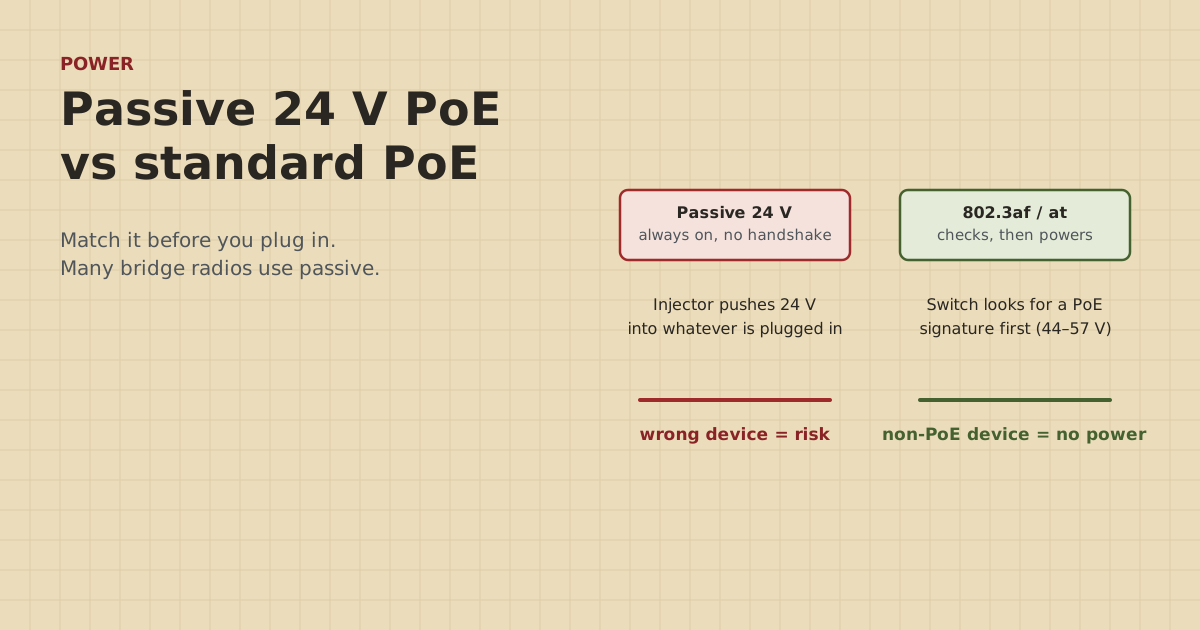
- Standard PoE (802.3af/at/bt) checks for a PoE device before sending power. Non-PoE gear plugged into it just gets no power.
- Passive PoE sends a fixed voltage, often 24 V, all the time, with no check. The wrong device can be damaged.
- Many bridge radios, including Ubiquiti's NanoBeam 5AC and TP-Link's CPE510, use passive 24 V from the injector in the box.
- A standard PoE switch port won't power a passive-only radio. Use the radio's own injector and plug its data port into the switch.
- Label passive injectors and the cables they feed, so nobody plugs a laptop or camera into them later.
Standard PoE (IEEE 802.3af, 802.3at and 802.3bt) checks first: the switch or injector looks for a PoE device, works out how much power it needs, and only then sends power, at 44–57 V. Passive PoE doesn’t check: the injector sends a fixed voltage, often 24 V, all the time. Many bridge radios use passive 24 V. Most cameras, access points and PoE switches use standard PoE. Plug a passive-only radio into a standard switch and it won’t turn on. Plug the wrong device into a passive injector and it can be damaged.
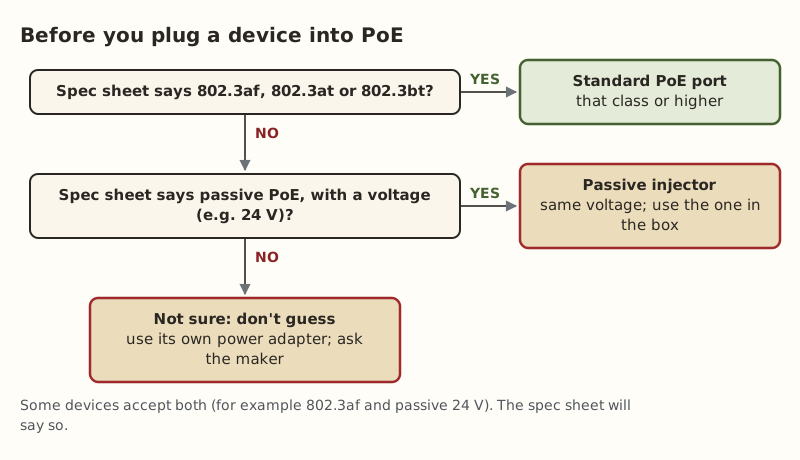
The rule: read the power line on the spec sheet, and power each device the way it says.
How standard PoE works
Per the IEEE standard, as summarized in the Power over Ethernet reference we cite:
- Detection. The switch or injector checks the cable for a specific “signature” resistance that only a PoE device presents.
- Classification. It works out the device’s power class.
- Power. Only then does it supply power: 44–57 V for 802.3af, 50–57 V for 802.3at.
At full cable length, 802.3af guarantees 12.95 W at the device (15.4 W at the switch). 802.3at (PoE+) guarantees 25.5 W (30 W at the switch).
The safety feature: a laptop, a printer or any non-PoE device plugged into a standard PoE port doesn’t present the signature, so it gets data and no power. Nothing is harmed.
How passive PoE works
A passive injector puts a fixed DC voltage on two of the cable’s pairs and leaves it there. No detection, no classification. The device on the other end either expects that voltage or it doesn’t. Common passive voltages are 24 V and 48 V, with 12, 18 and 54 V also used.
Why makers use it: it’s simple and cheap. The radio doesn’t need the circuitry to negotiate, and the injector in the box is a basic power supply.
The catch: there’s no safeguard. A non-PoE device, or a device built for a different voltage, plugged into a passive injector, can be damaged.
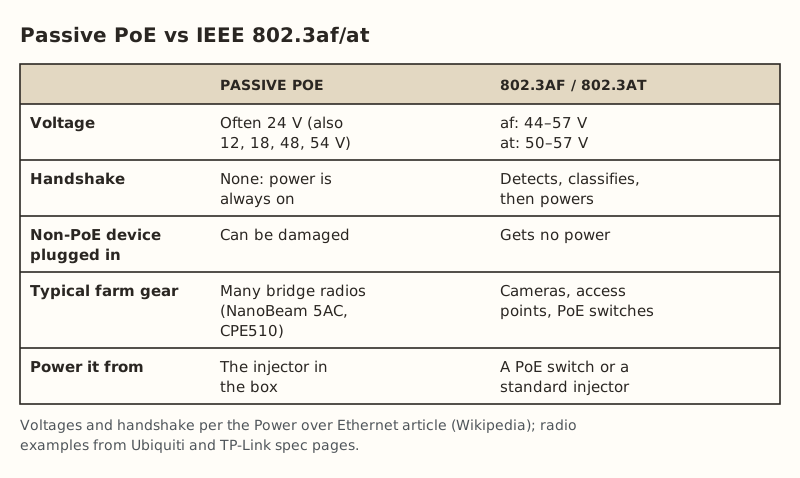
The farm gear that uses which
Bridge radios are where farm networks most often meet passive PoE. From the makers’ spec pages:
- Ubiquiti NanoBeam 5AC: passive PoE, 2-pair (pins 4,5 positive; 7,8 return), 24 V 0.5 A gigabit PoE adapter included, 8.5 W max, accepts 20–27 V DC.
- TP-Link CPE510: passive PoE on its LAN0 port (pins 4,5 positive; 7,8 negative), accepts 16–27 V DC, 10.5 W max. The included adapter supports up to 60 m of PoE, and TP-Link notes that power draw rises with cable length.
Cameras, by contrast, are usually standard PoE. Reolink lists its RLC-810A camera as IEEE 802.3af, 48 V active. Access points and PoE switches for a barn are usually standard too.
In our parts data, bridge pairs ran $108–$139.99 (short range) and $142–$218 (long range). At least one of those examples, the CPE510, ships with a passive injector. Check each model’s spec sheet. Some newer radios accept both standard and passive PoE, and the spec sheet will say so.
What goes wrong when they’re mixed
| Plugged into | Device | What happens |
|---|---|---|
| Standard PoE switch port | Passive-only radio | No power. The radio stays dark |
| Standard PoE switch port | Laptop or non-PoE device | Data only, no power. Safe |
| Passive 24 V injector | Matching 24 V passive radio | Works as designed |
| Passive 24 V injector | Laptop, camera or non-PoE device | Risk of damage. No handshake protects it |
| Passive 24 V injector | Device that needs 48 V passive | Underpowered: won’t start or keeps rebooting |
| Passive injector with too high a voltage | Any device built for less | Risk of damage |
The dangerous rows are the ones where a passive injector feeds the wrong thing. That usually happens months later, when someone grabs “the network cable by the door” for a laptop or a new camera.
How to set up a bridge radio with a camera switch
A common barn layout has a bridge radio on the gable and a PoE switch inside for cameras. Here’s how to wire it so nothing gets the wrong power:
- Radio to injector: outdoor cable from the radio to the injector’s PoE port. This cable carries 24 V.
- Injector to switch: a normal patch cable from the injector’s LAN port to any switch port. This cable carries data only.
- Cameras to switch: each camera on a PoE port of the switch. In our parts data a 5-port switch with 4 PoE+ ports was $44.99–$63.66.
- Label it. Tag the radio’s cable at both ends “24 V PASSIVE: radio only”, and put a label on the injector.
- Surge protection: put an outdoor Ethernet surge protector ($11.69–$14.14) on the radio’s cable where it enters, grounded per the maker’s instructions by an electrician.
If you’d rather have one fewer power brick, there are converters that take standard PoE in and put out passive 24 V. Check the converter’s wattage against the radio’s max draw before you rely on one. We haven’t priced or tested them.
Worked example: a mixed barn
Say a barn has a CPE510 bridge radio on the gable, three standard-PoE cameras and an access point (a made-up but typical layout).
| Device | Spec sheet says | Powered from |
|---|---|---|
| CPE510 radio | Passive PoE, 16–27 V, 10.5 W max | Its own 24 V passive adapter |
| Camera 1–3 | 802.3af | PoE switch ports 1–3 |
| Access point | 802.3af or at (check model) | PoE switch port 4 |
| Injector’s LAN port | Data only | PoE switch port 5 (uplink) |
The switch powers four standard devices and gets its link to the house through the injector’s LAN port. The radio’s cable never touches a switch port. If the access point turns out to be passive too (some older outdoor ones are), it gets its own injector as well, and a label.
Cable length check: the radio sits 25 m of cable from the injector, well inside the adapter’s 60 m rating. The farthest camera is 80 m from the switch, inside standard PoE’s 100 m design length.
Why passive gear is still everywhere
If passive PoE has no safety handshake, why do makers keep using it? Three reasons:
- Cost and simplicity. Skipping the detection and classification circuitry makes radios cheaper and simpler. The injector is a basic power supply.
- Long product lines. Some radio families have been passive for many generations, and installers keep a drawer of matching injectors.
- Outdoor installs are usually single-purpose. The cable from the injector goes to one radio on a roof and stays there for years. The risk mostly shows up when someone repurposes that cable later.
None of that makes passive PoE bad. It makes it something you label and keep separate.
Replacing a lost injector
If the injector that came with a radio dies or goes missing:
- Match the voltage exactly (24 V for the radios above) and match or exceed the current rating (0.5 A on the NanoBeam’s adapter).
- Match the pinout. Most 24 V passive gear uses pins 4,5 positive and 7,8 return, but check.
- Match gigabit if the radio is gigabit. Some cheap passive injectors only pass 100 Mbps.
- Don’t substitute a standard PoE injector unless the radio’s spec sheet says it accepts 802.3af/at. A standard injector ($19.99–$35.49 in our data) is the right buy for a standard-PoE camera, not a passive radio.
A weak or wrong injector is a classic cause of a radio that keeps rebooting. See the bridge keeps rebooting.
Common mistakes
- “It’s PoE, it’ll be fine.” Two different systems share one name.
- Plugging the passive radio cable into the switch after a rearrange, and wondering why the barn link died.
- Plugging a laptop into the injector’s PoE port to “test the cable”. Use the LAN port.
- Counting passive radios in the switch’s PoE budget. They’re not on it. See adding up PoE watts.
- Running passive PoE farther than its adapter is rated for. The CPE510’s adapter is rated for 60 m. Standard PoE is designed for 100 m.
What we don’t know
Which exact radios in the market are passive-only, dual-mode or standard changes with each product generation, so always check the current spec sheet for your model. Injector quality varies, and we haven’t bench-tested any. Owner-run tests at home will be published on the gear tests page and labeled as such.
Next step
Find the power line on the spec sheet of every PoE device in your setup and write “passive 24 V” or “802.3af/at” on a label for each. Then wire the bridge as in the bridge recipe. If you’re still choosing a method, see wireless bridge or a long cable, or put each building into the planner.
Go deeper
This post answers one question. The full guide covers the rest: 300 to 1,000 ft: point-to-point wireless bridge (line of sight, mounting, aiming and powering a bridge pair).
Questions people ask
What is the difference between passive PoE and active PoE?
Can I use a standard PoE switch with a passive 24V device?
Can passive PoE damage a device?
Is 24V passive PoE the same as 802.3af?
How far can passive PoE go?
How do I know if my device uses passive or standard PoE?
Sources
- Ubiquiti UISP airMAX NanoBeam 5AC tech specs, retrieved Oct 6, 2026
- TP-Link CPE510 product page and specifications, retrieved Oct 6, 2026
- Power over Ethernet - Wikipedia (voltages, passive PoE, detection), retrieved Oct 6, 2026
- Reolink RLC-810A specifications, retrieved Oct 6, 2026
- Category 6 cable - Wikipedia, retrieved Oct 5, 2026
- TP-Link TL-POE160S, retrieved Oct 5, 2026
- TP-Link TL-SG1005P (4 PoE+ ports, 65 W), retrieved Oct 5, 2026
- Loco5AC (base $49.00; $54.00 surcharge incl.), retrieved Oct 5, 2026
- LBE-5AC-Gen2 (base $65.00; $71.00 surcharge incl.), retrieved Oct 5, 2026
- ETH-SP-G2, retrieved Oct 5, 2026
Prices on this page are US retail ranges for named example parts, checked on the date shown, before tax and shipping. They change often.
Independent · not affiliated with SpaceX or Starlink. Links to Starlink’s plan pages use the site owner’s own referral link (your price is the same); there are no affiliate links (how we make money). It is general information, not electrical advice: where code applies, use a licensed electrician. Found an error? Tell us.