Adding up PoE watts when cameras turn on night vision
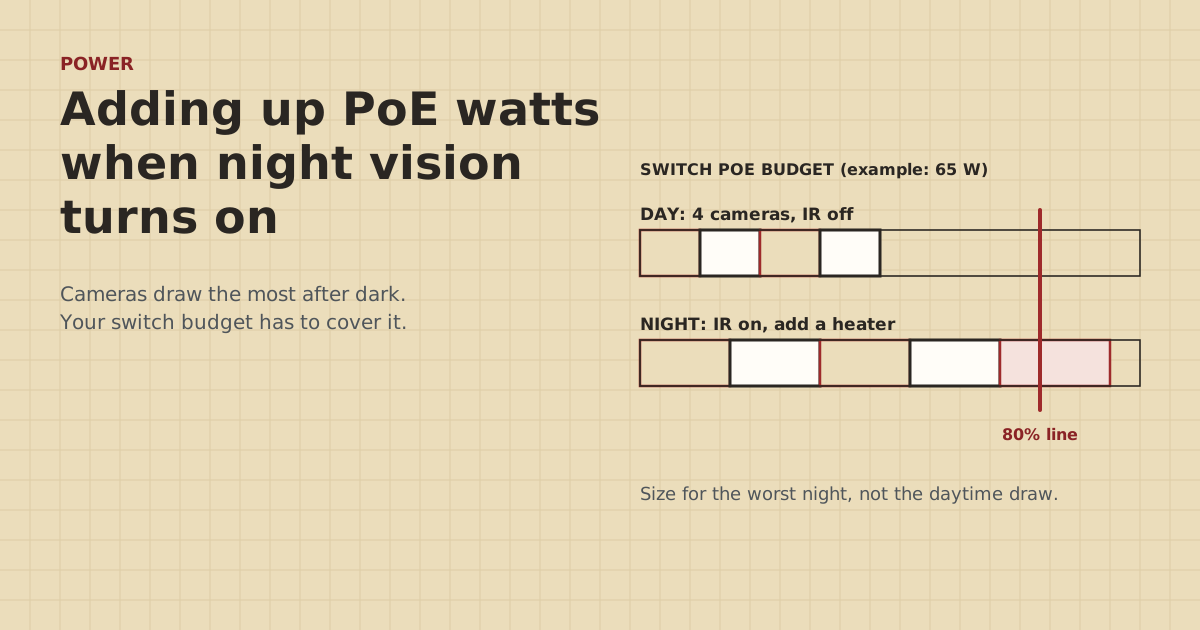
A PoE switch that runs four cameras fine at noon can drop one at midnight. The fix is simple arithmetic, done with the right numbers.
Research-based, not tested on a farmWorks with any internet provider at the house.
Key takeaways
- Use each camera's maximum power with IR, heater and spotlight on. That's the night-time number.
- Two limits apply: each port's PoE class (15.4 W for 802.3af, 30 W for PoE+) and the switch's total PoE budget.
- Keep the total under about 80% of the switch budget. That's our rule of thumb for margin, not a standard.
- Bridge radios on passive 24 V PoE don't belong on a standard PoE switch port. Power them from their own injectors.
- If you're over: split across two switches, add a single-port injector, or turn off features you don't need.
To size PoE for farm cameras, add up each camera’s maximum power draw, the figure with infrared night vision, heaters and spotlights on. Check that each device fits its port’s PoE class, then compare the total with the switch’s total PoE budget and keep some margin. A common rule of thumb is to stay under about 80% of the budget. Night is when cameras draw the most, so a switch that’s fine at noon can run short at midnight.
Here’s the arithmetic, with real spec-sheet numbers and a worked example on a common small switch.
Two limits, not one
Every PoE switch has two separate power limits:
- Per port, set by the PoE standard the port supports:
- 802.3af (PoE): 15.4 W at the switch, 12.95 W guaranteed at the device.
- 802.3at (PoE+): 30 W at the switch, 25.5 W at the device.
- 802.3bt Type 3: 60 W. Type 4: 90 W.
- Total budget for the whole switch. That’s often less than “ports times per-port max”. A small switch with four PoE+ ports might have a 65 W total, not 4 × 30 W = 120 W.
A camera has to fit its port, and all the cameras together have to fit the total.
Why night is the problem
During the day, a camera runs its image sensor, processor and network. At dusk, the infrared LEDs switch on to light the scene, and the draw goes up. In cold weather, cameras with built-in heaters add more. Cameras with a spotlight or siren draw the most when those fire, usually at night, on a motion event.
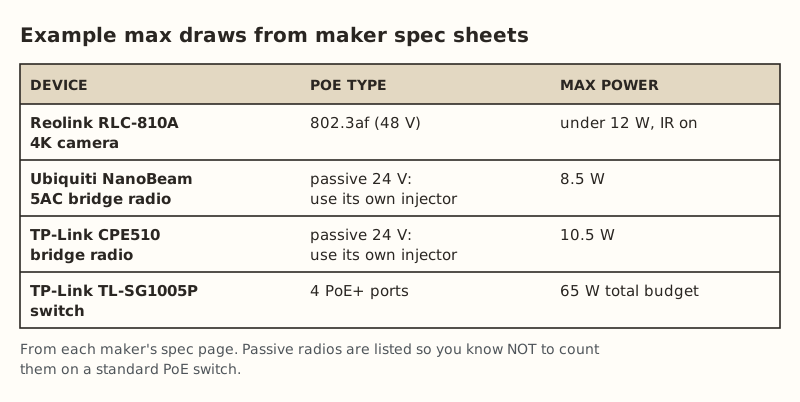
That’s why spec sheets list a max figure, often “with IR on”. It’s the number to plan with. Reolink, for example, lists its RLC-810A 4K camera as 802.3af with power under 12 W max with IR on.
Where the max watts hide on a spec sheet
Spec sheets don’t all label power the same way. Look for these:
- “Power consumption: max” or “< X W” is the number you want. Some sheets add “IR on” or “with heater”.
- “Typical” or “average” is daytime. Don’t plan with it.
- “PoE class 0/1/2/3/4” tells you which port class the camera asks for. Class 3 is up to the 802.3af limit. Class 4 needs PoE+.
- “DC 12 V, X A” is for when the camera runs on its own power adapter. Multiply volts by amps for a rough watt figure, but use the PoE line if there is one.
- Separate lines for spotlight, siren or heater. Add them if they can be on at the same time as IR.
If a sheet gives no max at all, use the camera’s PoE class limit as the planning number. For 802.3af that means 12.95 W at the device.
The worksheet
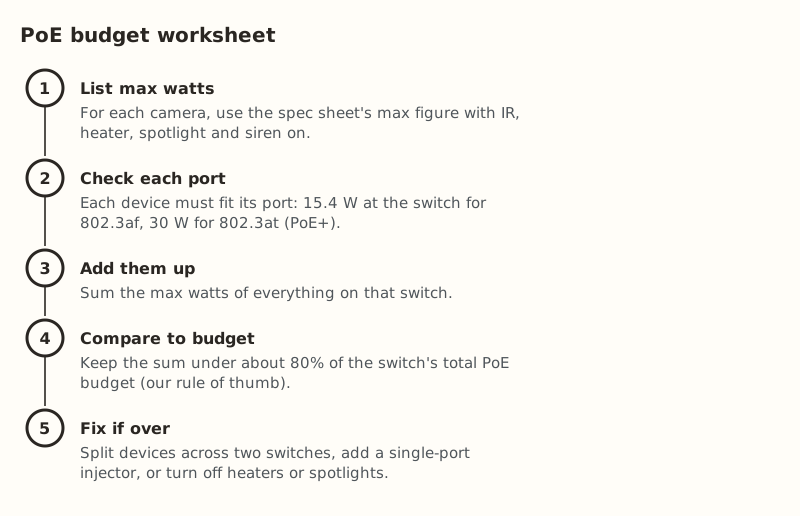
- List max watts. Use the spec sheet’s maximum, not “typical”. If a camera lists separate figures for heater or spotlight, add them.
- Check each port. A camera that needs more than 12.95 W at the device needs a PoE+ port.
- Add them up.
- Compare with the total budget printed in the switch’s specs, usually as “PoE budget” in watts. Keep the total under about 80%. That margin is our rule of thumb, to cover cable losses, aging power supplies and the camera you’ll add next year.
- Fix if over. See below.
One more wrinkle: some switches reserve power by the device’s PoE class, not by what it actually draws. A device that tells the switch it’s a 15.4 W class can tie up that much budget even while it uses less. If your switch’s status page shows “allocated” or “reserved” power higher than actual draw, that’s why. Plan with the larger number.
Worked example: four cameras on a 65 W switch
The switch: a TP-Link TL-SG1005P, a 5-port switch with 4 PoE+ ports and a 65 W PoE budget. In our parts data it was $44.99–$63.66 (checked Oct 5, 2026).
Four fixed 4K cameras rated under 12 W max with IR on:
| Camera | Max watts (IR on) |
|---|---|
| Barn door | under 12 W |
| Machine shed | under 12 W |
| Fuel tank | under 12 W |
| Lane | under 12 W |
| Total | under 48 W |
48 W out of 65 W is about 74%. That’s under the 80% line. Each camera also fits an 802.3af or PoE+ port. This switch works.
Now swap the lane camera for a floodlight camera. Say it lists 25 W max with the light on. That’s a made-up figure for illustration; check yours. The total becomes up to 36 W + 25 W = 61 W, about 94% of the budget. On a cold night with every light firing at once, you’re at the edge. Options:
- Move the floodlight camera to its own single-port PoE+ injector ($19.99–$35.49 in our parts data).
- Or get a switch with a bigger PoE budget.
- Or turn the floodlight’s light off and rely on IR.
Choosing a switch budget for the barn
Here’s a quick sizing table using cameras rated under 12 W max with IR on, like the RLC-810A. Swap in your own cameras’ figures.
| Cameras (under 12 W each) | Total max | Budget needed for 80% margin |
|---|---|---|
| 2 | under 24 W | at least 30 W |
| 4 | under 48 W | at least 60 W |
| 6 | under 72 W | at least 90 W |
| 8 | under 96 W | at least 120 W |
Add an access point’s max draw on top if it’s powered from the same switch. Count ports too: four cameras plus an access point plus an uplink needs at least six ports, so a 5-port switch won’t do even if the budget fits.
A note on cold starts: a camera with a heater may run it at power-up in freezing weather before it boots fully. That’s the same moment several cameras restart together after a power blink. If your barn sees hard winters and the cameras have heaters, leave more margin than 80%.
Don’t count bridge radios on the camera switch
It’s natural to want everything in the barn on one PoE switch, including the bridge radio that links the barn to the house. Check the radio’s power type first:
- Ubiquiti’s NanoBeam 5AC lists passive PoE, 24 V, 0.5 A adapter included, 8.5 W max, 20–27 V supported.
- TP-Link’s CPE510 lists passive PoE, 16–27 V, 10.5 W max, and its adapter supports up to 60 m of PoE.
Passive 24 V PoE doesn’t negotiate. A standard 802.3af/at switch port (48 V class) either won’t power a passive device or, with some passive setups, the mismatch can damage gear. Power these radios from the injector that came in the box, and plug the injector’s data port into the switch. Then leave them out of the switch’s budget. Details in passive PoE vs standard PoE.
Fixes when you’re over budget
In order of simplicity:
- Move the hungriest device to its own injector. One PoE+ injector takes the biggest load off the switch.
- Split cameras across two switches, or replace the switch with one that has a bigger budget.
- Turn off features you don’t need: spotlights on cameras that also have IR, sirens, or heaters in a climate that doesn’t need them.
- Fix long or poor cable. Bad cable doesn’t change the switch’s budget, but it eats voltage. A camera at the end of a long CCA run can reboot while the switch shows plenty of budget left. Use solid copper and stay within 328 ft. See a PoE camera at the end of a long cable run.
Keeping the budget honest over time
Barns grow. A camera gets added at the feed room, an access point goes on for the shop, someone plugs in a PoE light. Keep a short list taped inside the switch cabinet: each port, the device on it, and its max watts. When the list’s total passes your 80% line, that’s the signal to split devices onto a second switch or an injector, before the night a camera drops.
Common mistakes
- Using “typical” watts. Typical is daytime. Plan with max.
- Multiplying ports by 30 W. The total budget is usually much smaller. Read the spec.
- Forgetting the heater. A camera rated for deep cold may have a heater that switches on exactly when the IR does.
- Putting a passive radio on a standard switch port. Check before you plug in.
- Adding “just one more” camera without redoing the sum.
- Blaming the switch when it’s the cable. If one far camera drops while closer ones are fine, suspect the run.
What we don’t know
How each switch behaves when it runs over budget varies by model and isn’t always documented. Some drop the newest port, some the lowest-priority port, and some may restart. Camera max-power figures come from maker spec sheets, and real draw varies with temperature and scene. We haven’t measured farm cameras on a switch. Owner-run tests at home will be published on the gear tests page and labeled as such.
Next step
Pull the spec sheet for every PoE device in the barn, write down the max watts, and do the five steps above. If you’re planning the barn from scratch, enter what runs there in the Outbuilding Link Planner for a parts list. If a camera or radio keeps rebooting anyway, work through the bridge keeps rebooting. The same checks apply to cameras.
Go deeper
This post answers one question. The full guide covers the rest: the Outbuilding Link Planner (enter what runs at each building; get the method, parts list, dated cost and power notes).
Questions people ask
How do I calculate PoE budget for cameras?
Why does my PoE camera only drop at night?
How many PoE cameras can a 65 W switch power?
What is the difference between PoE and PoE+?
Can I plug a wireless bridge into my PoE camera switch?
What happens when a PoE switch runs out of power budget?
Sources
- Reolink RLC-810A specifications, retrieved Oct 6, 2026
- Ubiquiti UISP airMAX NanoBeam 5AC tech specs, retrieved Oct 6, 2026
- TP-Link CPE510 product page and specifications, retrieved Oct 6, 2026
- Power over Ethernet - Wikipedia, retrieved Oct 5, 2026
- Category 6 cable - Wikipedia, retrieved Oct 5, 2026
- TP-Link TL-SG1005P (4 PoE+ ports, 65 W), retrieved Oct 5, 2026
- TP-Link TL-POE160S, retrieved Oct 5, 2026
Prices on this page are US retail ranges for named example parts, checked on the date shown, before tax and shipping. They change often.
Independent · not affiliated with SpaceX or Starlink. Links to Starlink’s plan pages use the site owner’s own referral link (your price is the same); there are no affiliate links (how we make money). It is general information, not electrical advice: where code applies, use a licensed electrician. Found an error? Tell us.