The bridge keeps rebooting: a weak injector or a bad cable?
The barn link drops for a minute, comes back, drops again. Before you blame the radio, check what feeds it. Here's the order that finds the cause fastest.
Research-based, not tested on a farmWorks with any internet provider at the house.
Key takeaways
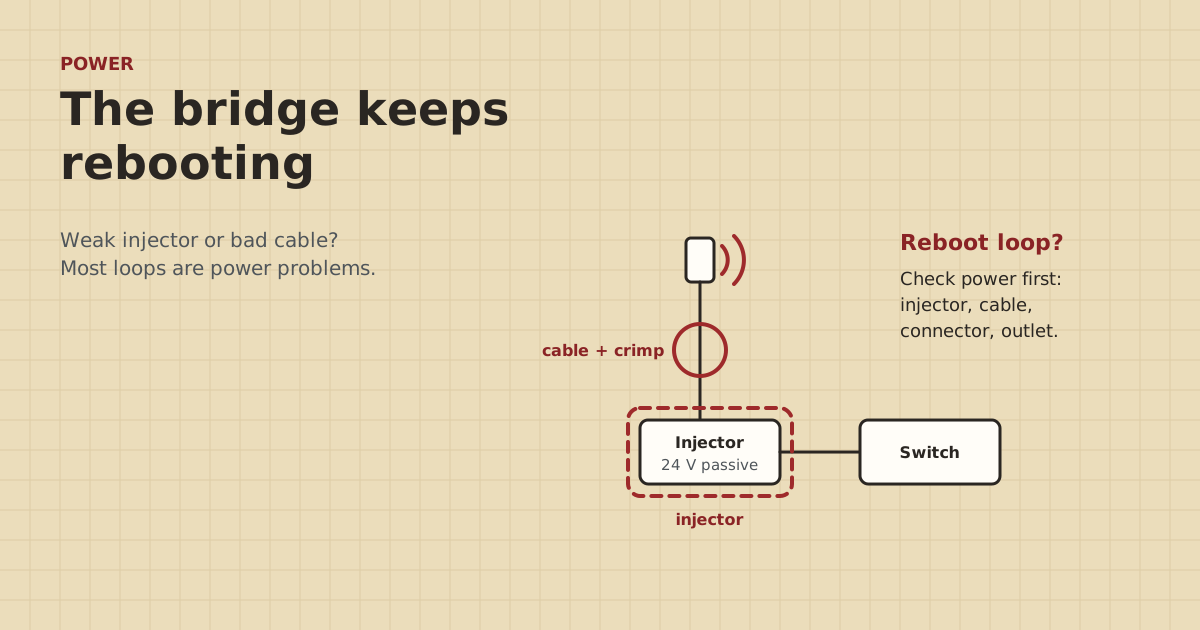
- A radio that reboots in a loop usually isn't getting steady power. Check the injector, the cable and the connectors before the radio.
- Many bridge radios need passive 24 V PoE from their own injector. A standard PoE port or the wrong injector won't run them reliably.
- Passive PoE adapters can have shorter rated distances. TP-Link rates the CPE510's adapter for up to 60 m.
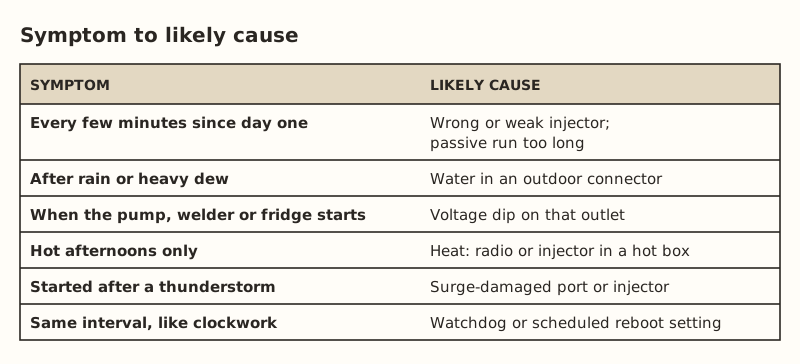
- Reboots after rain point to water in a connector. Reboots after a storm point to surge damage.
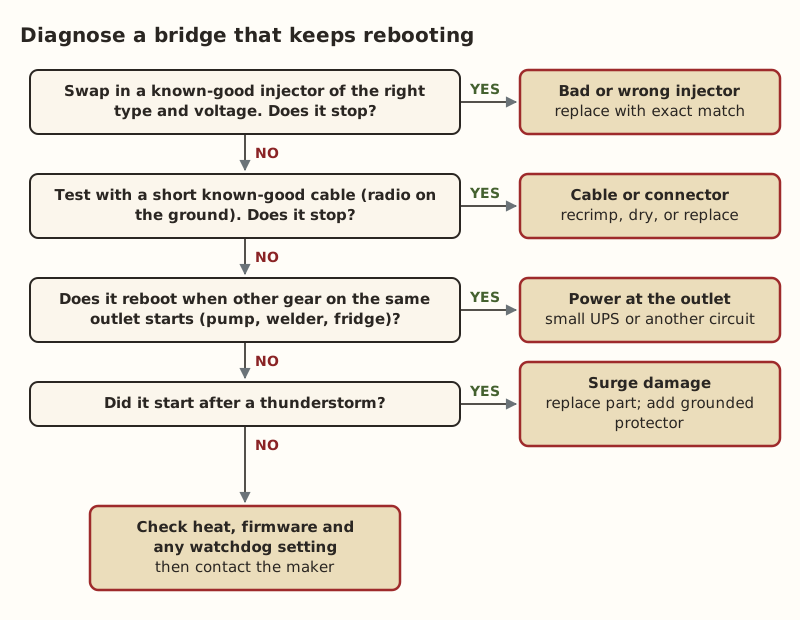
- Test on the ground with a short, known-good cable and a known-good injector. That splits the problem in two.
A wireless bridge that keeps rebooting almost always has a power problem, not a radio problem. The usual causes, in order: the wrong or failing PoE injector, a long or poor cable or a bad crimp that lets the voltage sag, water in an outdoor connector, or an outlet whose voltage dips when a pump or welder starts. Test the radio on the ground with a short, known-good cable and a known-good injector of the right type. If the reboots stop, the problem is in what you replaced.
Here’s how to tell a reboot from a link drop, then the checks in the order that finds the cause fastest.
First: is it rebooting, or just losing the link?
These look the same from the barn: the internet goes away for a minute, then comes back. They have different causes.
- A reboot means the radio loses power or crashes and starts up again. Its status page shows a short uptime (minutes, not days), and the LEDs go dark and cycle through startup.
- A link drop means the radio stays on but loses its partner. Uptime keeps counting. The signal or link-status page shows the wireless link going down and back up.
Log into each radio’s web page or app and check the uptime. If it’s always short, you have a reboot problem, and this post is for you. If uptime is long but the link keeps dropping, it’s usually line of sight, interference or alignment. Trees growing into the path are a common one, since leaves add loss at 2.4, 5 and 6 GHz. See no real line of sight in the troubleshooting guide.
Why power problems cause reboot loops
A radio needs a steady voltage within a range. Ubiquiti’s NanoBeam 5AC accepts 20–27 V DC and draws up to 8.5 W. TP-Link’s CPE510 accepts 16–27 V and draws up to 10.5 W. When the radio transmits hard, its draw goes up. If anything in the power path adds resistance, the voltage at the radio sags under that load. It dips below the radio’s minimum, the radio browns out, restarts, comes up, loads up again, and sags again. That’s the loop.
Things that add resistance or cut power:
- An injector that’s failing, underrated, or the wrong voltage.
- Cable that’s too long for the injector, or copper-clad aluminum instead of solid copper.
- A loose, corroded or badly crimped connector, often the outdoor one.
- An outlet on a circuit that sags when big motors start.
The checks, in order
1. Confirm the injector is the right type
Read the radio’s spec sheet power line and the injector’s label. They must match. Many bridge radios use passive 24 V PoE and ship with their own injector. A standard 802.3af/at switch port won’t power a passive-only radio. A 48 V passive injector on a 24 V radio is the wrong supply entirely. Details in passive vs standard PoE.
If the radio does support standard PoE and you power it from a switch, check that the port class covers it: 12.95 W at the device for 802.3af, 25.5 W for 802.3at. Also check that the switch has budget left.
2. Swap in a known-good injector
Injectors fail, especially cheap ones in hot or damp spots. Borrow the injector from the other end of the link, if it’s the same model, or buy a spare of the exact type. If the reboots stop, you’ve found it. A standard PoE injector was $19.99–$35.49 in our parts data. That’s for standard-PoE devices, not passive radios.
3. Test the radio on the ground with a short cable
Take the radio down, or bring a spare up, and connect it to the injector with a short, known-good patch cable. Leave it running for an hour or more.
- Stable on the short cable: the problem is the long cable or its connectors.
- Still rebooting: the problem is the injector, the outlet, or the radio itself.
4. Check the long cable and its ends
- Length. Passive PoE adapters can be rated for less than standard PoE’s 100 m. TP-Link rates the CPE510’s adapter for up to 60 m, and notes that power draw rises with cable length.
- Cable type. Solid bare copper, not CCA. Outdoor-rated where it’s in the sun.
- Connectors. Cut off the outdoor plug and re-terminate it with a fresh one. Look for green corrosion or water in the old one. A plug, crimper and tester kit ran $114.96–$199.43 in our data if you don’t own one.
- Continuity. Run a cable tester. A pair that’s open or shorted can still pass some data while failing to carry power properly.
5. Watch the outlet
Plug a lamp into the same outlet. Does it flicker when the well pump, a welder, a freezer or a big fan starts? Those voltage dips can reset an injector. Options: move the injector to a different circuit, or put the injector and switch on a small UPS that rides through dips. Do it at both ends, or the link still drops when the other end blinks. New circuits or outlet changes are electrician work.
6. Think about storms and heat
- Started right after a thunderstorm? A surge can half-damage a radio’s Ethernet port or an injector so it works intermittently. Replace the damaged part. Then add an outdoor Ethernet surge protector ($11.69–$14.14). Ubiquiti’s ETH-SP-G2 must be grounded, either to a grounded pole or structure or by a drain wire to a grounding block. See checking your network after a lightning strike.
- Only on hot afternoons? An injector sealed in a box in full sun, or a radio on a south-facing metal wall, can overheat. Give the box shade and ventilation. A weatherproof enclosure ($29.96–$74.99) should be sized and placed so it doesn’t bake.
7. Rule out settings
Some radios have a “ping watchdog” or a scheduled-reboot option that restarts the radio if it can’t reach a set address, or on a timer. If reboots happen at a perfectly regular interval, look for those settings. Also update the firmware on both radios to the same current version.
Take radios down rather than working on them from the top of a ladder in wind. Never mount or service a radio near overhead power lines. Outlet, circuit and grounding work is for a licensed electrician.
Worked example
Say the barn end of a short-range bridge pair ($108–$139.99 in our parts data) reboots every 10–20 minutes, mostly in the evening. The house end is fine.
- Barn radio uptime is 14 minutes, so it’s a reboot, not a link drop.
- The injector label says 24 V passive, matching the radio. Type is fine.
- Swapping injectors between the two ends: still rebooting at the barn. The injector isn’t the problem.
- Radio on the ground with a 2 m patch cable: stable for three hours. So the cause is in the long cable.
- The outdoor plug at the radio has green corrosion and a drop of water inside the boot. Re-terminating with a new plug, adding a drip loop and seating the radio’s weather cover properly fixes it.
Why the evening pattern? Dew. The connector got wet every night.
Preventing the next loop
Once the radio is stable, a few habits keep it that way:
- Label the injector with the radio it belongs to and “24 V passive” if that’s what it is.
- Keep a spare injector of the exact type in a dry, known place.
- Protect the outdoor connector with a boot or the radio’s cover, and give the cable a drip loop.
- Check the uptime now and then. A radio that has started restarting once a day is easier to fix before it starts restarting every ten minutes.
- Put both ends on a small UPS if your power blinks often.
Common mistakes
- Replacing the radio first. It’s the most expensive part and rarely the problem.
- Using a “close enough” injector from a drawer of old gear.
- Plugging a passive radio into a PoE switch after a rearrange.
- Leaving the outdoor connector unprotected. Use a boot, the radio’s cover, and a drip loop.
- Covering only one end with a UPS.
- Ignoring a storm-damaged part because it “mostly works”.
What we don’t know
Exact causes vary by radio model, injector quality and site conditions. We haven’t diagnosed bridges on farms. This guide is built from maker specs and standard power troubleshooting. Owner-run bridge tests at home will be published on the gear tests page and labeled as such.
Next step
Check the radio’s uptime to confirm it’s really rebooting, then work down the list above. Swap the injector, then test with a short cable. If it turns out the link drops without rebooting, the problem is the radio path. Start with the line-of-sight section of barn link troubleshooting, and see wireless bridge or a long cable if the path can’t be fixed.
Go deeper
This post answers one question. The full guide covers the rest: Barn link troubleshooting: five ways it fails (over 100 m, no line of sight, surge damage, CGNAT cameras, wrong cable).
Questions people ask
Why does my wireless bridge keep rebooting?
Can a bad Ethernet cable cause a PoE device to reboot?
How do I know if my PoE injector is bad?
Can I power my bridge radio from a PoE switch instead of the injector?
Why does my bridge drop out when it rains?
Should I put my bridge on a UPS?
Sources
- TP-Link CPE510 product page and specifications, retrieved Oct 6, 2026
- Ubiquiti UISP airMAX NanoBeam 5AC tech specs, retrieved Oct 6, 2026
- Power over Ethernet - Wikipedia, retrieved Oct 5, 2026
- Category 6 cable - Wikipedia, retrieved Oct 5, 2026
- Ubiquiti ETH-SP-G2 Quick Start Guide, retrieved Oct 5, 2026
- Interline: Fresnel Zone, Link Clearance and Signal Loss in Outdoor Wi-Fi Links, retrieved Oct 5, 2026
- TP-Link TL-POE160S, retrieved Oct 5, 2026
- ETH-SP-G2, retrieved Oct 5, 2026
- FS.com Cat6 shielded pass-through RJ45, 50/pack (144309), retrieved Oct 5, 2026
- Altelix NF100808 10x8x8 fiberglass NEMA 4X, retrieved Oct 5, 2026
- Loco5AC (base $49.00; $54.00 surcharge incl.), retrieved Oct 5, 2026
Prices on this page are US retail ranges for named example parts, checked on the date shown, before tax and shipping. They change often.
Independent · not affiliated with SpaceX or Starlink. Links to Starlink’s plan pages use the site owner’s own referral link (your price is the same); there are no affiliate links (how we make money). It is general information, not electrical advice: where code applies, use a licensed electrician. Found an error? Tell us.