Weather, lightning and grounding
Checking your farm network after a lightning strike
The storm's past, the barn cameras are dark, and the internet at the house may or may not be working. Here's the order that finds the damage fastest, and what to fix so it doesn't happen again.
Research-based, not tested on a farmWorks with any internet provider at the house.
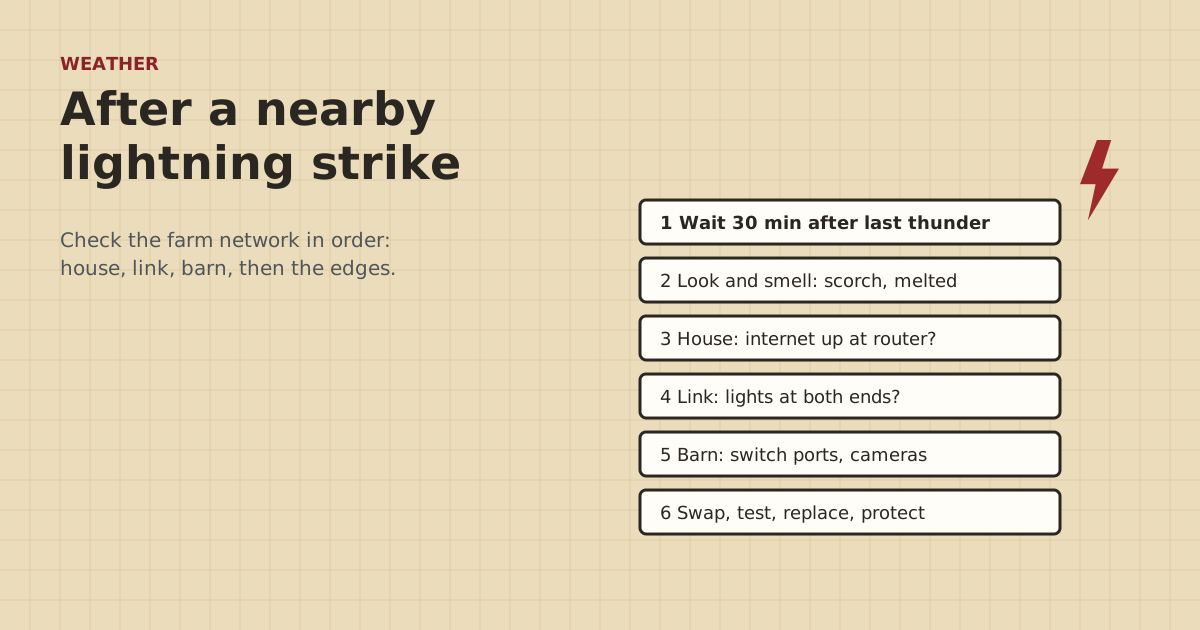
Key takeaways
- Wait 30 minutes after the last thunder or lightning before going out to check gear, per the National Weather Service.
- Work from the house outward: house router and provider, then the link, then the barn switch, then outdoor radios and cameras.
- Copper links between buildings often lose a port at both ends. Test ports by moving a working device to them.
- A link stuck at 100 Mbps after a storm usually means a damaged pair, port or surge protector.
- Fix the cause: add grounded protectors at both ends, or replace the copper link with fiber.
After a nearby lightning strike, wait at least 30 minutes after the last thunder, then check the network from the house outward. First the house router and the internet provider, then the link to the barn, then the barn switch’s ports, then outdoor gear like bridge radios and pole cameras. Copper cables between buildings often lose a port at both ends, so test ports by moving a working device to them. Replace what failed, and fix the cause: grounded surge protectors at both ends, or fiber instead of copper.
Here’s the full routine, a symptom table, and what to change before the next storm.
Safety first
The National Weather Service’s advice is plain: “Wait 30 minutes after the last lightning or thunder before going back outside.” Don’t climb to a gable radio or walk the pasture to a pole camera while the storm is still nearby.
Inside, the NWS also says not to unplug equipment during a thunderstorm, because you could be struck. Wait until it has passed.
Don't touch the gear. Turn off the breaker for that circuit if you can do it safely, and call a licensed electrician. If anything is smoking or hot, call 911. Network gear can be replaced. Wiring damage inside walls needs a professional.
The order to check things in
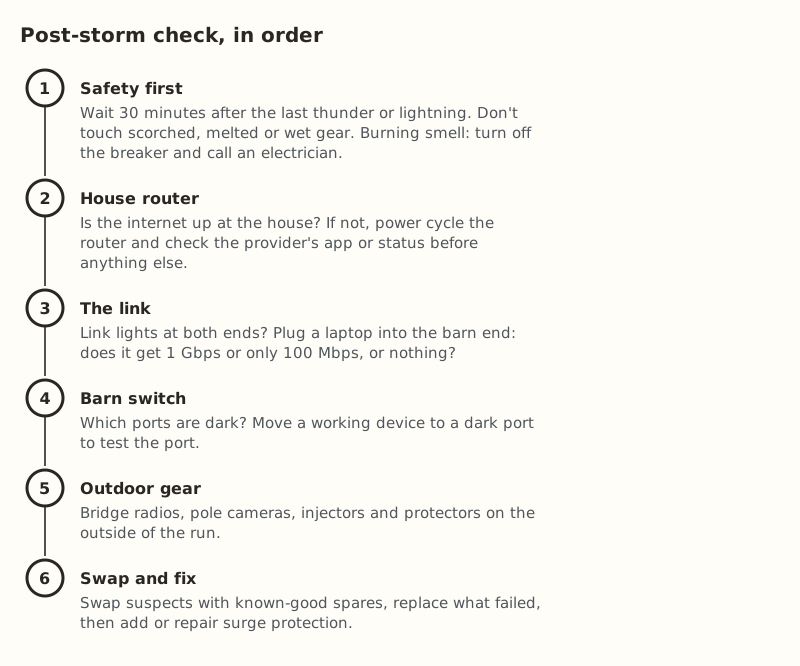
1. Is the internet up at the house?
Stand next to the main router and check a phone on its Wi-Fi, or a laptop plugged into it.
- No internet at the house: power cycle the router. Unplug it, wait, plug it back in, and give it several minutes. Check your provider’s app for alerts or outages. If you have Starlink, the app shows whether the dish and router are online. If the router or its power supply won’t come on at all, it may be damaged. Contact your provider’s support.
- Internet works at the house: the problem is past the router. Move on.
2. Is the link to the barn up?
Look at the link lights where the barn cable plugs into the house router or switch, and at the barn end.
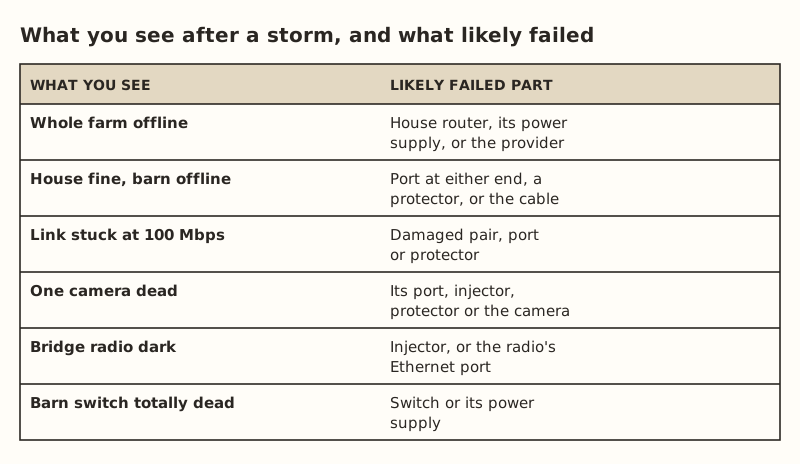
- No lights at either end: a dead port at one or both ends, a failed surge protector, or, rarely, a damaged cable.
- Lights on, no traffic: plug a laptop into the barn end of the link. Does it get a network address? What link speed does it show?
- Link at 100 Mbps instead of 1 Gbps: gigabit needs all four pairs, and 100 Mbps runs on two. A link that falls back to 100 Mbps after a storm often has a damaged pair, port or protector.
For a wireless bridge, log into each radio: is it powered, and does it show a link to its partner? A dark radio usually points to its injector or the radio’s Ethernet port. See the bridge keeps rebooting for power checks.
3. Test the ports at each end
Ports often die individually while the rest of the switch keeps working.
- Find a device you know works, such as a laptop.
- Plug it into the suspect port. No link light means the port is likely dead.
- Plug the barn cable into a different, working port on the same switch or router. If the link comes up, you’ve found it: a dead port. Label it “dead, storm” so nobody uses it again.
Do this at both ends of a copper link. A strike that raises one building’s ground pushes the surge through the gear at both ends.
4. Check the barn switch and what’s on it
Which ports are dark? Which cameras or access points don’t power up? If the whole switch is dead, try its power supply first. A PoE switch with some dead PoE ports may still pass data on others. Replacement 5-port PoE switches ran $44.99–$63.66 in our parts data.
5. Check outdoor gear last
Bridge radios, pole cameras and their injectors are the most exposed. Check each: power light on, reachable on the network? A single-port injector ($19.99–$35.49 for a standard one) is cheap to swap as a test. For passive bridge radios, use the matching passive injector.
6. Check the surge protectors
Protectors can fail while absorbing a surge. Bypass each one briefly with a known-good patch cable. If the link comes back with the protector out, the protector likely failed. Replace it ($11.69–$14.14 each). While you’re there, check its ground connection: a loose screw, a corroded lug or a broken drain wire means it wasn’t protecting anything.
Testing the cable itself
Buried cable is the least likely part to be damaged by a nearby strike, and the hardest to replace, so rule out everything else first. Then:
- Disconnect both ends and run a cable tester. A plug, crimper and tester set was $114.96–$199.43 in our data. Look for open or shorted pairs.
- Re-terminate the ends if the plugs look scorched or corroded.
- If the tester shows a pair open somewhere in the middle, the cable is damaged. In conduit, pull a new one. Bare in the ground, you’re digging. That’s the moment to consider fiber.
Write it down
Before you throw anything away:
- Take photos of damaged gear, scorch marks, and model and serial labels.
- Note the date and time of the storm and what stopped working.
- Keep the failed parts until you know whether you’ll file a claim. Some homeowner or farm policies cover surge damage. Check yours.
- Keep receipts for replacements.
Fix the cause, not just the parts
If a copper link between buildings lost ports, it’ll happen again unless something changes. Copper data lines tie two buildings’ grounds together, and a nearby strike can raise one building’s ground above the other’s. Options, best first:
- Replace the copper link with fiber. All-dielectric fiber carries no electricity between buildings. A media converter pair was $60.06–$79.98. See two buildings, two grounds.
- Add a grounded outdoor surge protector at each end, bonded to each building’s grounding system by an electrician. For communications protectors, the NEC (800.100, as summarized on UpCodes) sends the ground to the building’s intersystem bonding termination with at least 14 AWG copper, no more than 20 ft in one- and two-family homes. See surge protectors at both ends.
- Check existing protectors are actually grounded. Ubiquiti’s ETH-SP-G2 must be grounded, by screw to a grounded pole or structure with shielded cable, or by a short drain wire to a grounding block.
- Keep a spares kit: a small switch, an injector of each type you use, a few patch cables, plugs and a tester. That turns the next storm into a ten-minute fix.
The NWS also notes that typical surge protectors won’t protect equipment from a lightning strike. Protection lowers the odds and the damage. It doesn’t make anything strike-proof.
A storm spares kit
A small box of spares turns most post-storm checks into a ten-minute fix, because you can swap parts instead of guessing. What to keep in it, sized for a typical house-plus-barn network:
| Item | Why | Price range (checked Oct 5, 2026) |
|---|---|---|
| Small PoE switch | Replaces a barn switch with dead ports | $44.99–$63.66 |
| PoE injector of each type you use | Tests a dark radio or camera | $19.99–$35.49 for a standard one |
| Outdoor Ethernet surge protector | The part most likely to sacrifice itself | $11.69–$14.14 |
| Plugs, crimper, tester | Re-terminate a scorched end, test a run | $114.96–$199.43 for the set |
| Two or three known-good patch cables | The simplest swap of all | — |
Label everything in the box, including which injector goes with which radio. Passive and standard PoE injectors look alike and aren’t interchangeable. Keep the box somewhere dry and easy to find, and write its location on your network sketch.
If the farm has no copper between buildings
If the barn link is fiber or a wireless bridge, the check is shorter. Fiber carries no surge between the buildings, so damage usually stays on one side. Check each building’s switch, converter and power on its own. With a bridge, check each radio and its injector separately. A strike near the barn can still take out the barn radio’s port or injector without touching the house. In both cases, the outdoor copper runs that remain, such as to pole cameras, are where to look first.
Common mistakes
- Starting at the barn. If the house router is down, nothing past it will work. Start at the house.
- Replacing a whole switch when one port died. Move the cable to another port and label the dead one.
- Checking only one end of a copper link.
- Reinstalling a failed protector because it “looks fine”.
- Going out too soon after the storm.
- Fixing parts but not the cause. Same copper, same exposure, same result next summer.
What we don’t know
Every strike is different. We can’t tell you which part failed without testing it, and some damage is intermittent: a port that works for a week and then quits. We haven’t diagnosed storm damage on farms. This checklist comes from NWS safety guidance, maker documentation and general network troubleshooting. Insurance coverage varies by policy. Ask your agent.
Next step
Work through the six steps above, then fix the cause. Price fiber for the main link in the storms guide, or book an electrician to bond protectors at both ends. If parts keep failing without storms, see barn link troubleshooting.
Go deeper
This post answers one question. The full guide covers the rest: Lightning, surge and grounding for long runs (why long runs get hit, protecting copper, and what to do after a storm).
Questions people ask
How do I know if lightning damaged my network?
Can lightning damage an Ethernet port without hitting the house?
Can a lightning strike damage a Starlink router?
Should I unplug my network equipment during a thunderstorm?
Do surge protectors stop lightning damage?
Why is my Ethernet link slow after a storm?
Sources
- National Weather Service: Lightning Safety Overview, retrieved Oct 6, 2026
- National Weather Service: Lightning Indoors, retrieved Oct 6, 2026
- Ubiquiti ETH-SP-G2 Quick Start Guide, retrieved Oct 6, 2026
- Cabling Installation & Maintenance: Ground potentials and damage to LAN equipment, retrieved Oct 5, 2026
- Multilink: Do Fiber-Optic Cables Need to Be Grounded?, retrieved Oct 5, 2026
- UpCodes: NEC 800.100 Cable and Primary Protector Bonding and Grounding, retrieved Oct 5, 2026
- ETH-SP-G2, retrieved Oct 5, 2026
- TP-Link TL-SG1005P (4 PoE+ ports, 65 W), retrieved Oct 5, 2026
- TP-Link TL-POE160S, retrieved Oct 5, 2026
- FS.com Cat6 shielded pass-through RJ45, 50/pack (144309), retrieved Oct 5, 2026
- 10Gtek Gigabit SM media converter, dual SC, 1000Base-LX, 20 km (2-pack), retrieved Oct 5, 2026
Prices on this page are US retail ranges for named example parts, checked on the date shown, before tax and shipping. They change often.
Independent · not affiliated with SpaceX or Starlink. Links to Starlink’s plan pages use the site owner’s own referral link (your price is the same); there are no affiliate links (how we make money). It is general information, not electrical advice: where code applies, use a licensed electrician. Found an error? Tell us.