Weather, lightning and grounding
Ethernet surge protectors: one at each end, and where they go
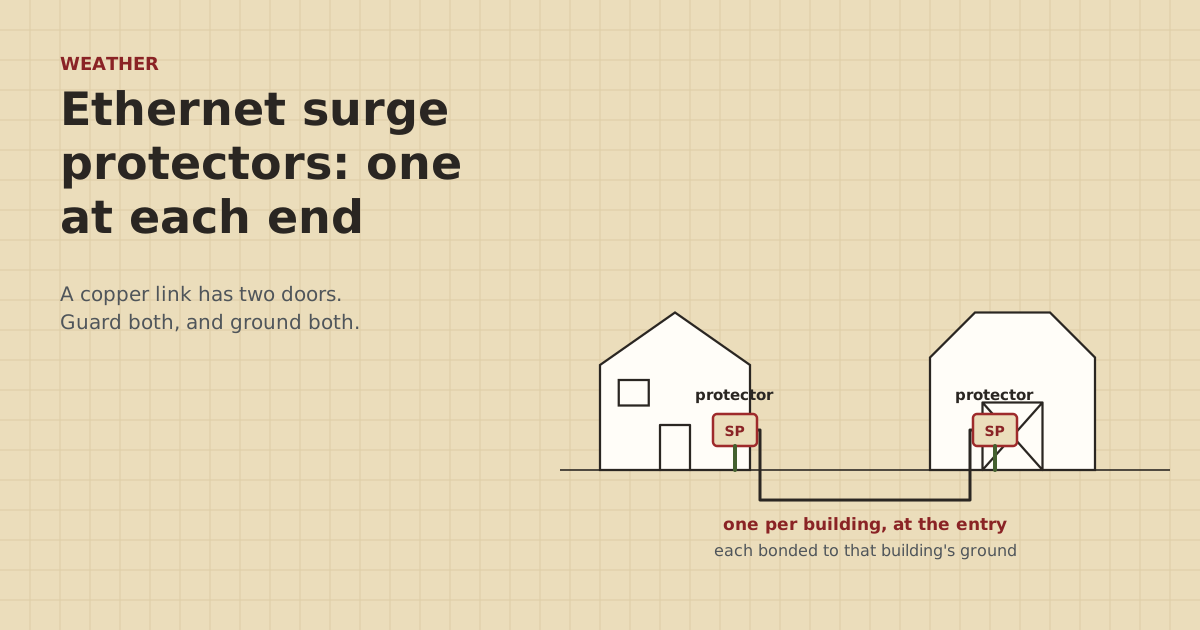
A surge protector on only one end of a barn cable protects half the link. And a protector with no ground wire protects none of it. Here's how to place and ground them.
Research-based, not tested on a farmWorks with any internet provider at the house.
Key takeaways
- Every copper Ethernet run that leaves a building gets a protector at each end: two per link.
- A protector only works if it's grounded. No ground path means nowhere for the surge to go.
- Mount each protector close to the equipment or the building entry it guards, with a short, straight ground connection.
- Each protector's ground must tie into that building's grounding system. That's electrician work.
- Check the protector passes your PoE type and gigabit. Fiber between buildings removes the need on that link.
Put an outdoor Ethernet surge protector at each end of any copper cable that runs between buildings or outdoors. That means one where the cable enters the house and one where it enters the barn, or one near a bridge radio or pole camera and one where its cable comes indoors. Each protector must be grounded to that building’s grounding system with a short, direct connection, or it can’t divert anything. In our parts data an outdoor protector was $11.69–$14.14 (checked Oct 5, 2026), so a link needs two.
Below: why both ends, exactly where they mount, how grounding works, and what to check on the box.
Why both ends
A copper cable between two buildings is exposed at both ends. A surge can come in at either one:
- A strike near the barn raises the barn’s ground. The surge travels down the cable toward the house.
- A strike near the house, or on the power lines feeding it, does the reverse.
- A cable running along the ground or overhead can pick up surge current along its length.
Copper data lines also tie the two buildings’ grounds together. So when one ground jumps, gear at both ends is in the path. More on that in two buildings, two grounds. A protector at only one end leaves the other end’s switch, router or camera exposed.
Where they go
The rule: as close as practical to the thing being protected, or to where the cable enters the building, with the shortest, straightest ground connection you can get. Ubiquiti’s quick start guide for its ETH-SP-G2 says to install it near an Ethernet device, mounted on a pole or a wall.
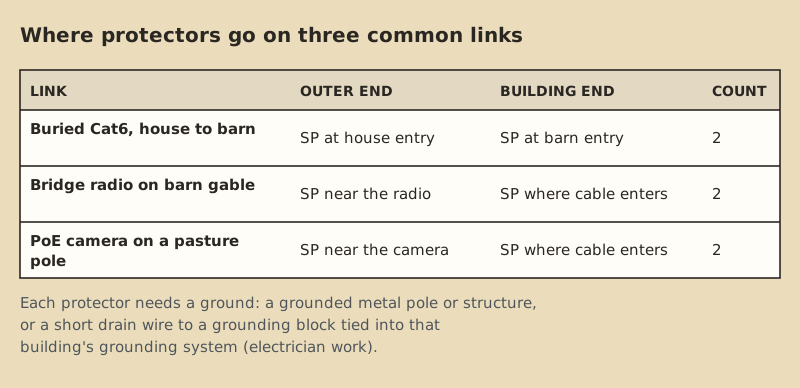
Buried cable, house to barn. One protector where the cable comes out of the ground and into each building, before it reaches the switch or router. Mount it on the wall at the entry, inside if the space is dry, or in an outdoor box ($29.96–$74.99 in our data) if not.
Bridge radio. One near the radio on the mast or gable, which protects the radio, and one where the drop cable enters the building, which protects the injector and switch inside.
Camera on a pole in the pasture. One near the camera, grounded to the pole if the pole is properly grounded, and one where the cable enters the barn.
How the grounding works
A surge protector is a fast switch to ground. When the voltage on the data pairs spikes, it shunts the excess to its ground connection. That means three things:
- No ground, no protection. Ubiquiti says the ETH-SP-G2 must be grounded. You can do it by screwing it to a grounded metal pole or structure using shielded (STP) cable, or by an optional short drain wire, which its guide lists as 16 AWG and up to 40 cm, to a grounding block.
- Short and straight. Long, looping ground wires don’t carry fast surges well. Mount the protector where a short ground run is possible.
- The building’s ground, not a random one. The ground connection has to be part of that building’s grounding system. For communications protectors, the NEC (Article 800.100, as summarized on UpCodes) sends the protector ground to the building’s intersystem bonding termination, using at least 14 AWG copper and no more than 20 ft in one- and two-family dwellings.
That last point is why this is a job for an electrician. They’ll know where the building’s bonding point is and how to reach it within code.
Bonding a protector to a building's grounding system is electrician work. Don't drive a separate ground rod and leave it unbonded. Our parts data notes any extra rod ($26.56–$34.90) must be bonded to the building's grounding electrode as part of an electrician-approved plan. Call 811 before driving rods or digging.
What to check on the box
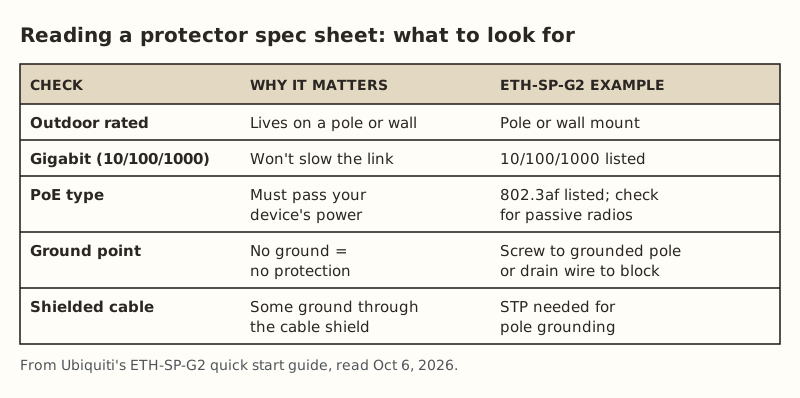
- Outdoor rating if it’ll live on a pole, mast or exterior wall. Our parts note says indoor desktop protectors aren’t made for outdoor mounting.
- Gigabit (10/100/1000) so it doesn’t hold the link to 100 Mbps.
- PoE pass-through that matches your device. Ubiquiti lists 802.3af support for the ETH-SP-G2. If the device uses passive 24 V, as many bridge radios do, confirm with the maker that the protector passes it. See passive vs standard PoE.
- A real ground point, a lug, screw or drain-wire terminal, not just a plastic case.
- Shielded cable requirement. Some protectors ground through the cable’s shield in certain mounting setups, which means you need shielded cable and shielded connectors on that segment.
Worked example: a barn link with a camera
The setup: buried Cat6 from the house to the barn (240 ft), a PoE switch in the barn, and one PoE camera on a pole 150 ft from the barn.
| Location | Protector? | Grounded to |
|---|---|---|
| House entry of the barn cable | Yes | House grounding system (electrician) |
| Barn entry of the house cable | Yes | Barn grounding system (electrician) |
| Barn entry of the camera cable | Yes | Barn grounding system |
| At the camera on the pole | Yes, if the pole is grounded | The grounded pole, per the protector’s instructions |
That’s four protectors at $11.69–$14.14 each, plus the electrician’s time for the bonding. If the house-to-barn link were fiber instead ($60.06–$79.98 for a converter pair), the first two protectors go away, because there’s no copper between the buildings. The camera cable still needs its two.
When a protector has done its job
Protectors can be damaged by the surge they stop. After a storm, if the link is down, slow, or stuck at 100 Mbps:
- Check the gear behind the protector first: switch port lights, camera power.
- Bypass the protector for a moment with a known-good patch cable. If the link comes back, the protector has likely failed. Replace it.
- Re-check the ground connection. Look for a loose screw, a corroded lug, or a broken drain wire.
The full post-storm routine is in checking your network after a lightning strike.
What a protector can’t fix
It’s worth being clear about the limits, so a protector isn’t treated as a cure-all:
- A direct or very close strike can overwhelm any protector. The NWS says typical surge protectors won’t protect equipment from a lightning strike. Outdoor Ethernet protectors are about reducing damage from nearby strikes and induced surges.
- A bad ground. A protector with a long, loose or corroded ground connection does little. Check it once a year and after storms.
- The power side. A data-line protector doesn’t protect against surges on the power circuit. Power protection is a separate job, and building-wide surge protection is an electrician’s call.
- Gear on unprotected cables. If one outdoor camera cable skips its protector, that camera and the switch port it uses are still exposed.
- Ground differences on copper. Protectors limit what reaches your gear, but the copper still ties two buildings’ grounds together. Only fiber or a bridge removes that.
A yearly check
Once a year, ideally before storm season, walk the network:
- Look at each outdoor protector for cracks, water inside, or a missing cover.
- Tug-test each ground connection: screw tight, lug clean, drain wire intact.
- Confirm the link still negotiates gigabit. A protector that’s quietly failing can hold the link to 100 Mbps.
- Make sure no new outdoor cable went in without a protector, such as a camera added last summer.
- Update your network sketch with what’s protected and where.
Common mistakes
- One protector, at the house. The barn end is just as exposed.
- Protector mounted, ground never connected. It’s decoration until it’s grounded.
- A long, coiled ground wire. Keep it short and straight.
- Indoor desktop protectors outdoors. Use outdoor-rated ones on poles and walls.
- Relying on the power strip. Surge strips protect the outlet side, not the data cable.
- Unplugging during a storm. The National Weather Service says not to unplug equipment during a thunderstorm, because you could be struck. Unplug before the storm arrives, if you’re going to.
What we don’t know
No protector makes gear immune. A close or direct strike can overwhelm any of them. We can’t tell you how much risk a protector removes on your farm, because that depends on strike frequency, soil and how each building is grounded. Product details come from Ubiquiti’s guide. Other brands differ, so read yours. Code details come from the NEC as summarized online, and your electrician and local inspector have the final say.
Next step
Count every copper cable that leaves a building, double it, and that’s how many protectors you need. Then book an electrician to bond them. If you’re still choosing how to link the buildings, the storms guide explains why fiber removes this job on the main link. For the cable itself, see outdoor vs direct-burial Cat6.
Go deeper
This post answers one question. The full guide covers the rest: Lightning, surge and grounding for long runs (what to protect, what's electrician work, digging safely, after a storm).
Questions people ask
Do I need an Ethernet surge protector at both ends?
Where should an Ethernet surge protector be installed?
Does an Ethernet surge protector need to be grounded?
Do Ethernet surge protectors work with PoE?
Will an Ethernet surge protector slow my network?
Do I need surge protectors if I use fiber between buildings?
Can I plug my network gear into a surge strip instead?
Sources
- Ubiquiti ETH-SP-G2 Quick Start Guide, retrieved Oct 6, 2026
- National Weather Service: Lightning Indoors, retrieved Oct 6, 2026
- UpCodes: NEC 800.100 Cable and Primary Protector Bonding and Grounding, retrieved Oct 5, 2026
- Cabling Installation & Maintenance: Ground potentials and damage to LAN equipment, retrieved Oct 5, 2026
- Multilink: Do Fiber-Optic Cables Need to Be Grounded?, retrieved Oct 5, 2026
- ETH-SP-G2, retrieved Oct 5, 2026
- Altelix NF100808 10x8x8 fiberglass NEMA 4X, retrieved Oct 5, 2026
- ERICO 615880UPC 5/8 in x 8 ft copper ground rod, retrieved Oct 5, 2026
- 10Gtek Gigabit SM media converter, dual SC, 1000Base-LX, 20 km (2-pack), retrieved Oct 5, 2026
Prices on this page are US retail ranges for named example parts, checked on the date shown, before tax and shipping. They change often.
Independent · not affiliated with SpaceX or Starlink. Links to Starlink’s plan pages use the site owner’s own referral link (your price is the same); there are no affiliate links (how we make money). It is general information, not electrical advice: where code applies, use a licensed electrician. Found an error? Tell us.