Weather, lightning and grounding
Two buildings, two grounds: why copper between them is risky
After a summer storm, switch ports are dead in the house and the barn, though nothing was hit directly. The cable between the buildings is why.
Research-based, not tested on a farmWorks with any internet provider at the house.
Key takeaways
- Each building has its own connection to earth. A nearby strike can briefly raise one building's ground far above the other's.
- A copper data cable between them becomes a path for that difference, which is why ports often die at both ends.
- All-dielectric fiber has no metal, needs no grounding and can't carry lightning currents between buildings. It's the clean fix.
- A wireless bridge also leaves no cable between buildings, though each radio and mast needs protection.
- If you keep copper: a grounded outdoor surge protector at each end, bonded to that building's grounding system by a licensed electrician.
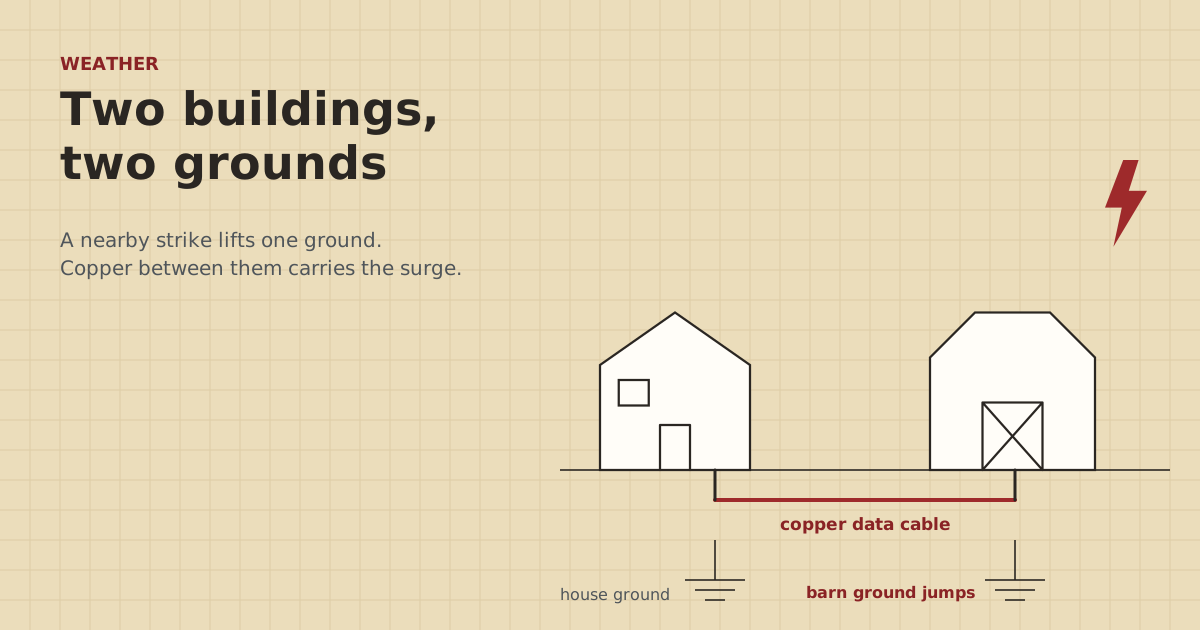
A copper network cable between two buildings connects their grounds, and the two grounds aren’t always at the same voltage. When lightning strikes nearby, current spreading through the soil can raise one building’s ground far above the other’s for a split second. The copper cable becomes a path between them, and the surge goes through whatever is plugged in at each end. That’s why switch ports die in the house and the barn after a storm. The clean fix is fiber, which carries no electricity. The next best is a wireless bridge. If you keep copper, put a grounded surge protector at each end, bonded by an electrician.
Here’s how it happens, what it damages, and how to choose a fix.
Every building has its own ground
A building’s electrical system connects to the earth through its grounding electrode system, such as ground rods, a metal water pipe or a footing electrode, depending on how it was built. That’s what “ground” means for the outlets and equipment inside.
Your house has one. A barn or shop with its own electrical service or panel usually has one too. They’re tens or hundreds of feet apart, in different soil. On a normal day they sit at nearly the same voltage, and nothing happens.
What a nearby strike does
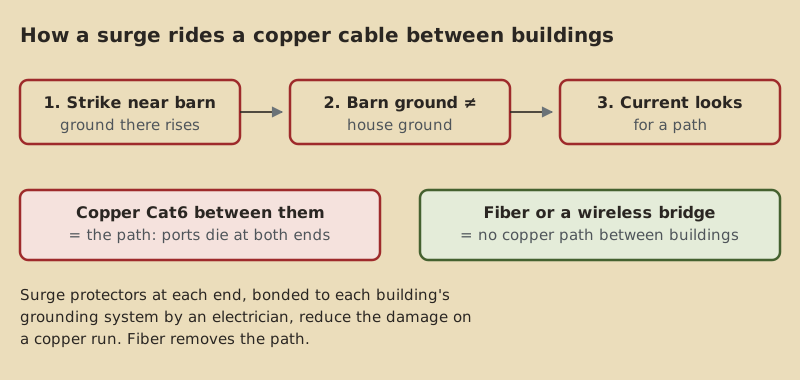
Lightning doesn’t have to hit a building to cause trouble. When it strikes the ground, a tree, or a fence near the barn, the current spreads out through the soil. Near the strike point, the ground voltage shoots up. Farther away, it’s lower. For a moment, the barn’s ground can sit thousands of volts above the house’s.
As the National Weather Service puts it, lightning gets into structures through direct strikes, through wires or pipes that extend outside, or through the ground. Once inside, it travels through electrical, phone, plumbing and other wiring.
Why the network cable carries it
A copper Ethernet cable links the barn switch to the house router. Each of those devices is powered from its own building’s outlets, referenced to its own building’s ground. So the cable ties the two grounds together through the network gear.
When the barn’s ground jumps, the difference has to go somewhere. The data cable is a low-resistance path between the two buildings. The surge goes through the barn switch’s port, down the cable, and into the house router’s port. Our fact sheet sums up the trade-press explanation: copper data lines tie two buildings’ grounds together, a nearby strike can raise one building’s ground potential, and fiber in place of copper fixes it.
Longer copper runs and runs that go between buildings are the most exposed. A cable inside one building doesn’t bridge two grounds.
What typically gets damaged
- Ethernet ports at both ends: the switch port in the barn, the router or switch port in the house. Often a single port dies while the rest of the switch keeps working.
- PoE injectors and the radios or cameras on them, especially on outdoor runs.
- Anything else plugged into the same switch, if the surge spreads.
- Sometimes power supplies, because the surge can find its way back through the device to the outlet.
After a storm, see checking your farm network after a nearby strike for a step-by-step check.
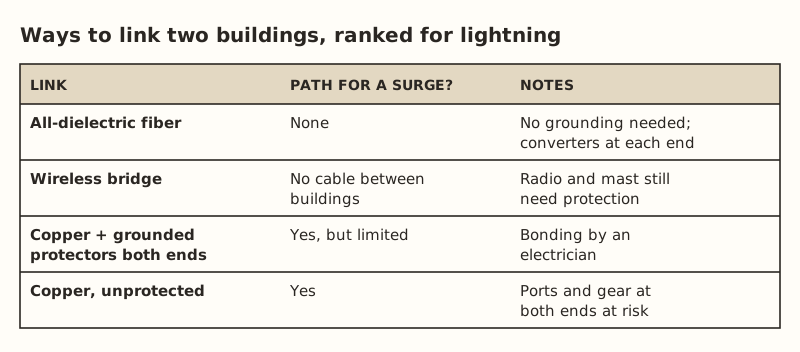
The fixes, ranked
1. All-dielectric fiber
Fiber carries light, not electricity. All-dielectric (non-armored) fiber has no metal, needs no grounding and doesn’t carry lightning-induced currents between buildings. The two buildings stay electrically separate. You plug a media converter in at each end, so the barn switch and the house router each connect to a short copper patch cable inside their own building.
From our parts data (checked Oct 5, 2026): a media converter pair with modules was $60.06–$79.98, and a 300 m pre-terminated outdoor fiber was $268–$278.99. Those listings were armored, which means a metal layer, and not burial-rated, so plan on conduit, and ask an electrician how the armor should be treated at each building. Which glass to buy: single-mode or multimode fiber.
2. A wireless bridge
A bridge removes the cable between buildings entirely. A short-range pair ran $108–$139.99. But each radio sits high on a gable or mast, and its drop cable comes indoors. Lightning protection now means protecting each radio’s cable with a grounded surge protector, and bonding the mast as an electrician advises. You’ve traded one long exposed cable for two short ones.
3. Copper with a grounded protector at each end
If copper is staying, an outdoor Ethernet surge protector goes on the cable where it enters each building: two protectors per link. They were $11.69–$14.14 each in our data. A protector works by diverting the surge to ground, so it has to be grounded. Ubiquiti’s instructions for its ETH-SP-G2 say it must be grounded, either to a grounded metal pole or structure, or by a drain wire to a remote grounding block.
That grounding connection has to tie into that building’s grounding system. For communications cable protectors, the NEC (Article 800.100, as summarized on UpCodes) sends the protector’s ground to the building’s intersystem bonding termination, with at least 14 AWG copper and no more than 20 ft in one- and two-family dwellings. That’s electrician work. Details on placement are in surge protectors at both ends.
Protectors reduce damage. They don’t make a copper run immune. A close strike can still get through.
Don't drive your own separate ground rod for network gear and leave it unbonded. A rod that isn't bonded to the building's grounding electrode system adds another separate ground, which is the problem you're trying to fix. Our parts data notes any extra rod must be bonded to the building's grounding electrode. Our parts data lists a ground rod ($26.56–$34.90) and 6 AWG bare copper ($52.92) only as parts an electrician might use in a bonding plan. Call 811 before driving rods or digging.
Which fix for which farm
| Situation | Best fit |
|---|---|
| New link, you can trench, lightning is common in your area | Fiber in conduit |
| Existing copper link that keeps losing ports after storms | Replace with fiber, or add grounded protectors at both ends now and plan fiber |
| Can’t trench, buildings can see each other | Wireless bridge, with protected drop cables |
| Short copper run, quiet storm area | Copper with grounded protectors at both ends |
| Run is over 328 ft anyway | Fiber or a bridge. Copper is out regardless |
Worked example: deciding for a 280 ft barn link
Say a house and barn are 280 ft apart along the route, in an area with frequent summer storms. The barn has its own panel fed from the house. The current link is buried Cat6, and the barn switch has lost ports twice.
| Option | What it takes | What changes |
|---|---|---|
| Add protectors at both ends | Two outdoor protectors ($11.69–$14.14 each) plus an electrician to bond them | Less damage from nearby strikes. Copper still links the grounds |
| Replace with fiber | Converter pair ($60.06–$79.98), outdoor fiber, conduit, a trench or pull | No copper between buildings. The grounds are separate |
| Replace with a bridge | Short-range pair ($108–$139.99), mounts, two protected drop cables | No cable between buildings. Masts need bonding |
If the old cable is in conduit, pulling fiber through it may be easy, using the old cable as a pull line. If it’s bare in the ground, a bridge avoids digging. In both cases, protectors on any copper that’s left outdoors are still worth it.
Signs your link is exposed
You can’t see ground potential, but you can see its effects. Your copper link is a likely path if:
- Ports at both ends of the house-to-barn cable have failed after storms.
- Devices at the barn fail after storms that didn’t seem close.
- The cable runs a long way, or crosses open, high ground.
- The two buildings have separate electrical services or grounding.
Any one of these is a reason to look at fiber or a bridge for the main link.
Common mistakes
- One protector at the house only. The barn end is just as exposed. Two buildings, two protectors.
- Protectors with no ground wire. An ungrounded protector has nowhere to send the surge.
- A separate, unbonded ground rod “just for the network”. Ask an electrician instead.
- Trusting the power strip. A surge strip on the outlet doesn’t protect the data cable coming in from another building.
- Unplugging during a storm. The NWS says not to unplug equipment during a thunderstorm, because you could be struck. Unplug before a storm arrives, if at all.
- Assuming armored fiber is the same as all-dielectric. The armor is metal. Ask how it should be handled.
What we don’t know
How likely damage is on a given farm depends on how often lightning strikes there, soil conditions, run length and how each building is grounded. We can’t put a number on your risk. We haven’t found a code source that sets burial depth for data cable. The fact that copper links grounds and fiber doesn’t comes from trade press and fiber makers. Code requirements come from the NEC as summarized online, and your local inspector and electrician have the final word.
Next step
If you’re planning a new link between buildings, read the storms guide and price fiber against a bridge before defaulting to copper. If you already have copper, get two outdoor protectors and have an electrician bond one at each end. Then, after the next storm, run through checking your network after a lightning strike.
Go deeper
This post answers one question. The full guide covers the rest: Lightning, surge and grounding for long runs (surge protectors, bonding, fiber isolation, safe trenching).
Questions people ask
What is ground potential difference?
Can lightning travel through a buried Ethernet cable?
Does fiber optic cable protect against lightning?
Should I put a separate ground rod at the barn for my network gear?
Do I need surge protectors at both ends of an Ethernet cable between buildings?
Is a wireless bridge safer than a cable for lightning?
Sources
- Cabling Installation & Maintenance: Ground potentials and damage to LAN equipment, retrieved Oct 5, 2026
- National Weather Service: Lightning Indoors, retrieved Oct 6, 2026
- Multilink: Do Fiber-Optic Cables Need to Be Grounded?, retrieved Oct 5, 2026
- UpCodes: NEC 800.100 Cable and Primary Protector Bonding and Grounding, retrieved Oct 5, 2026
- Ubiquiti ETH-SP-G2 Quick Start Guide, retrieved Oct 5, 2026
- Category 6 cable - Wikipedia, retrieved Oct 5, 2026
- 811 Before You Dig (Common Ground Alliance), retrieved Oct 5, 2026
- ETH-SP-G2, retrieved Oct 5, 2026
- 10Gtek Gigabit SM media converter, dual SC, 1000Base-LX, 20 km (2-pack), retrieved Oct 5, 2026
- LightSaber Optics Outdoor Armored Fiber Patch Cable, OS2 LC-LC duplex (300 M option), retrieved Oct 5, 2026
- Loco5AC (base $49.00; $54.00 surcharge incl.), retrieved Oct 5, 2026
- ERICO 615880UPC 5/8 in x 8 ft copper ground rod, retrieved Oct 5, 2026
- Southwire 10638592 50 ft 6 AWG solid SD bare copper, retrieved Oct 5, 2026
Prices on this page are US retail ranges for named example parts, checked on the date shown, before tax and shipping. They change often.
Independent · not affiliated with SpaceX or Starlink. Links to Starlink’s plan pages use the site owner’s own referral link (your price is the same); there are no affiliate links (how we make money). It is general information, not electrical advice: where code applies, use a licensed electrician. Found an error? Tell us.