Single-mode or multimode fiber for a run between buildings
Both carry gigabit Ethernet farther than copper. Single-mode reaches miles, multimode reaches about a third of a mile, and the modules at each end have to match the glass.
Research-based, not tested on a farmWorks with any internet provider at the house.
Key takeaways
- For a new farm run, buy single-mode (OS2) pre-terminated outdoor fiber and 1000BASE-LX modules. They reach 10 km, far more than you'll need.
- Multimode with SX modules reaches 275 m to about 1,000 m depending on the grade (OM1 to OM4). That's fine for many barns, but it gives you less headroom.
- Fiber type, module type, speed, connector and strand count must all match at both ends.
- All-dielectric fiber carries no electricity between buildings, so a lightning surge can't ride it from barn to house.
- No splicing needed: pre-terminated cable in conduit plus a media converter at each end.
For a new run between farm buildings, buy single-mode fiber (labeled OS2) with 1000BASE-LX modules at each end. Single-mode reaches 10 km at gigabit speed, so length stops being a question. Pre-terminated outdoor single-mode cable is easy to find, and it costs about the same as multimode. Multimode (OM1 to OM4) with SX modules works too, out to 275–1,000 m depending on the grade. It just gives you less room to grow. Either way, the module type has to match the fiber at both ends.
This post covers what actually differs, how far each one goes, what has to match, and how to buy a working set without a splicing kit.
Why fiber at all
Fiber shows up in farm networks for two reasons.
- Distance. Copper Ethernet stops at 100 m (328 ft) end to end. Fiber goes much farther.
- Lightning. Copper between two buildings ties their grounds together. A nearby strike can raise one building’s ground and push a surge down the cable. All-dielectric fiber has no metal, needs no grounding and can’t carry lightning currents between buildings. More in two buildings, two grounds.
If neither applies (a barn 150 ft away in a quiet-weather area), buried Cat6 is simpler. See how to get internet to a barn.
The difference, in plain words
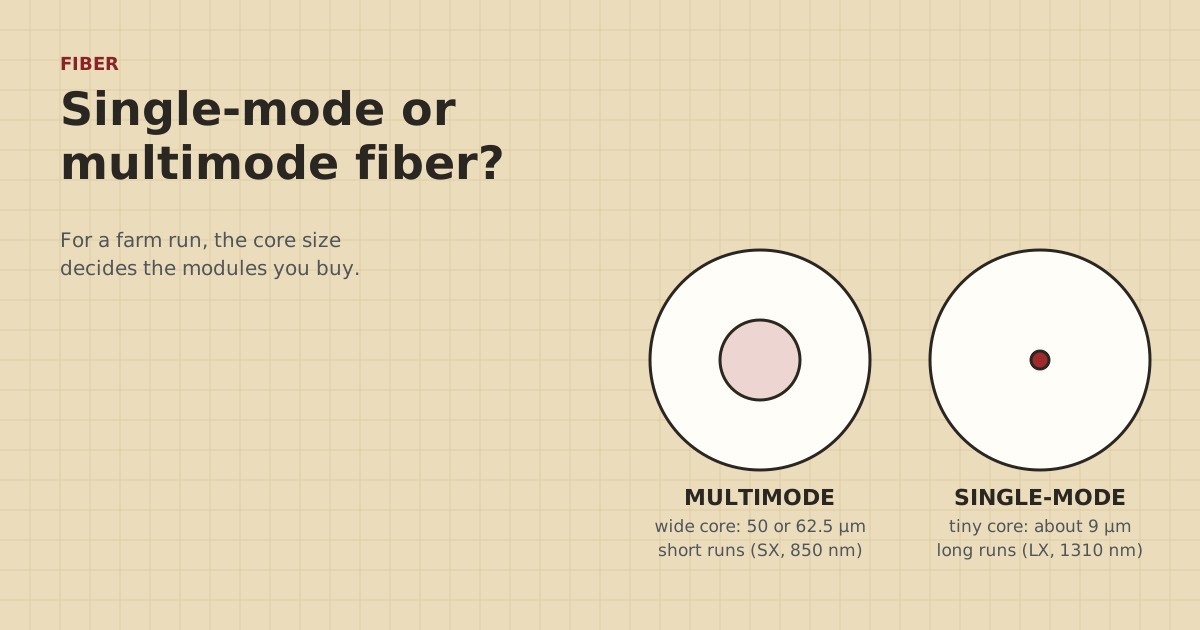
Inside a fiber is a glass core that carries light. The difference is the core size.
- Multimode has a wide core: 62.5 microns (OM1) or 50 microns (OM2, OM3, OM4). Light bounces along it in many paths, or “modes”. It’s driven by cheaper short-wave lasers (850 nm, SX modules). Because the paths spread out over distance, multimode is for shorter runs.
- Single-mode has a tiny core of about 9 microns. Light travels in essentially one path, so the signal stays clean over long distances. It uses 1310 nm LX modules for gigabit.
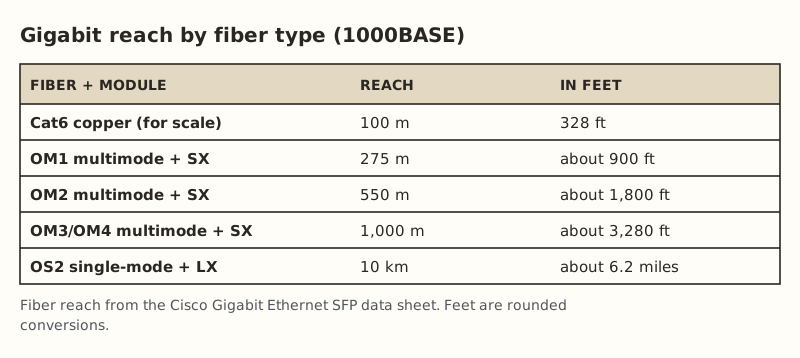
Our fact sheet records Cisco’s numbers: 1000BASE-SX on OM2 multimode reaches 550 m (275 m on OM1, 1,000 m on OM3/OM4), and 1000BASE-LX on single-mode reaches 10 km.
Which one to buy, by situation
| Your situation | Pick | Why |
|---|---|---|
| New run, any length on a farm | Single-mode OS2 + LX | Reach is never a concern. Widely sold pre-terminated |
| Run under about 900 ft and you already own OM1 gear | Multimode OM1 + SX | Works within 275 m. Reuse what you have |
| You found leftover multimode cable | Check the jacket print (OM1/OM2/OM3) | Match modules to it. Stay within its reach |
| Might go 10G later, under 300 m | OM3/OM4 multimode or single-mode | Both handle 10G at farm distances with the right modules |
| Want one strand instead of two | Single-mode BiDi modules | Must be a matched A/B pair |
When in doubt, single-mode. The one reason to pick multimode for a new run is if you already own multimode modules or cable.
What has to match at both ends
This is where most first fiber jobs go wrong. The link only comes up if everything lines up.
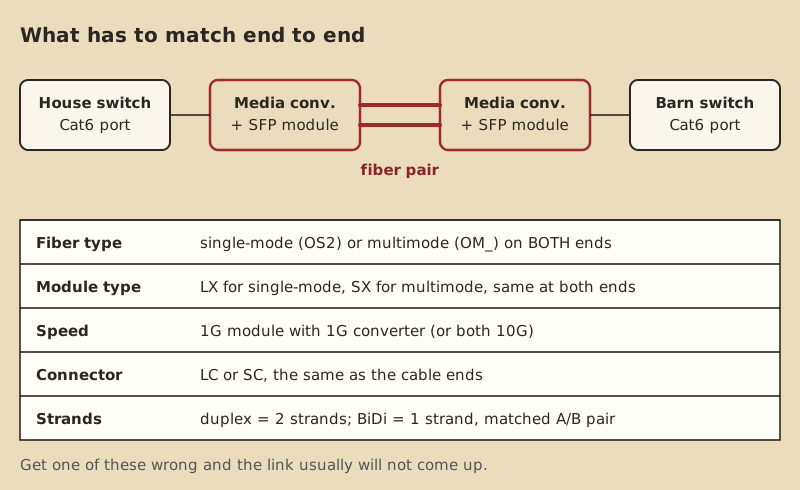
- Fiber type. Single-mode cable with single-mode modules. Multimode with multimode modules.
- Module type and wavelength. LX (1310 nm) for single-mode gigabit. SX (850 nm) for multimode gigabit. The same type at both ends.
- Speed. A 1G module goes in a 1G converter or switch port. Many cheap media converters are gigabit-only and won’t run a 10G module.
- Connector. LC (small, the most common on SFP modules) or SC (larger, square). The cable’s connectors must fit the module. LC-LC duplex is typical for a converter pair with SFP slots.
- Strands. A standard “duplex” link uses two strands: one sends, one receives. BiDi modules use one strand, but come as a matched pair with different wavelengths, often marked A and B or with both wavelengths printed.
A working shopping list
From our parts data, checked Oct 5, 2026:
| Part | Qty | Price range | Notes |
|---|---|---|---|
| Media converter pair, with SFP modules | 1 pair | $60.06–$79.98 | Gigabit. Single-mode LX examples in our data |
| Pre-terminated outdoor fiber, about 300 m, OS2 LC-LC duplex | 1 | $268–$278.99 | Armored. Not burial-rated: run in conduit |
| 1 in PVC conduit, 10 ft stick | as needed | $9.53–$10.75 each | Protects the cable. Lets you replace it |
Two notes from the parts data:
- One converter in our list, the TP-Link MC220L, has an SFP slot and needs a module. The price range includes two modules. Another example, a 10Gtek single-mode pair, has the optics built in with SC connectors. If you buy built-in-optics converters, your cable needs SC ends, not LC.
- The outdoor fiber listings we found are armored but not rated for direct burial, so plan on conduit. We didn’t find a priced length over 300 m (984 ft).
Worked example: shop 1,150 ft away, diggable, near a creek that floods. That’s past copper and past OM1’s reach. Single-mode OS2 with LX modules covers it easily. We don’t have a priced pre-terminated cable that long, so get a custom-length pre-terminated cable quoted, or plan a splice point in a weatherproof box with a local installer. Run it in conduit, routed above the flood line.
Do you need 10G?
Almost certainly not for a barn link today. Gigabit (1G) fiber is already faster than any farm’s internet connection, and faster than most switches and cameras in a barn can use. Where 10G could matter: a big NVR in one building with people pulling lots of recorded video from it in another, or file transfers between a house office and a shop. If that might be you, two cheap choices keep the door open:
- Run single-mode now. The same OS2 glass carries 10G with 10G single-mode (LR) modules later. You swap the modules and converters, not the cable.
- Pull a spare. If you’re trenching anyway, a second fiber, or a second conduit with a pull string, costs little now and saves digging later.
What you shouldn’t do is buy multimode OM1 for a new run. It’s the grade with the shortest reach at higher speeds.
Fiber or a long-range bridge for the same run?
If you’re weighing fiber against a wireless bridge for a long run, here’s how they compare:
| Fiber | Long-range bridge | |
|---|---|---|
| Needs a trench | Yes, the whole way | No |
| Needs line of sight | No | Yes, plus clear Fresnel zone |
| Affected by trees, rain, wind | No | Trees yes; wind can knock it off aim |
| Lightning between buildings | Isolated (all-dielectric) | No copper between buildings, but masts need protection |
| Parts | $60.06–$79.98 converter pair, plus cable and conduit | $142–$218 long-range pair |
| Lifespan once in | Decades in conduit | Radios need firmware and eventual replacement |
The bridge usually wins on effort. Fiber wins on reliability and lightning isolation. If you can trench the route without tearing up a working field or crossing someone else’s land, fiber is the “do it once” choice. The full comparison is in wireless bridge or a long cable.
Pulling pre-terminated fiber
- Protect the connectors. Pre-terminated outdoor cables usually come with a pulling eye or sock over the ends. Leave it on until the cable is through.
- Use big, gentle bends. Use sweeps, not tight 90-degree elbows. Fiber has a minimum bend radius, printed in the cable’s specs. Kinks can crack the glass.
- Pull slowly, by the strength member or pulling eye, never by the connectors.
- Leave slack coiled loosely in each building. Don’t cinch it with tight zip ties.
- Label both ends with the length and type, e.g. “OS2 LC-LC 300 m to shop”.
Call 811 a few business days before you trench. It's free. Armored fiber has a metal layer: ask a licensed electrician whether and how it should be bonded where it enters each building. All-dielectric fiber needs no grounding. The media converters plug into outlets, so the barn end needs power.
Common mistakes
- Buying SX modules for single-mode cable (or LX for multimode) because the listing said “gigabit fiber module”.
- LC cable for SC converters. Check the converter photos before you order the cable.
- Crossed strands on duplex. If the link won’t come up, swap the two connectors at one end. Transmit has to meet receive.
- Looking into the fiber end. Infrared light is invisible and can hurt your eyes. Never look into a connector or module that might be live.
- Dirty connectors. Keep the dust caps on until the moment you plug in. A speck of dust can stop a link.
- Forgetting surge protection on the copper side. The fiber isolates the buildings from each other. The copper patch cables and power at each end still benefit from normal protection ($11.69–$14.14 for an outdoor Ethernet protector, if any copper runs outside).
What we don’t know
We haven’t tested specific converter and module brands together. Compatibility between brands is usually fine for plain gigabit LX or SX, but some switches only accept their own brand of SFP. Check your switch’s documentation if you plug modules into a switch instead of a converter. We also don’t have a dated price for pre-terminated runs over 300 m. The site owner hasn’t run fiber on a farm. This guide comes from the Cisco SFP data sheet, maker listings and our dated parts data.
Next step
Measure the route, add slack, and check that you can power a converter at the far end. Then follow the beyond-1,000-ft recipe for conduit, pulling and setup. If you can’t dig, compare a long-range bridge in wireless bridge or a long cable. The storms guide covers what to protect at each end.
Go deeper
This post answers one question. The full guide covers the rest: Beyond 1,000 ft: fiber or a relay hop (pre-terminated outdoor fiber with media converters, or two bridges around an obstacle).
Questions people ask
Which is better for long distance, single-mode or multimode?
Can I use single-mode SFP modules on multimode fiber?
Is single-mode fiber more expensive than multimode?
Do I need to splice fiber to run it to a barn?
Does fiber need to be grounded?
What is the difference between OS2 and OM fiber?
Sources
- Cisco Gigabit Ethernet SFP Modules Data Sheet, retrieved Oct 5, 2026
- Multilink: Do Fiber-Optic Cables Need to Be Grounded?, retrieved Oct 5, 2026
- Cabling Installation & Maintenance: Ground potentials and damage to LAN equipment, retrieved Oct 5, 2026
- Category 6 cable - Wikipedia, retrieved Oct 5, 2026
- 811 Before You Dig (Common Ground Alliance), retrieved Oct 5, 2026
- 10Gtek Gigabit SM media converter, dual SC, 1000Base-LX, 20 km (2-pack), retrieved Oct 5, 2026
- LightSaber Optics Outdoor Armored Fiber Patch Cable, OS2 LC-LC duplex (300 M option), retrieved Oct 5, 2026
- JM Eagle 1 in. x 10 ft PVC Sch 40 Conduit 67462, retrieved Oct 5, 2026
- ETH-SP-G2, retrieved Oct 5, 2026
- LBE-5AC-Gen2 (base $65.00; $71.00 surcharge incl.), retrieved Oct 5, 2026
Prices on this page are US retail ranges for named example parts, checked on the date shown, before tax and shipping. They change often.
Independent · not affiliated with SpaceX or Starlink. Links to Starlink’s plan pages use the site owner’s own referral link (your price is the same); there are no affiliate links (how we make money). It is general information, not electrical advice: where code applies, use a licensed electrician. Found an error? Tell us.