How to get internet to a barn: pick the method in five questions
Most barn internet problems aren't the internet. They're the last few hundred feet. Here's how to pick the right way across, in the order that saves money.
Research-based, not tested on a farmWorks with any internet provider at the house.
Key takeaways
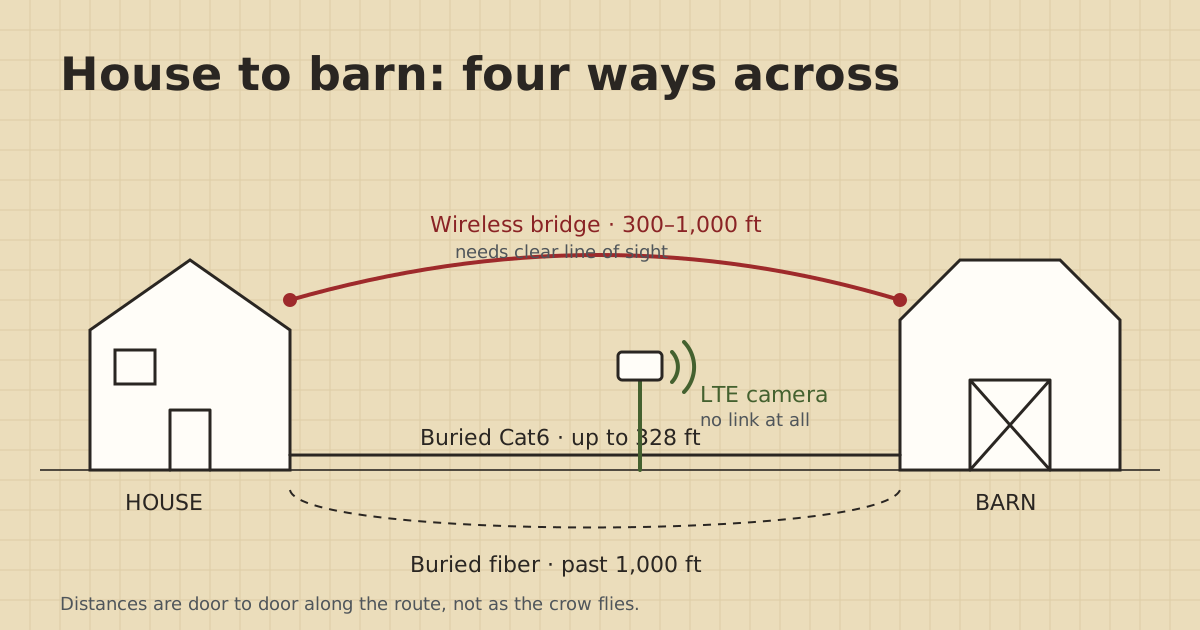
- Under 328 ft along the route and you can dig: bury Cat6. It's the cheapest, fastest and most reliable link.
- Over 328 ft, or you can't dig, and the two buildings can see each other: a point-to-point wireless bridge pair.
- Long runs where you can dig, or where lightning worries you: fiber with a media converter at each end.
- Only cameras out there and a phone gets signal at the spot: an LTE camera needs no link at all.
- Stretching house Wi-Fi, consumer mesh and powerline adapters usually fail between buildings.
To get internet to a barn, you extend the house network out to it. You don’t need new internet service. Under about 300 ft with diggable ground, bury direct-burial Cat6. If you can’t dig, or it’s farther, and the two buildings can see each other, mount a pair of point-to-point wireless bridge radios. Past 1,000 ft, or where lightning is a worry, bury fiber. If all you want out there is a camera and phones get signal at the spot, an LTE camera skips the link altogether.
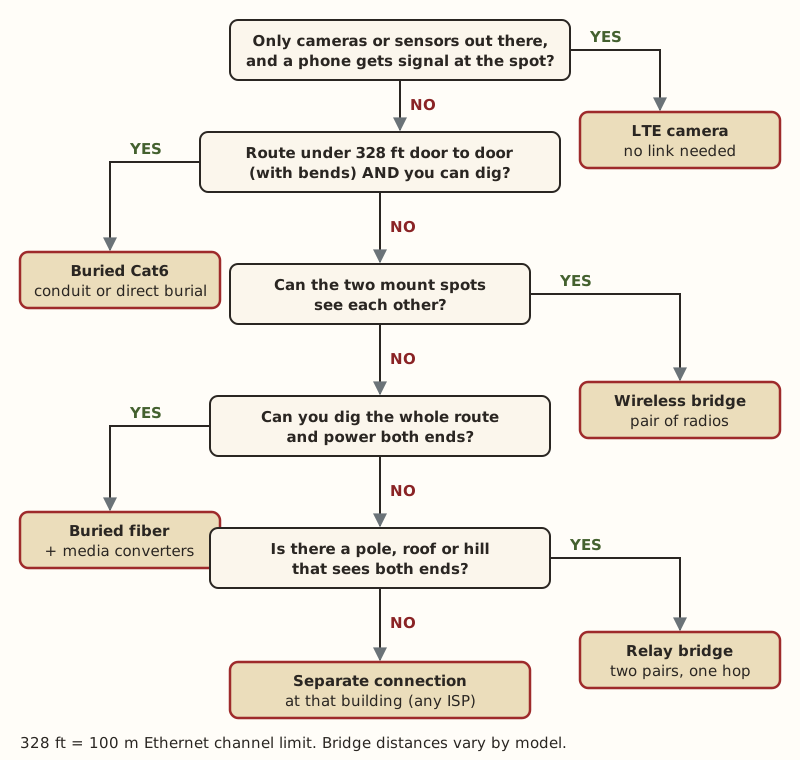
The five questions below pick between those. Go in order. Each one rules out options that cost more or fail more.
Why the barn has no internet when the house does
The house connection is almost never the problem. Whatever feeds the house (fiber, cable, fixed wireless, or a Starlink dish on the roof) ends at a router, and a router’s Wi-Fi is built to fill a house, not a yard. Wi-Fi fades fast over open ground and drops sharply through walls. Metal siding is worse: metal blocks Wi-Fi most when it fully encloses a space, and an all-steel shop or pole barn comes close to that.
So the job is getting the network across a gap of 100 to 1,500 ft, then putting Wi-Fi inside the barn. Treat those as two separate problems.
Question 1: What actually needs to run at the barn?
Write down every device. It changes the answer more than distance does.
- People on phones and laptops. You need a real network link plus an access point inside the building.
- One or two cameras, nothing else. If a phone gets two or more bars where the camera goes, an LTE (cellular) camera needs no link at all. LTE cameras ran $94.99–$279.99 (checked Oct 5, 2026) in our parts data, plus a monthly cellular data plan for each camera.
- Several cameras, sensors, a gate controller. A link plus a small PoE switch in the barn usually beats a data plan per device.
- A second household. A link works, but read one connection for several buildings first. It covers what one service can reasonably carry.
If the answer is “a single camera with good cell signal”, stop here. Everything below is for a real network link.
Question 2: How far is it along the route?
Measure the path the cable would really take: out of the house, around the drive, along the fence, into the barn, up to the shelf where the switch sits. Not the straight line. A phone map’s distance tool is fine for a first guess. Then add about 10% for bends, plus 10 ft of slack at each end.
The number that matters is 328 ft. A copper Ethernet channel tops out at 100 m (328 ft) end to end, patch cords included. Go past it and the link may come up slow, drop out, or not come up at all.
| Route length (with slack) | Methods that fit |
|---|---|
| Under 300 ft | Buried Cat6 (best), wireless bridge, fiber (overkill) |
| 300–328 ft | Cat6 only if you measured carefully; otherwise bridge or fiber |
| 328–1,000 ft | Wireless bridge, fiber, or Cat6 with a powered extender midway |
| Over 1,000 ft | Long-range bridge, fiber, or a relay bridge around an obstacle |
The 1,000 ft line isn’t a hard limit. It’s where short-range bridge radios run out of margin and you move to a longer-range class or fiber. Single-mode fiber with standard 1000BASE-LX modules reaches 10 km, far more than any farm needs.
Question 3: Can you dig the whole way?
A trench beats a radio if you can dig it. A buried cable has no aiming, no line-of-sight problem, nothing to blow off a gable in a storm, and usually the lowest parts cost.
You can’t dig if there’s ledge or rock, a paved road or drive you can’t cross, someone else’s land in the way, or the run crosses buried utilities you can’t avoid.
811 is free. Contact it a few business days before you dig, even for a shallow cable trench. If the trench runs near power lines, or you want power and data in the same trench, talk to a licensed electrician first.
If you can dig and the route is under 328 ft, here’s the parts side of a 250 ft run, from our parts data (checked Oct 5, 2026):
| Part | Price range | Notes |
|---|---|---|
| Direct-burial Cat6, 500 ft spool | $149.99 | Gel-filled, sold as “direct burial” |
| 1 in PVC conduit, 10 ft stick (optional) | $9.53–$10.75 each | About 25 sticks for 250 ft |
| Outdoor Ethernet surge protector | $11.69–$14.14 each | One at each building, bonded to ground |
Direct-burial cable can go in the ground with or without conduit. Conduit costs more and adds work, but it lets you pull a new cable later without digging again. Outdoor vs direct-burial Cat6 explains which cable a run needs. The under-300-ft recipe covers depth, testing and surge protection.
Question 4: Can the two buildings see each other?
If you can’t dig, or the run is longer than copper allows, a point-to-point wireless bridge is next. It’s two small directional radios, one on the house and one on the barn, aimed at each other. They act like an invisible Ethernet cable.
Bridges need line of sight: a clear, straight path between the two radios. Not just “I can see the barn roof”, but clear air along the whole line, with room around it. The rule of thumb in radio planning is to keep at least 60 % of the “Fresnel zone” (a football-shaped space around the straight line) free of trees and ground. Trees in leaf are the classic cause of a bridge that works in March and crawls in July.
How to check without tools: stand where each radio would go and look at the other spot. Use binoculars. At dusk, have someone shine a flashlight back at you. If branches cross the line, plan to mount higher, on a gable end, a pole or a mast.
From our parts data (checked Oct 5, 2026):
- Short-range bridge pair (5 GHz, roughly a few hundred feet up to around 1,000 ft): $108–$139.99
- Long-range bridge pair (higher-gain 5 GHz dishes or beams): $142–$218
Each radio is powered over its own Ethernet cable through a PoE injector, which usually comes in the box. The barn end still needs power, at least an outlet for the injector and a small switch. Read wireless bridge or a long cable for the head-to-head, and the bridge recipe for mounting and aiming.
If something blocks the line, look for a third spot that can see both ends: a pole, a shed roof, the top of a rise. Two bridge pairs with a “relay hop” in the middle go around the obstacle. The relay spot needs power. The beyond-1,000-ft recipe covers relays.
Question 5: Is it a long run where fiber makes more sense?
Fiber is the answer when you can dig and the run is past copper’s limit, or when you want the two buildings electrically separated. Glass fiber carries no current. An all-dielectric (non-metal) fiber cable needs no grounding and can’t carry a lightning surge from one building to the other. Copper between two buildings can.
It’s less scary than it sounds. You don’t splice anything. You buy pre-terminated outdoor fiber with the connectors already on, pull it through conduit, and plug a media converter into each end. A converter turns fiber into a normal Ethernet port. From our parts data (checked Oct 5, 2026):
| Part | Price range |
|---|---|
| Media converter pair (with SFP modules) | $60.06–$79.98 |
| Outdoor pre-terminated fiber, about 300 m (984 ft) | $268–$278.99 |
The outdoor fiber listings we found were armored but not rated for direct burial, so plan on conduit. Each converter needs an outlet. Single-mode or multimode fiber explains which glass to buy.
Putting Wi-Fi inside the barn
The link brings a network port into the barn. People still need Wi-Fi. Plug an access point into the far end of the link: an indoor one for a dry shop, an outdoor-rated one for a dusty or damp barn or to cover a yard. Outdoor access points ran $69.95–$219 (checked Oct 5, 2026).
Mount the access point inside a metal building, not outside it. If the house router is a Starlink Router 3, its LAN side has 2 ports for Ethernet, so you can plug the house end of the link straight in without an adapter. On other routers, any free LAN port works.
What I’d do in three common setups
Barn 180 ft away, soft ground, cameras and a laptop. Bury direct-burial Cat6, in conduit if you’ll ever want to add a second cable. Surge protector at each end, a 5-port PoE switch in the barn for the cameras, one access point. One weekend of work.
Shop 600 ft across a hayfield, can see the shop door from the porch. Short-range bridge pair, house radio under the eave on the shop side, shop radio on the gable. No trench across a working field. Check the line again after the trees leaf out.
Second barn 1,400 ft away, behind a tree line, ground is diggable. Fiber in conduit with a media converter pair. A bridge would need a tall mast to clear the trees, and the fiber also keeps lightning on the barn’s ground from reaching the house.
Common ways this goes wrong
- Measuring as the crow flies. The cable follows fences and drives. A “250 ft” barn turns into 340 ft of cable, and the link won’t hold.
- Burying cable that isn’t rated for burial. Indoor or plain outdoor Cat6 soaks up water over time. Buy cable sold as direct burial.
- Expecting mesh Wi-Fi to jump the gap. Consumer mesh makers say to keep nodes within about 50 ft of each other. A barn 300 ft away is out of that range. See why mesh fails between buildings.
- Skipping surge protection on copper runs. A buried copper run between two buildings links their grounds. One nearby strike can take out switch ports at both ends.
- Forgetting power at the far end. Every method except an LTE camera needs an outlet in the barn.
More of these in common mistakes running internet to a barn.
What we don’t know
Real-world bridge range depends on the exact radio, how high it’s mounted, what’s in the path and local interference. Spec-sheet ranges are best-case numbers. The site owner hasn’t run these setups on a farm. This guide comes from manufacturer specs, standards and the dated parts prices above, and owner-run tests at home will be labeled as such when they’re published on the gear tests page.
Next step
Measure the route, stand at both ends and look, and write down what runs out there. Then put those answers into the Outbuilding Link Planner to get a parts list and a dated cost for each building.
Go deeper
This post answers one question. The full guide covers the rest: the Outbuilding Link Planner (enter each building's distance, view, digging and power; get a method, parts list and dated cost).
Questions people ask
What is the cheapest way to get internet to a barn?
Can I just extend my Wi-Fi to the barn?
How far can you run Ethernet cable to an outbuilding?
Do I need a second Starlink dish for the barn?
Is a wireless bridge reliable enough for a barn?
Should I run fiber or Cat6 between buildings?
Sources
- Ubiquiti UISP airMAX NanoBeam 5AC tech specs, retrieved Oct 6, 2026
- Category 6 cable - Wikipedia, retrieved Oct 5, 2026
- eero: Where should I place my eeros?, retrieved Oct 5, 2026
- McElroy Metal: Does a Metal Roof Affect Wifi?, retrieved Oct 5, 2026
- Fresnel zone - Wikipedia, retrieved Oct 5, 2026
- Cisco Gigabit Ethernet SFP Modules Data Sheet, retrieved Oct 5, 2026
- Multilink: Do Fiber-Optic Cables Need to Be Grounded?, retrieved Oct 5, 2026
- 811 Before You Dig (Common Ground Alliance), retrieved Oct 5, 2026
- Starlink Standard 4 X Specifications PDF, retrieved Oct 5, 2026
- Voltive V-1236-1 Cat6 Direct Burial Gel Filled, 500 ft, retrieved Oct 5, 2026
- JM Eagle 1 in. x 10 ft PVC Sch 40 Conduit 67462, retrieved Oct 5, 2026
- Loco5AC (base $49.00; $54.00 surcharge incl.), retrieved Oct 5, 2026
- LBE-5AC-Gen2 (base $65.00; $71.00 surcharge incl.), retrieved Oct 5, 2026
- 10Gtek Gigabit SM media converter, dual SC, 1000Base-LX, 20 km (2-pack), retrieved Oct 5, 2026
- LightSaber Optics Outdoor Armored Fiber Patch Cable, OS2 LC-LC duplex (300 M option), retrieved Oct 5, 2026
- Reolink Go PT Plus, retrieved Oct 5, 2026
- EAP225-Outdoor, retrieved Oct 5, 2026
- ETH-SP-G2, retrieved Oct 5, 2026
Prices on this page are US retail ranges for named example parts, checked on the date shown, before tax and shipping. They change often.
Independent · not affiliated with SpaceX or Starlink. Links to Starlink’s plan pages use the site owner’s own referral link (your price is the same); there are no affiliate links (how we make money). It is general information, not electrical advice: where code applies, use a licensed electrician. Found an error? Tell us.