My phone has no Wi-Fi inside the metal barn
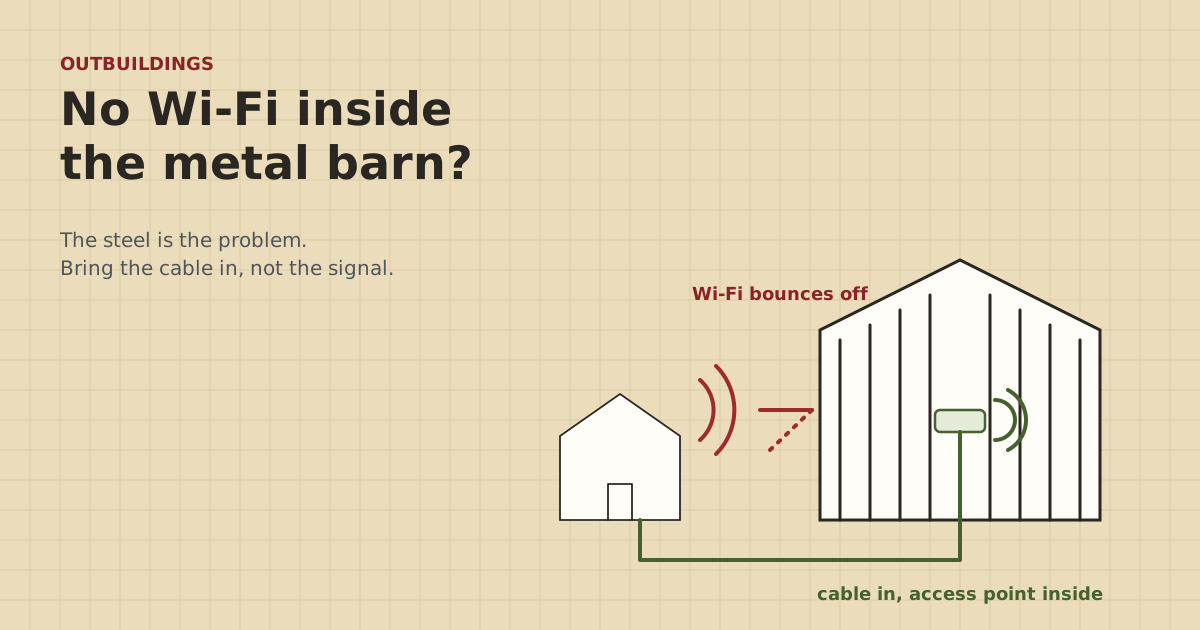
A steel building comes close to a closed metal box. Wi-Fi from the house mostly bounces off it. The fix is to bring the network inside on a wire and make the Wi-Fi there.
Research-based, not tested on a farmWorks with any internet provider at the house.
Key takeaways
- Steel siding and roofing reflect Wi-Fi. A building that's metal on every side comes close to a closed metal box, so little signal from outside gets in.
- A stronger router, an extender at the house or a mesh node by the door rarely fixes it. The signal has to start inside the building.
- Bring the network into the barn on a cable or a bridge, then put a Wi-Fi access point inside, high and central, clear of steel beams.
- Long barns and closed rooms (office, tack room) usually need a second access point. One cable, a small PoE switch and two APs covers most.
- Use an access point rated for dust and damp if the barn houses livestock or equipment. Keep the house router in the house.
Steel siding and a steel roof reflect Wi-Fi. A metal roof alone doesn’t block much, because signal still gets in through the walls and windows, but a building that’s metal on every side comes close to a closed metal box, and very little from the house gets inside. That’s why your phone drops the moment you step through the door. A stronger router or an extender at the house won’t fix it. The Wi-Fi has to start inside the barn: bring the network in on a cable or a bridge, and put an access point inside, high and central.
Here’s why it happens, what doesn’t work, and how to set it up so the whole barn has signal.
Why metal buildings kill Wi-Fi
Wi-Fi is a radio signal. Wood, drywall and glass let most of it through. Brick and stone slow it down. Metal reflects it.
Metal roofing maker McElroy Metal puts the nuance this way: a metal roof alone can’t block Wi-Fi unless the building is fully enclosed in metal, like a Faraday cage. A house has wood walls and windows, so the signal finds a way in. A steel pole barn or shop is different. Steel roof, steel siding on all four walls, often a big steel door: that’s much closer to the fully enclosed case. Mesh maker eero makes the same point in its placement advice, listing metal walls as hard for Wi-Fi to get through.
So outside the barn, your phone hears the house router fine. Step inside, and almost all of that signal is bouncing off the outside of the building.
What usually doesn’t work
- A more powerful router at the house. More signal hitting the steel still mostly bounces off. And your phone has to talk back to the router, at phone power, through the same steel.
- An extender or mesh node at the house or outside the barn. It only repeats what it hears and can’t push through steel either. eero places nodes 20 to 30 ft apart, no more than 50 ft. Consumer mesh isn’t built to span the gap between buildings, let alone through a metal wall. Our mesh across buildings page explains the details.
- Pointing the router at the barn through a window. You might get signal right by the door. Not in the back stalls.
- Leaving the barn door open. It helps a little near the door. It’s not a plan.
What works: wire in, Wi-Fi inside
The fix has two parts.
Part 1: Get the network into the barn on something other than Wi-Fi. Pick by distance and ground:
- Under 328 ft and you can dig: buried direct-burial Cat6 ($149.99 for a 500 ft spool). See the under-300-ft recipe.
- Longer, or you can’t dig, and the buildings can see each other: a point-to-point wireless bridge ($108–$139.99 for a short-range pair). Mount the barn radio outside on the wall or gable facing the house, never inside. Then run a short cable through the wall.
- Very long runs: fiber with media converters.
Internet to the barn in five questions walks through the choice.
Part 2: Make the Wi-Fi inside. Put a Wi-Fi access point (AP) inside the barn, plugged into that cable. Most APs are powered over the Ethernet cable from a PoE injector ($19.99–$35.49) or a small PoE switch ($44.99–$63.66), so you only need one outlet, wherever the switch lives.
Where to put the access point
Placement inside the barn matters almost as much as getting the cable there.
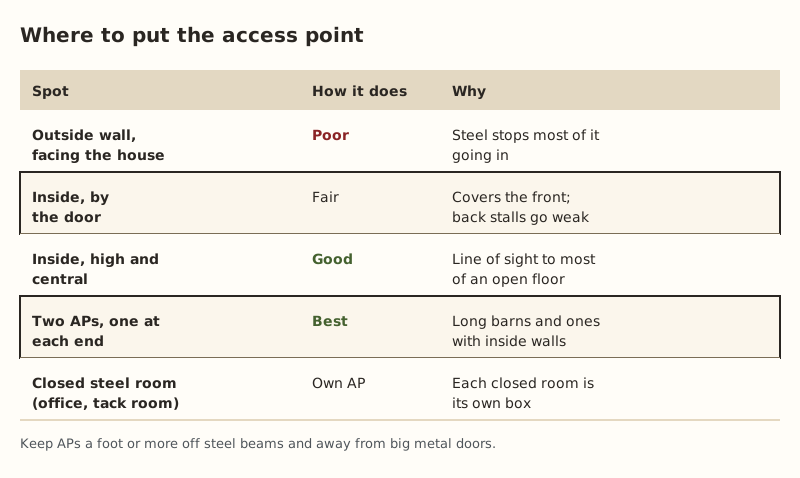
Rules of thumb:
- Inside, not outside. An AP on the outside wall has the same problem as the house router.
- High and central. Mount it on a beam or the ceiling near the middle of the open floor, above head height and above stall walls and equipment.
- A foot or more off steel. Don’t mount it flush against a steel purlin or girt. Use a short standoff or a wood block.
- Away from big metal doors and stored equipment. A parked combine or a stack of steel gates is a wall to Wi-Fi.
- One AP per closed room. An office, tack room or shop with steel interior walls is its own box. It gets its own AP, on the same cable through a switch.
One AP or two?
For a small open shop, one AP inside, central, is usually enough. Add a second when:
- The barn is long, with the far end weak from a single AP in the middle.
- There are interior walls of steel or block between the work areas.
- There’s a closed office or tack room.
- People and gear are spread across two floors, such as a loft.
The layout that covers most barns: one cable (or the bridge radio’s drop cable) into a small PoE switch, then a cable from the switch to each AP. Give both APs the same Wi-Fi name and password, so phones move between them on their own.
Barn conditions: dust, damp, cold and ammonia
Barns are hard on electronics. Dust gets into vents, damp air condenses on cold mornings, winters freeze, and livestock barns add ammonia that corrodes metal contacts.
- Use an outdoor-rated AP in livestock barns, hay barns and unheated shops. They’re sealed against dust and water and rated for a wider temperature range. In our parts data, outdoor APs come to $69.95–$219 (checked Oct 5, 2026).
- Put the switch and any injector in a sealed box. A NEMA 4X enclosure ($29.96–$74.99) keeps dust and damp off. Leave room for heat to escape and plan where the cables enter.
- Use outdoor-rated cable for any run along the outside of the building or exposed to sunlight ($224.99–$277.99 per 1,000 ft spool). Indoor cable is fine inside a clean office, not in a damp stall area.
- Protect the outlet. If the switch’s outlet is near wash-down areas, it should be a protected outlet. Ask a licensed electrician.
A note on Starlink routers
If the house runs on a Starlink router, you have two common ways to set up the barn:
- Third-party AP in the barn. Put the AP in access point (bridge) mode, so it hands out the same network as the house rather than making a second one. This works whether the Starlink router is in normal mode or in bypass mode with your own router.
- A Starlink mesh node in the barn. Starlink routers mesh only with Starlink mesh nodes, not with other brands. A node out in a steel barn usually can’t hold a wireless link back to the house, so feed it by cable from the bridge or the trench.
If you use your own router at the house, Starlink’s bypass mode turns off the Starlink router’s Wi-Fi and its mesh, so your own router and APs handle everything.
Worked examples
40 x 60 ft steel shop, 180 ft from the house. Bury direct-burial Cat6 to the shop. Inside, a small PoE switch in a sealed box by the bench, one outdoor-rated AP on a ceiling truss near the middle. Done.
120 ft long steel loafing barn, 600 ft from the house. Too far for copper. Bridge radio on the barn’s gable facing the house, short cable inside to a PoE switch in a box. Two APs, one about a third of the way in from each end, high on the trusses. Same Wi-Fi name on both.
Machine shed with an office in the corner. Cable into the office, PoE switch on the office wall. One AP inside the office, one out in the shed on a cable through the office wall.
Common mistakes
- Mounting the bridge radio inside the barn. It can’t see the house through steel.
- Putting the AP by the door. It covers the door.
- Mounting the AP flush on steel. Give it a few inches of air.
- Using a second router in the barn. You end up with two separate networks and devices that can’t see each other. Use an AP or a router in access point mode.
- Indoor gear in a livestock barn. Dust and ammonia shorten its life.
What we don’t know
Every steel building is different: gauge, insulation backing, door type, and how much is stored inside all change how Wi-Fi behaves. We can’t predict exactly where your dead spots will be. Walk the barn with your phone after the AP is in and add a second one where it’s weak. The site owner hasn’t set up Wi-Fi in a farm building. Owner-run tests at home will be on the gear tests page, labeled as such.
Next step
Plan the link to the barn with the Outbuilding Link Planner, then follow the metal buildings recipe to put the AP in the right place. If you’ll be digging, call 811 first. It’s free.
Go deeper
This post answers one question. The full guide covers the rest: Wi-Fi inside shops, pole barns and metal sheds: bring the cable inside and put the access point there.
Questions people ask
Why does my phone lose Wi-Fi when I walk into a metal building?
Will a Wi-Fi extender fix Wi-Fi in a metal barn?
What is the best way to get Wi-Fi inside a steel building?
Can I just put the bridge radio inside the barn?
Can I use a Starlink mesh node in the barn?
Do I need an outdoor access point inside a barn?
Sources
- McElroy Metal: Does a Metal Roof Affect Wifi?, retrieved Oct 6, 2026
- eero: Where should I place my eeros?, retrieved Oct 6, 2026
- Starlink Standard 4 X Specifications PDF, retrieved Oct 5, 2026
- Starlink Help: Can I add a third-party router or mesh system?, retrieved Oct 5, 2026
- Category 6 cable - Wikipedia, retrieved Oct 5, 2026
- 811 Before You Dig (Common Ground Alliance), retrieved Oct 5, 2026
- EAP225-Outdoor, retrieved Oct 5, 2026
- TP-Link TL-POE160S, retrieved Oct 5, 2026
- TP-Link TL-SG1005P (4 PoE+ ports, 65 W), retrieved Oct 5, 2026
- Altelix NF100808 10x8x8 fiberglass NEMA 4X, retrieved Oct 5, 2026
- trueCABLE Cat6 Outdoor Unshielded CMX, 1000 ft, retrieved Oct 5, 2026
- Voltive V-1236-1 Cat6 Direct Burial Gel Filled, 500 ft, retrieved Oct 5, 2026
- Loco5AC (base $49.00; $54.00 surcharge incl.), retrieved Oct 5, 2026
Prices on this page are US retail ranges for named example parts, checked on the date shown, before tax and shipping. They change often.
Independent · not affiliated with SpaceX or Starlink. Links to Starlink’s plan pages use the site owner’s own referral link (your price is the same); there are no affiliate links (how we make money). It is general information, not electrical advice: where code applies, use a licensed electrician. Found an error? Tell us.