Using the Starlink app's obstruction check on land for sale
You don't need a dish, an account or a deal on the land to see whether the sky is open enough. You need a phone, the free app and a plan for where to stand.
Research-based, not tested on a farmWorks with any internet provider at the house.
Key takeaways
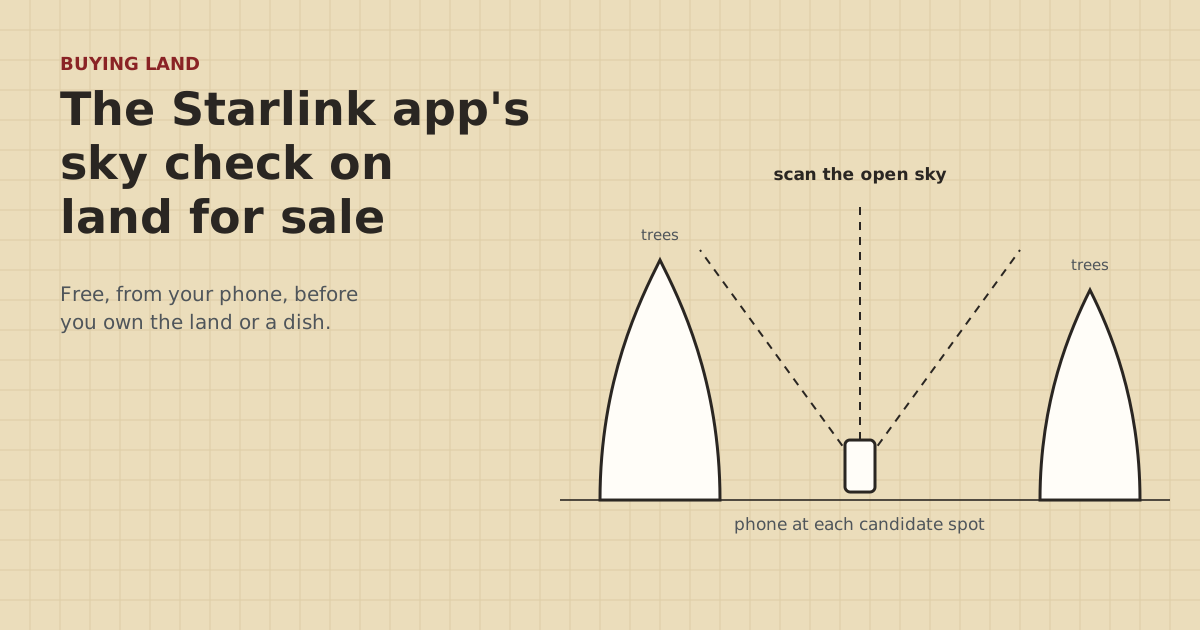
- The Starlink app's Check for Obstructions scan uses your phone at the planned mounting spot. Starlink recommends running it before ordering.
- Scan three to five spots, not one: the house site, a clearing, an outbuilding roofline, anywhere a pole could stand.
- A winter scan with bare trees looks better than summer will. Rescan in leaf or assume the canopy fills in.
- Your phone is at head height. A dish on a roof or pole sits higher and may clear trees the scan says are in the way.
- Screenshot every result with the date, and sort the property into clear, borderline or blocked before you offer.
Yes, you can check the sky at land for sale before you own it or a dish. Install the free Starlink app, stand at each spot where a dish could go, and run Check for Obstructions. It uses your phone to map trees and buildings against the sky, and Starlink recommends running it before ordering. Scan several spots, remember that bare winter trees look clearer than summer leaves, and keep in mind that your phone is lower than a roof or pole mount would be.
Here’s how to do it well on a property visit, and how to read what you get.
What the scan does, and what it doesn’t
The scan checks one thing: whether trees, buildings or terrain block the part of the sky a dish needs, from where your phone is. It doesn’t tell you:
- Whether Starlink service is offered at that address. That’s a separate check on starlink.com.
- What speeds you’d get.
- Whether fiber, cable or fixed wireless could reach the property. Use the FCC National Broadband Map for that.
- What the view is from a spot you didn’t scan, or from higher up.
So it’s one of several free checks. The full sequence is in what to check before you make an offer and the test-before-you-buy guide.
Before the visit
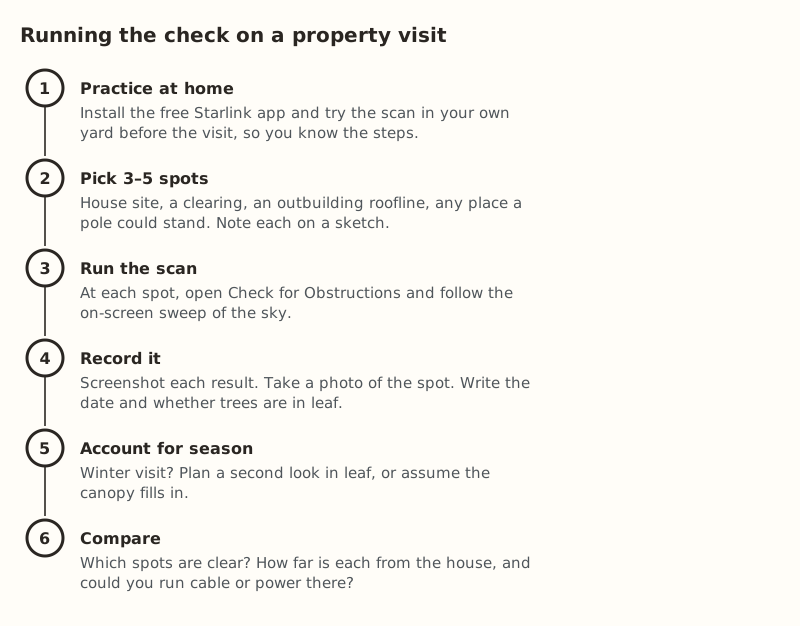
- Install the app and practice at home. Run the scan in your own yard so you know the steps and how long it takes. Don’t learn it while the agent waits.
- Charge your phone, and bring a battery pack. Scanning several spots with the camera on drains it.
- Sketch the parcel from a satellite map: where a house would go, existing buildings, clearings, the driveway. Mark three to five candidate spots.
- Note the season. If the trees are bare, plan to come back in leaf, or treat close calls as blocked.
On site: where to stand
Good candidate spots:
- The house site or the existing house’s roofline. This is the simplest place for a dish.
- The biggest clearing near the house, even if it’s a walk away.
- An outbuilding roof or gable. A barn or shop is often taller and more open than the house site.
- Anywhere a pole could stand: the edge of a field, the top of a rise.
At each spot, hold the phone where the dish would be, as high as you reasonably can, and follow the app’s on-screen sweep slowly and fully.
Height changes the answer
Your phone is at head height. A dish on a roof ridge or a pole can be well above that, and may clear tree tops the scan shows as blocking. The reverse is also true: a scan from a second-floor deck can look better than a ground-level spot would.
What to do about it:
- If a spot is borderline at head height, scan again from the highest safe place nearby: a deck, a truck bed, an upstairs window if there’s a house.
- Note on your sketch where a roof or pole could put the dish higher.
- Don’t climb roofs or ladders on someone else’s property. Height you can’t safely reach is something to note, not to test.
Dish mounting itself is a separate subject. This site covers getting internet from the house to other buildings, not the dish install.
Leaves and seasons
Trees and leaves block radio signals. That’s true for the satellite link and for the bridges this site covers. A winter scan through bare branches will look clearer than it will in July.
- Visit in leaf if you can, or come back for a second look before your due-diligence period ends.
- Visit in winter only? Treat partial blocks from deciduous trees as worse than shown.
- Evergreens block year-round, so a winter scan is more honest for them.
Distance from the clear spot to the house
The clearest spot is often not next to the house. That’s workable, within limits. The Standard kit’s dish cable is 15 m. Starlink sells a 45 m replacement for some kits and advises against splicing or extending the dish cable or using third-party cables. If the clear spot is farther than that, the usual answer is to put the dish and router there, in an outbuilding with power, and run a network link to the house: buried cable, fiber or a bridge pair ($108–$139.99 in our parts data). See wireless bridge or a long cable.
Note on your sketch how far each clear spot is from the house and whether there’s power there.
Reading the results
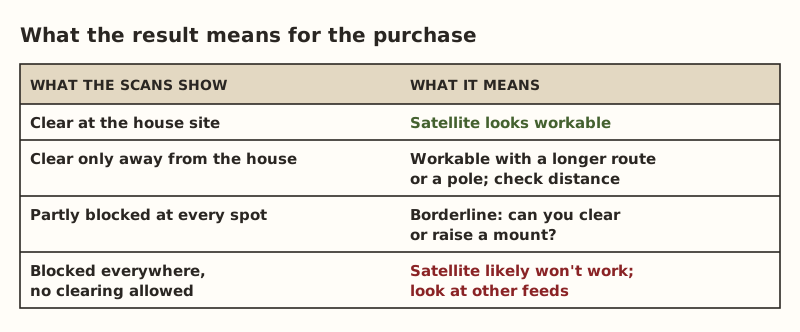
For “borderline” and “blocked” results, ask:
- Could you clear trees? Who owns them, are any protected, and would clearing ruin what you liked about the land?
- Could you raise a mount? On a pole, a barn roof or a taller building you’d put up anyway.
- Is there another feed? Fixed wireless or cell. Check the FCC map, call providers, and test phone signal on site. Mobile coverage on the FCC map is modeled, so your phone on site counts for more.
Record everything
For each spot, keep:
- A screenshot of the scan result.
- A photo of the spot facing the open sky, with something recognizable in frame.
- The date, the time and whether trees were in leaf.
- A pin or note on your sketch.
That record is what you compare between properties, and what you look back at if you rescan in summer. It also helps if you later talk to an installer.
When the app isn’t enough
If the scan is borderline, no other feed is available, and you need certainty before buying, a portable test with real equipment is the next step. It costs money and a trip. Residential service is tied to its registered service address, so a test elsewhere needs a plan that allows it. Kits bought on starlink.com can be returned within 30 days for a full refund, per Starlink; read the current terms first. The test-before-you-buy guide covers costs and caveats. We don’t suggest using a referral offer for a short test.
Comparing scan results between properties
If you’re looking at several parcels, keep the scans comparable:
| For each spot | Write down |
|---|---|
| Location | On your sketch, with a number |
| Date and time | And whether trees were in leaf |
| Height | Ground, deck, truck bed |
| Result | Clear, partly blocked, or blocked, plus the screenshot |
| Distance to house | Along a route a cable or bridge could take |
| Power nearby? | Outlet in an outbuilding, or none |
A property where the house site scans clear is simpler than one where only a far clearing is clear, even if both “pass”. The far clearing adds a cable route, a power question and maybe a second building to keep dry.
When other people are on the property
Be considerate on a visit. Ask the agent or seller before walking the property with your phone held up. Explain what you’re doing: it’s a free app check, and nothing gets installed. Don’t climb anything. If tenants live there, arrange the visit through the agent. The goal is a few minutes at each spot, not an inspection.
What the agent and seller can tell you
The seller may already know a lot about the sky: where a previous dish was mounted, which trees were trimmed, whether service dropped in summer. Ask. An agent can pass along what the seller says but usually can’t confirm it. Your own scans are what you can rely on. If the seller has Starlink now, ask to see the dish’s location and whether the app on their phone shows obstruction warnings. If the equipment conveys, read the seller is leaving the dish and router.
Common mistakes
- One scan, at the most convenient spot. Scan three to five.
- Rushing the sweep. Go slowly and cover the whole sky the app asks for.
- Trusting a winter scan through deciduous trees.
- Ignoring height. Note where a higher mount could change the result.
- Not writing anything down. You won’t remember which result was which spot.
- Forgetting the barn. If the clear spot is at the barn, plan how internet gets to the house.
What we don’t know
We can’t predict what the scan will show at your parcel, or how closely a phone scan matches a mounted dish’s real performance. The site owner hasn’t run this check on land for sale. This guide is built from Starlink’s help pages and the site’s research. App steps can change, so follow what the app shows on your phone.
Next step
Practice the scan at home, mark your candidate spots on a sketch, and take the printable property-visit checklist with you. Then do the other free checks in the test-before-you-buy guide.
Go deeper
This post answers one question. The full guide covers the rest: Test reception before you buy land (the full field kit: sky check, cell signal, FCC map, and a portable test only if still unsure).
Questions people ask
Can I check Starlink coverage at a property before I buy it?
Do I need a Starlink account to use the obstruction checker?
How accurate is the Starlink obstruction check?
Does the obstruction check work in winter when the trees have no leaves?
What if the obstruction check shows trees in the way?
Can I test Starlink on land with a real dish before buying?
Sources
- Starlink Help: How do I check for obstructions before installing Starlink?, retrieved Oct 5, 2026
- Starlink Help: How do I change my service address?, retrieved Oct 5, 2026
- Starlink Help: How do I return my Starlink kit?, retrieved Oct 5, 2026
- FCC: Broadband Data Collection, retrieved Oct 5, 2026
- FCC: Mobile Broadband Maps / What's on the National Broadband Map, retrieved Oct 5, 2026
- Interline: Fresnel Zone, Link Clearance and Signal Loss in Outdoor Wi-Fi Links, retrieved Oct 5, 2026
- Starlink Standard 4 X Specifications PDF, retrieved Oct 5, 2026
- Starlink Standard Accessories Guide PDF, retrieved Oct 5, 2026
- Starlink Help: How much cable do I have and how do I route it indoors?, retrieved Oct 5, 2026
- Loco5AC (base $49.00; $54.00 surcharge incl.), retrieved Oct 5, 2026
Prices on this page are US retail ranges for named example parts, checked on the date shown, before tax and shipping. They change often.
Independent · not affiliated with SpaceX or Starlink. Links to Starlink’s plan pages use the site owner’s own referral link (your price is the same); there are no affiliate links (how we make money). It is general information, not electrical advice: where code applies, use a licensed electrician. Found an error? Tell us.