What to check about internet before you make an offer on land
Internet is one of the few things about a rural property you can't fix with money after closing, at least not always. Most of the checks are free and take an afternoon.
Research-based, not tested on a farmWorks with any internet provider at the house.
Key takeaways
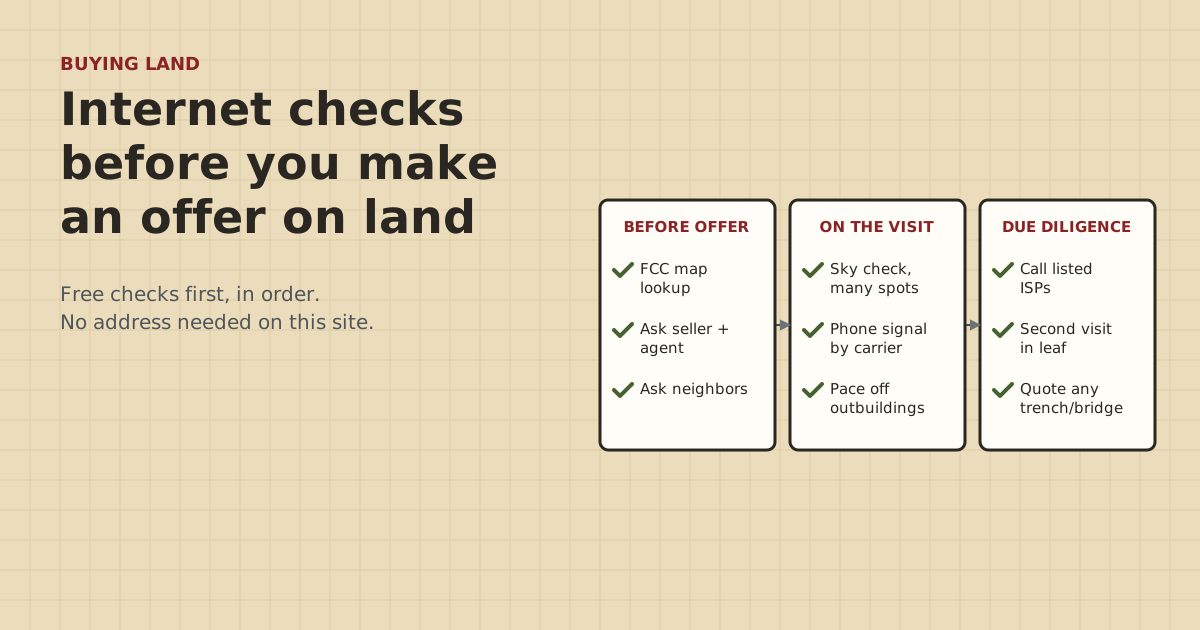
- Start free and from home: look the parcel up on the FCC National Broadband Map, then call any provider it lists about that exact location.
- On the visit: run the Starlink app's obstruction check at several spots, test phone signal on each carrier, and pace off distances to outbuildings.
- Ask the seller, the agent and the neighbors what they actually use. Ask for specifics, not 'it works fine'.
- Sort what you find into 'fine', 'fixable for a price' and 'deal-breaker' before you write the offer.
- A paid portable test is a last resort, not a first step. The free checks settle most properties.
Before you make an offer on rural land, do five free checks. Look the parcel up on the FCC National Broadband Map and call any provider it lists. Ask the seller, agent and neighbors what they actually use. On the visit, run the Starlink app’s obstruction check at several spots, test phone signal on each carrier, and pace off the distance to any barn or shop that will need internet. Then sort what you found into “fine”, “fixable for a price” and “deal-breaker”. A paid portable test is only worth it if the free checks leave you unsure.
This post walks through each check, what the answers mean, and what’s fixable after you buy.
Why check before the offer
After closing, you can usually fix the last few hundred feet: a cable or bridge to the barn. That’s what most of this site is about. What you can’t always fix is the feed: whether any internet reaches the property at all. Trees you aren’t allowed to cut, a hollow that hides the sky, no fiber within miles and no cell signal can add up to a home office that doesn’t work. The checks below take an afternoon and cost nothing.
Check 1: The FCC map, from home
The FCC National Broadband Map (broadbandmap.fcc.gov) shows the internet providers that report service at each location, fixed and mobile. You type the address into the FCC’s site or click the spot. This site never asks for it.
What to do with it:
- If a fiber or cable provider is listed, call them and ask about that exact location: is it served now, what would a hookup involve, and how far is the nearest line? If the answer is yes, that’s usually the best feed.
- If a fixed-wireless provider is listed, call and ask whether they need a site survey, and whether trees between you and their tower would block it.
- Mobile coverage on the map comes from carrier propagation models, and the FCC says real experience varies. Treat it as a hint, then test on site.
Providers report this data themselves, and it can be wrong. The FCC has a challenge process: a fixed availability challenge goes to the provider, who must concede or rebut it.
Check 2: Ask the people who know
The seller. Ask specific questions, not “how’s the internet?”:
- Which provider and plan do you have?
- Where is the equipment mounted, and where does the cable come into the house?
- What speeds do you see in the evening? Can you run a speed test while we’re here?
- Does it drop in storms or in summer?
- Is any cable, conduit or fiber buried between the house and the barn or shop? Where?
The agent. Agents can pass on what the seller says, but usually can’t confirm it. Ask whether the listing’s internet claims came from the seller.
The neighbors. If you meet them, ask what they use and whether it works for video calls. A neighbor down the road on fixed wireless tells you more than any map.
If the seller has Starlink and is leaving the equipment, see the seller is leaving the dish and router. There are account rules that matter.
Check 3: The sky, on site
If satellite might be the feed, install the free Starlink app before the visit. At the spot where a dish would go, run Check for Obstructions. It uses your phone to map trees and buildings against the sky. Starlink recommends running it before ordering, so you don’t need any equipment. Try several spots: the house site, a clearing, the roofline of an outbuilding, and anywhere a pole could go.
Bare winter trees look clearer than they will in July. If you visit in winter, plan a second look in leaf, or assume the canopy fills in. The how-to is in using the Starlink app’s check on land for sale.
Check 4: Phone signal, carrier by carrier
Borrow phones on different carriers if you can. At the house site, the barn and anywhere you’d want a gate camera, note the bars and run a speed test on each. Cell signal matters three ways:
- A backup when the main internet is down.
- LTE cameras at a gate or well need it. They ran $94.99–$279.99 (checked Oct 5, 2026) plus a data plan.
- Safety: calling for help from the house or the pasture.
Check 5: Distances to the other buildings
Pace off, or measure on a phone map, the route from the likely router spot to each barn, shop or second house. Note what’s in between: trees, a rise, a drive, a creek. That decides how you’d link them later:
| Distance and conditions | Likely method | Rough parts cost (checked Oct 5, 2026) |
|---|---|---|
| Under 328 ft, diggable | Buried Cat6 | Cable $149.99 for a 500 ft spool, plus protection |
| Hundreds of feet, clear view | Wireless bridge pair | $108–$139.99 |
| Long run, diggable | Fiber + media converters | $60.06–$79.98 for the converters, plus cable and conduit |
| Blocked view, can’t dig | Relay bridge or separate service | More, and more complex |
Copper Ethernet tops out at 100 m (about 328 ft) of cable. How to get internet to a barn has the full decision tree.
Sort what you found
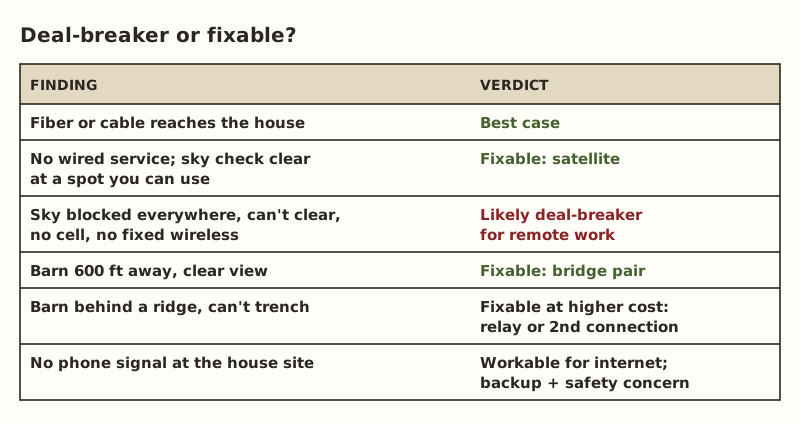
Questions that move something from “deal-breaker” to “fixable”:
- Can you clear trees at a dish spot, or are they protected, on a slope, or the reason you liked the land?
- Can you raise a mount on a pole or an outbuilding roof to clear the canopy?
- Do covenants or HOA rules limit dishes, poles or antennas? Read them, and ask your agent or attorney how they apply.
- Can you trench, or is it ledge, wetland or someone else’s land? Call 811 before any digging.
Fitting this into the purchase
If internet decides whether the property works for you, do these checks before your due-diligence or inspection period ends. How to word an offer or a contingency is a question for your agent or a real estate attorney. We can’t advise on that. What we can say: an afternoon of free checks before the deadline beats finding out after.
When a paid test is worth it
If the sky check is borderline, there’s no wired or fixed-wireless option, and you need to know before you commit, a portable test with real equipment answers it. That costs money and a trip. Residential Starlink service is tied to its registered service address, so testing elsewhere means a plan that allows it. Kits bought on starlink.com can be returned within 30 days for a full refund, per Starlink; read the current terms before you order. The full method, costs and caveats are in the test-before-you-buy guide. We don’t suggest using a referral offer for a short test, and this page has no referral link.
Comparing two properties
If you’re choosing between parcels, score them the same way, so the internet question doesn’t come down to memory:
| Check | Property A | Property B |
|---|---|---|
| FCC map: wired provider listed and confirmed? | ||
| Fixed wireless confirmed by phone? | ||
| Sky check: clear spots, and distance from house | ||
| Phone signal at house (bars, by carrier) | ||
| Phone signal at barn or gate | ||
| Route to outbuildings: distance and method | ||
| Seller and neighbor reports | ||
| Overall: fine / fixable / deal-breaker |
Fill it in on each visit, with the date and the season. A property with fiber at the road and a barn 200 ft away is a different purchase from one with a borderline sky check and a shop 900 ft behind trees, even if the listings look the same.
Budgeting the internet side
If the property passes, put a line in your move-in budget for the internet work. The feed itself (plan and equipment) depends on which provider you end up with, and this site doesn’t cover plans. The links to outbuildings are where farm properties add cost. Use the method table above and the Outbuilding Link Planner to get a dated parts list for each building. Add surge protection for any copper run between buildings, and an electrician if any building needs power or bonding.
Common mistakes
- Trusting the listing’s “high-speed internet available”. Ask what, from whom, and confirm it.
- One sky check, in winter, at one spot. Do several, and account for leaves.
- Forgetting the outbuildings. The house may be fine and the barn 900 ft behind a tree line.
- Testing only your own carrier. A neighbor’s carrier might work where yours doesn’t.
- Leaving the checks until after the inspection deadline.
What we don’t know
We can’t predict service at a specific parcel. Maps, seller reports and app checks each have limits, which is why we suggest several. The site owner hasn’t tested raw land this way. This guide comes from FCC and Starlink help pages and the site’s research. Covenant and contract questions belong with your agent or attorney.
Next step
Print the property-visit checklist and take it on your next visit. It covers each check above, and your ticks stay on your device. Then follow the test-before-you-buy guide for the sky and signal checks in detail.
Go deeper
This post answers one question. The full guide covers the rest: Test reception before you buy land (free checks first: sky view, cell signal, FCC map; a paid portable test only if still unsure).
Questions people ask
How do I find out what internet is available at a rural property?
Is the FCC broadband map accurate?
Can I check Starlink at a property before buying?
What questions should I ask the seller about internet?
Should internet be a contingency in a land purchase?
What if there is no internet at the property?
Sources
- FCC BDC Help: How to Use the FCC's National Broadband Map, retrieved Oct 5, 2026
- FCC: Broadband Data Collection, retrieved Oct 5, 2026
- FCC: Mobile Broadband Maps / What's on the National Broadband Map, retrieved Oct 5, 2026
- Starlink Help: How do I check for obstructions before installing Starlink?, retrieved Oct 5, 2026
- Starlink Help: How do I change my service address?, retrieved Oct 5, 2026
- Starlink Help: How do I return my Starlink kit?, retrieved Oct 5, 2026
- Category 6 cable - Wikipedia, retrieved Oct 5, 2026
- 811 Before You Dig (Common Ground Alliance), retrieved Oct 5, 2026
- Loco5AC (base $49.00; $54.00 surcharge incl.), retrieved Oct 5, 2026
- Voltive V-1236-1 Cat6 Direct Burial Gel Filled, 500 ft, retrieved Oct 5, 2026
- 10Gtek Gigabit SM media converter, dual SC, 1000Base-LX, 20 km (2-pack), retrieved Oct 5, 2026
- Reolink Go PT Plus, retrieved Oct 5, 2026
Prices on this page are US retail ranges for named example parts, checked on the date shown, before tax and shipping. They change often.
Independent · not affiliated with SpaceX or Starlink. Links to Starlink’s plan pages use the site owner’s own referral link (your price is the same); there are no affiliate links (how we make money). It is general information, not electrical advice: where code applies, use a licensed electrician. Found an error? Tell us.