The seller is leaving the dish and router: what to check
"The Starlink stays with the house" sounds like a bonus. It can be, if the seller can transfer the hardware, every part is there, and you know what the rest of the network looks like.
Research-based, not tested on a farmWorks with any internet provider at the house.
Key takeaways
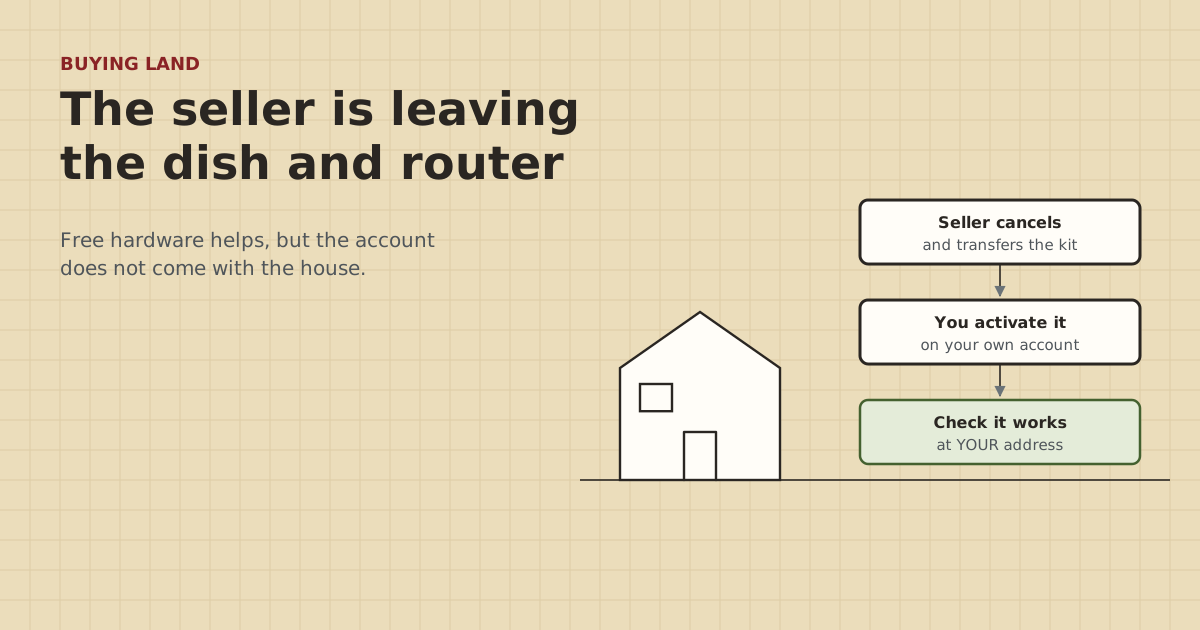
- The hardware can stay, but the service can't. The seller cancels and transfers the kit, and you activate it on your own account.
- Per Starlink's help, transfers aren't allowed until 120 days after purchase or 90 days after activation, whichever comes first, or with a balance owed. Rentals can't be transferred.
- On the visit: confirm it's owned, every part is there, where it's mounted, and run a speed test on site.
- Ask for a sketch of anything else that's wired: barn links, cameras, bridges, buried cable.
- Get the transfer done before or at closing, while the seller is still easy to reach.
If the seller is leaving their Starlink dish and router, the hardware can come with the property, but the service can’t. The seller has to cancel their service and transfer the device out of their account, then you activate it on your own account. Per Starlink’s help article, transfers aren’t allowed until 120 days after purchase or 90 days after activation, whichever comes first, or while a balance is owed, and rental kits can’t be transferred at all. On the visit, confirm the kit is owned and complete, see where it’s mounted, and run a speed test.
Here’s the transfer process, what to check, what to ask for, and the parts of the network that matter as much as the dish.
The hardware stays, the account doesn’t
Starlink service belongs to an account and, for Residential service, a registered service address. Using it elsewhere needs a Roam plan, and changing the address turns off service at the old one. When a property changes hands, the seller’s account doesn’t come with it. Instead:
- The seller cancels their service.
- The seller transfers the hardware out of their account.
- You set up your own account and activate the hardware at your address.
Plans and prices aren’t covered here. This post is about making sure the hardware handoff works.
How the transfer works
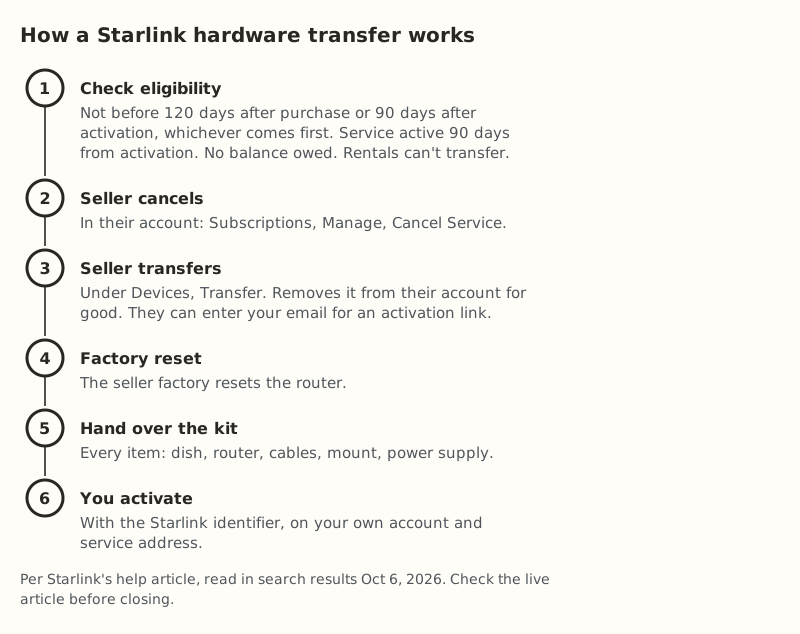
Per Starlink’s help article on transferring ownership:
- Eligibility. Transfers aren’t allowed until 120 days after purchase or 90 days after activation, whichever comes first. Service must stay active for 90 days from activation. No transfer with an outstanding balance. Rental service lines can’t be transferred to another person or location.
- Cancel. The seller logs into their account on starlink.com, opens Subscriptions, picks the subscription, clicks Manage and then Cancel Service.
- Transfer. Under Devices, the seller finds the Starlink, clicks Transfer and confirms. That removes it from their account permanently. They can enter your email to send you an activation link.
- Reset and hand over. The seller factory resets the router, gives you every item in the kit, and shares the Starlink identifier so you can activate it.
Expect service to stop once the seller cancels, so plan for a gap between their cancellation and your activation. If you need internet from day one, plan for that, for example with a phone hotspot for a few days.
What to check on the visit
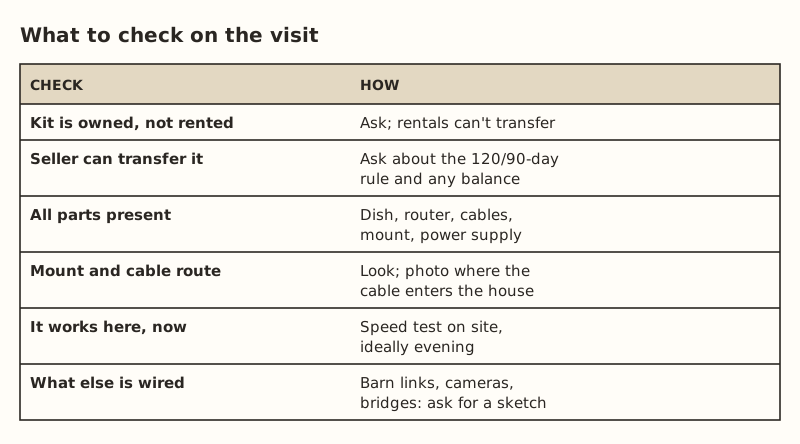
Owned, not rented. Ask directly. A rental can’t be transferred, so “it stays” would mean nothing.
Eligible to transfer. Ask roughly when they bought and activated it, and whether the account is paid up. A very new kit may not be transferable yet.
Complete. Dish, router, the dish cable, the mount, the power supply, and any mesh nodes or adapters. A missing power supply or a cut cable turns “free” into a parts order. Starlink advises against splicing or extending the dish cable, or using third-party cables. If the cable has been spliced to reach a far spot, plan to replace it. The Standard kit’s cable is 15 m.
Mount and cable route. Where is the dish, and is the mount solid? Where does the cable come into the house? Photograph it. If you’ll want the dish somewhere else, run the app’s obstruction check at that spot too. It’s free and uses only your phone. See the Starlink app check on land for sale.
Working now. Ask the seller to run a speed test while you’re there, ideally in the evening. Look at the app on their phone if they’re willing. It shows whether the dish reports obstructions or outages.
The rest of the network matters as much
On a farm, the dish is just the start. Ask about everything downstream:
| Ask about | Why |
|---|---|
| Links to the barn, shop or second house | Cable, fiber or bridge? You’ll maintain it |
| Buried cable or conduit | Where it runs, how deep, and whether there’s a spare pull string |
| Bridge radios | Model, where the injectors are, any passwords |
| Cameras and a recorder | Brand, app, whether they work from town (Starlink uses CGNAT) |
| Surge protectors | Present at both ends of copper runs? Grounded? |
| Mesh nodes | Starlink routers only mesh with Starlink nodes |
| Passwords and accounts | Router, radios, cameras: what gets reset and what you inherit |
Ask for a sketch with distances from fixed points, plus photos of where each cable enters each building. Buried cable is invisible once you own the place. A sketch saves a backhoe from finding it.
Cameras deserve a note: they may be registered to the seller’s account in the camera maker’s app. Ask the seller to remove them from their account so you can add them to yours, and factory reset anything you can’t take over. If the cameras were set up with port forwarding, expect that not to work on Starlink’s CGNAT. See bypass mode and cameras.
When to get the transfer done
Before or at closing, while the seller is easy to reach. Practical options to discuss with your agent:
- Note in writing which equipment conveys with the property, item by item.
- Agree on when the seller will cancel and transfer, and that they’ll share the Starlink identifier.
- Get the router factory reset done in front of you, or right before handover.
How any of this fits your contract is a question for your agent or attorney. We can’t give legal advice.
Worked example
Say a listing for 40 acres says “Starlink conveys.” On the visit:
- The seller says they bought it two years ago and owns it outright. Eligible, as long as the account is paid up.
- Dish on a pole by the machine shed, router in the shop, a buried cable to the house. The cable is the reason the house has internet at all, so the shop’s power and that cable matter as much as the dish.
- A speed test in the shop at 6 pm looks fine. The app shows no obstruction warnings.
- No surge protectors on the buried cable between shop and house. That’s a cheap add after closing: one per end at $11.69–$14.14 each in our parts data, bonded by an electrician.
- Two cameras are in the seller’s app. They agree to remove them before closing.
Result: a good handoff, with one small fix and one note for the move-in list.
Questions to send the seller in writing
It’s easier for a seller to answer a short list by email than in a rushed showing. Something like:
- Is the Starlink kit owned or rented?
- Roughly when was it bought and activated, and is the account paid up?
- Will you cancel service and transfer the hardware before or at closing, and share the Starlink identifier with us?
- Which items stay: dish, mount, router, cables, power supply, mesh nodes?
- Is there any buried cable, conduit or fiber on the property? Can you sketch where?
- Are there bridge radios, cameras or a recorder? Which apps and accounts do they use, and will you remove them from your accounts?
- Any problems we should know about: drops in summer, after storms, or in heavy snow?
Keep the answers with your purchase papers. They’re the start of your network notes.
If the transfer can’t happen
Sometimes it can’t: the kit is too new, it’s a rental, or the seller won’t do the steps. Then the dish on the roof is just a mount and some cable to you. Options:
- Ask the seller to take it, so you’re not left with equipment you can’t activate.
- Keep the mount and the cable route if they’re good. A well-placed mount and a tidy cable path into the house are useful whatever equipment you buy.
- Don’t plan the purchase around free hardware. The things that matter are the same: a clear sky view at a usable spot, or another feed, and a way to reach your outbuildings.
Common mistakes
- Assuming the account comes with the house. It doesn’t. You activate your own.
- Not asking if it’s a rental. Rentals can’t be transferred.
- Letting the seller leave before the transfer is done. Chasing a former owner for a device transfer is slow.
- Ignoring the downstream network. The barn link and cameras are what you’ll live with.
- No sketch of buried cable.
- Forgetting camera and app accounts.
What we don’t know
Starlink’s transfer rules can change. We read the help article in search results because the page loads by JavaScript, so check the live article before closing. We can’t confirm any specific seller’s eligibility or account status. Only they and Starlink can. The site owner hasn’t bought property with equipment conveying. This guide is built from Starlink’s help pages and the site’s research.
Next step
Take the printable property-visit checklist to the showing and add the questions above. Then do the free checks in what to check before you make an offer. The full field kit is in the test-before-you-buy guide.
Go deeper
This post answers one question. The full guide covers the rest: the printable rural property internet checklist (what to check on a property visit; ticks stay on your device).
Questions people ask
Can I take over the previous owner’s Starlink?
How do I transfer Starlink to a new owner?
Are there restrictions on transferring Starlink hardware?
What happens to the seller’s service after a transfer?
Should I buy a house with Starlink equipment included?
What should I check about the seller’s network besides the dish?
Sources
- Starlink Help: How do I transfer ownership of my Starlink hardware? (read in search results), retrieved Oct 6, 2026
- Starlink Help: How do I change my service address?, retrieved Oct 5, 2026
- Starlink Help: How do I check for obstructions before installing Starlink?, retrieved Oct 5, 2026
- Starlink Standard 4 X Specifications PDF, retrieved Oct 5, 2026
- Starlink Help: How much cable do I have and how do I route it indoors?, retrieved Oct 5, 2026
- Starlink Help: What IP address does Starlink provide?, retrieved Oct 5, 2026
- ETH-SP-G2, retrieved Oct 5, 2026
Prices on this page are US retail ranges for named example parts, checked on the date shown, before tax and shipping. They change often.
Independent · not affiliated with SpaceX or Starlink. Links to Starlink’s plan pages use the site owner’s own referral link (your price is the same); there are no affiliate links (how we make money). It is general information, not electrical advice: where code applies, use a licensed electrician. Found an error? Tell us.