Helping a parent’s rural setup
If the internet is down, how does your parent call for help?
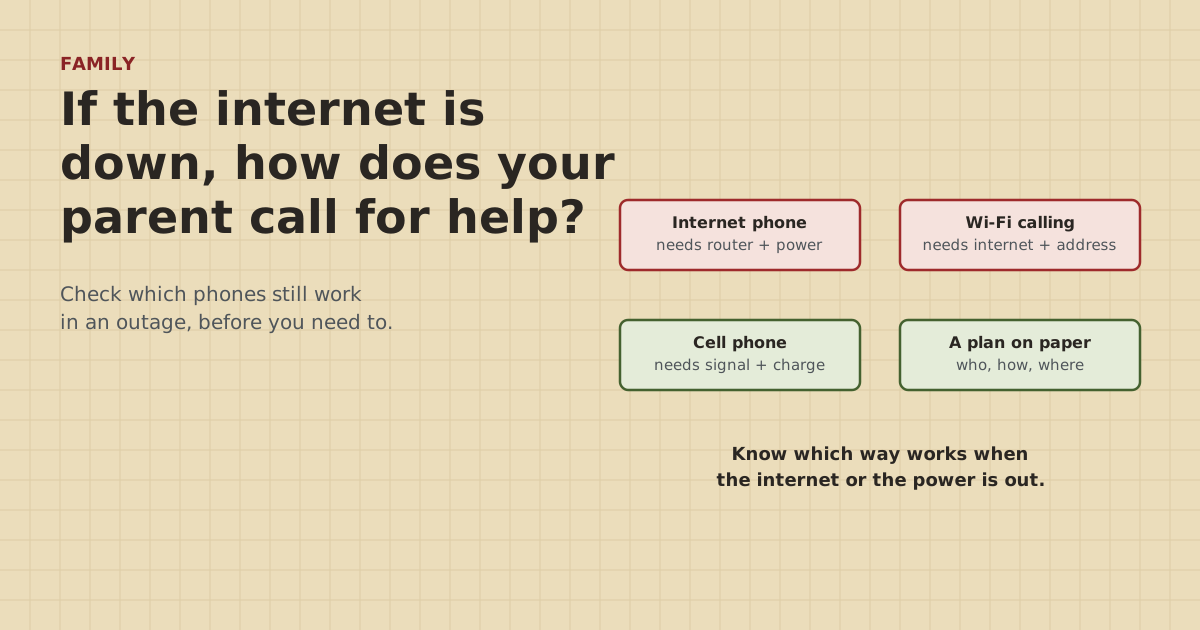
On a rural property, the home phone may run through the same router as the TV. When the internet goes down, that can take the phone with it. Here's how to check, and what to put in place.
Research-based, not tested on a farmWorks with any internet provider at the house.
Key takeaways
- Per the FCC, internet (VoIP) phone service may not work during a power outage or when the internet connection fails.
- Wi-Fi calling uses an address the user registers. If it's wrong, or there's no internet, 911 calls may be misrouted or go over cell instead.
- A charged cell phone with signal at the house is the most reliable backup. Test signal at the house, the barn and anywhere your parent works alone.
- Ask the phone provider about backup power. The FCC requires many home voice providers to offer customers a backup power option.
- Write the plan at the bottom of the fridge sheet and practice it together. Consent and their preferences come first.
If your parent’s home phone runs over the internet, it may not work when the internet goes down, and the FCC says the same about power outages. Wi-Fi calling on a cell phone also needs a working internet connection, and it routes 911 using an address the user registers. The most reliable backup is a charged cell phone that gets signal at the house, kept in a known spot. Check which kind of phone your parent actually uses, test cell signal where they live and work, ask the phone provider about backup power, and write the plan at the bottom of their fridge sheet.
Here’s how to work out which phones still work in an outage, and how to build a simple plan with them.
Which phones depend on the internet
Many rural homes now have phone service that runs through the same router as the TV and tablet. It’s easy to miss, because the handset looks like an ordinary landline.
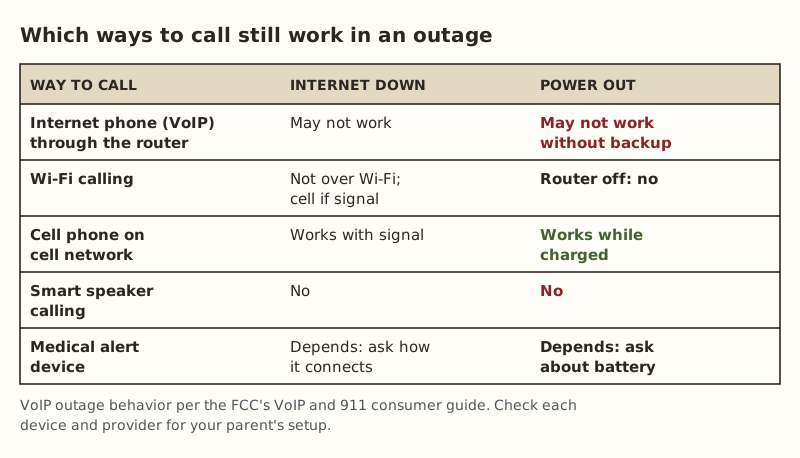
- Internet phone (VoIP). The phone plugs into a box or the router, and calls go over the internet. The FCC’s consumer guide says VoIP service may not work during a power outage or when the internet connection fails or becomes overloaded. Providers have to give customers warning labels about 911 limits. Look for one on or near the equipment.
- Wi-Fi calling on a cell phone. Lets a cell phone make calls over Wi-Fi when cell signal is weak. It needs the home internet to be working.
- Traditional copper landline. Fewer homes have one now. If your parent does, it doesn’t depend on the home internet.
- Cell phone on the cell network. Works when there’s signal and battery, whatever the home internet is doing.
- Smart speakers and tablets with calling. Need internet and power.
- Medical alert devices. Some use cellular, some a landline, some home internet. You have to ask.
Wi-Fi calling and the registered address
When Wi-Fi calling is turned on, the phone usually asks for an emergency address. An FCC advisory committee report on 911 over Wi-Fi explains why: most Wi-Fi access points don’t know their location, so Wi-Fi calling relies on the registered address. If the caller isn’t at that address, the 911 call may not reach the nearest call center or may be misrouted.
For a parent on a farm, check two things on their phone, with them:
- Is Wi-Fi calling on? It helps when cell signal is weak at the house.
- Is the emergency address right? It should be the farm’s address, written the way emergency services would find it. Many rural addresses get mistyped. If the parent also has a second house on the property, decide which address makes sense.
Power outages
On a rural property, power outages and internet outages often come together. The router, the internet equipment and any internet phone box all need power.
The FCC’s 2015 order on 911 continuity requires providers of fixed home voice service that isn’t line-powered to offer customers the option to buy backup power. The order describes 8 hours of standby power, with a 24-hour option to follow. Whether to buy it is the customer’s choice. Ask your parent’s phone provider:
- What backup power option do you offer, and how long does it last?
- What exactly keeps working during an outage: the phone only, or the internet too?
- How does my parent check that the battery is still good?
A small battery backup on the router may keep an internet phone running through a short outage, but only if everything the phone needs (the router and the internet equipment) stays powered. That’s a question for the provider, not a guess.
Test cell signal where it matters
The FCC’s map shows mobile coverage, but it comes from carrier models, and the FCC says real experience varies. Test on site:
- In the house, especially the rooms your parent uses most and the bedroom.
- In the barn or shop.
- Out where they work alone: the pasture, the garden, the far field.
Check bars and make a short test call on each carrier you can borrow a phone for. If signal is poor inside but fine on the porch, put that on the plan: “No signal inside? Step out on the porch.”
Build the plan together
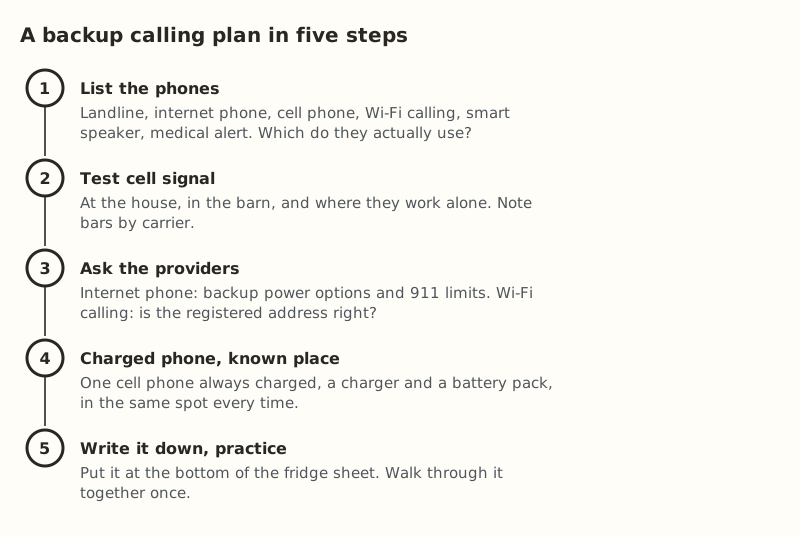
- List the phones they actually use. Ask, don’t assume.
- Test cell signal in the places above.
- Ask the providers about backup power and 911 limits, and check the Wi-Fi calling address.
- One charged phone, one known place. A charger plugged in at that spot, and a battery pack nearby for long outages.
- Write it down and practice. The last line of the fridge sheet should say: “Emergency? Use the cell phone. Call 911. Don’t wait for the internet.”
Doing it with respect
This is their safety and their house. A few things that help:
- Start with a question: “If the phone didn’t work, what would you do?” Their answer tells you what to build on.
- Offer options and let them choose. Some parents want a cell phone in their pocket. Others want a landline they trust.
- Don’t add monitoring they didn’t ask for. Cameras and alerts are a separate conversation, with consent first. See camera check-ins for a parent.
- Share the plan with a neighbor if your parent agrees. A neighbor down the road can be there long before you can.
After a storm
Storms knock out power and internet together. The National Weather Service says to stay off corded phones during a thunderstorm and that cell or cordless phones are fine to use. If equipment looks burnt or smells hot afterward, don’t touch it. Your parent should call you or an electrician, and 911 if there’s smoke or fire. What to check afterward is in checking your network after a lightning strike.
Common setups and what to check
Three typical rural setups, and the question each one raises:
| Setup | What can fail | What to ask or do |
|---|---|---|
| Internet phone through the router, weak cell signal | Phone stops with the internet or power | Backup power option from the provider; a spot with cell signal; a landline if available |
| Cell phone only, good signal at the house | A dead battery | Charger in a fixed spot, a battery pack, a habit of charging every night |
| Medical alert device plus internet phone | Depends on how the device connects | Ask the device provider how it connects and how long its battery lasts in an outage |
If cell signal is poor everywhere on the property, the backup question gets harder. Wi-Fi calling can help when the internet is up, but it depends on the same internet. That’s the case where a traditional line or the provider’s backup power option matters most. Ask about both.
Check it twice a year
Phones and services change. Twice a year, perhaps when clocks change, run through it with your parent:
- Is the charged phone still where it should be, and does it hold a charge?
- Is the Wi-Fi calling address still right?
- Does the internet phone’s backup battery, if they have one, still pass its self-test? The provider can say how to check.
- Has anything changed: a new phone, a new provider, a new medical device?
- Is the plan still on the fridge sheet, and do they still agree with it?
Who else should know the plan
A plan works better when more than one person knows it. With your parent’s agreement, share it with a sibling who helps, a neighbor who checks in, and any caregiver who visits. Each of them should know where the charged phone lives and that the internet phone may not work in an outage.
Common mistakes
- Assuming the home phone is a landline because it looks like one.
- A cell phone that’s never charged, or kept in a drawer with no signal.
- A wrong Wi-Fi calling address, typed in years ago.
- Not asking about the medical alert device. How it connects decides whether it works in an outage.
- Making the plan for them. It works when it’s theirs.
What we don’t know
Phone services, devices and provider backup options vary. We can’t tell you what your parent’s specific phone does in an outage. Their provider can, and the warning label on the equipment is a good start. FCC rules are summarized here from the FCC’s own pages and order. Check them for current details. The site owner hasn’t set this up for a parent on a farm. This guide is research-based.
Next step
On your next visit, list your parent’s phones together, test cell signal around the property, and check the Wi-Fi calling address. Then add the emergency line to the fridge sheet. The rest of the visit checklist is in helping your parents from far away.
Go deeper
This post answers one question. The full guide covers the rest: Helping your parents with their rural internet from far away (what to set up on your next visit, and how to help after).
Questions people ask
Does a home phone work if the internet is down?
Can you call 911 with Wi-Fi calling?
What is the best backup phone for an elderly parent in a rural area?
Does a VoIP phone work in a power outage?
Do medical alert devices work without internet?
How do I talk to my parent about an emergency plan without taking over?
Sources
- FCC: VoIP and 911 Service (consumer guide), retrieved Oct 6, 2026
- FCC CSRIC VIII: Report on 911 Service over Wi-Fi, retrieved Oct 6, 2026
- FCC 15-98: Ensuring Continuity of 911 Communications (backup power order), retrieved Oct 6, 2026
- National Weather Service: Lightning Indoors, retrieved Oct 6, 2026
- FCC: Mobile Broadband Maps / What's on the National Broadband Map, retrieved Oct 5, 2026
- FCC: Broadband Data Collection, retrieved Oct 5, 2026
Prices on this page are US retail ranges for named example parts, checked on the date shown, before tax and shipping. They change often.
Independent · not affiliated with SpaceX or Starlink. Links to Starlink’s plan pages use the site owner’s own referral link (your price is the same); there are no affiliate links (how we make money). It is general information, not electrical advice: where code applies, use a licensed electrician. Found an error? Tell us.