Helping a parent’s rural setup
A one-page "internet is down" sheet for a parent's fridge
Most rural internet outages end with a restart or a wait. A sheet on the fridge lets your parent handle that on their own, and tells them clearly when to call you or 911.
Research-based, not tested on a farmWorks with any internet provider at the house.
Key takeaways
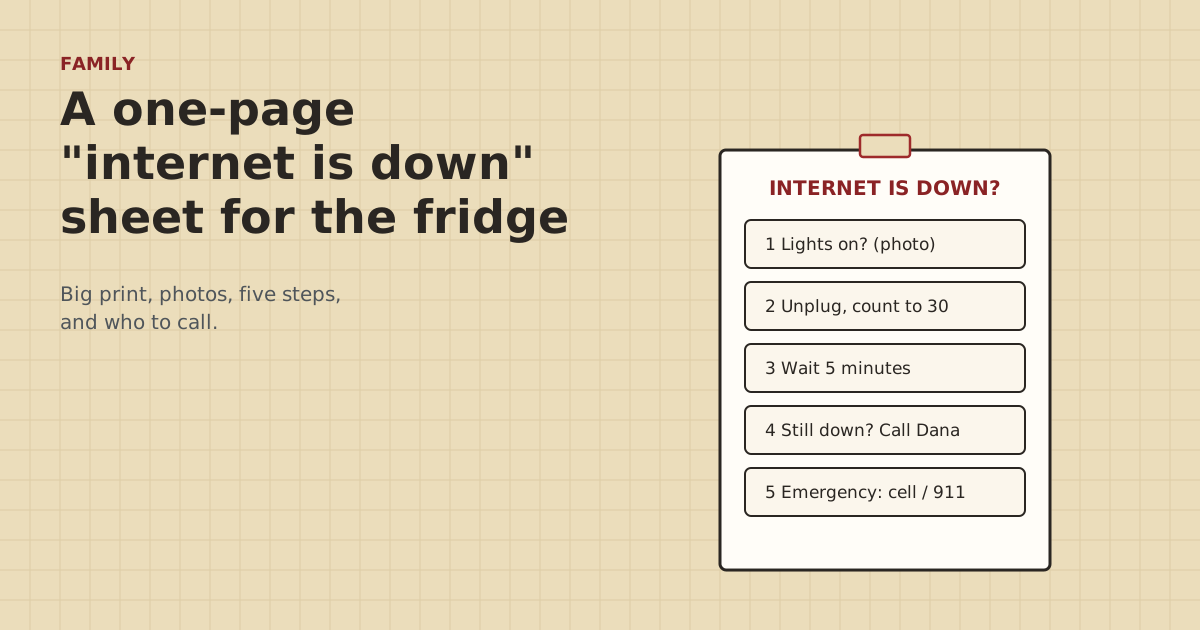
- One page, big print, five steps: look at the router, restart it, wait, call a named helper, and what to do in an emergency.
- Use photos of their actual router and label the one plug to pull, so there's no guessing.
- Keep passwords and account details off the sheet. Scam callers ask for exactly that.
- Make it together on a visit and practice it once while you're there. It's their sheet, in their words.
- Put emergency calling at the bottom of every version: the internet is never the way to reach 911.
Make a single page, in big print, with five steps: look at the router (with a photo), turn it off and on (with the one plug labeled), wait, call a named helper, and in an emergency use a cell phone or landline and call 911. Use photos of their actual equipment. Keep passwords off it. Make it together on a visit and practice it once while you’re there. Most outages on a rural connection end with a restart or a short wait, and a clear sheet lets your parent handle that on their own terms.
Below: what goes on the sheet, what stays off, a sample layout, and how to make it work on the day.
Why a sheet works better than “just call me”
When the TV and tablet stop working, a phone call goes like this: “Which box? The one with the lights? Which cord?” A sheet with photos ends that. Your parent can fix the common cases without waiting for you. When they do call, you can say “do step 2 on the fridge sheet”, and you both know exactly what that means.
It’s also about respect. A sheet in their kitchen, in words they chose, puts them in charge of their own house.
What goes on it
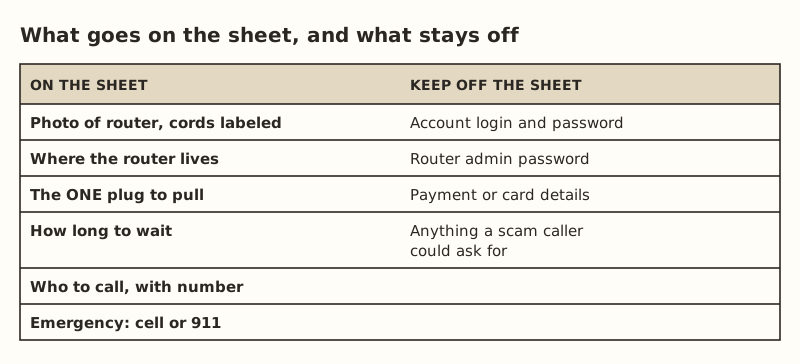
- A photo of their router, taken on your visit, with the power cord and any cables labeled with tape or tags. If they have Starlink, the router is the box the dish cable plugs into. On a farm there may be other boxes too: a switch, a bridge injector for the barn. Label the one that matters.
- Where it lives. “Hall closet, bottom shelf.” It sounds obvious until someone else has to find it.
- The one plug to pull, matching a label on the cord itself, for example a red tag that says INTERNET.
- How long to wait. We suggest “count slowly to 30, plug it back in, wait 5 minutes”. It’s easy to remember and gives most equipment time to restart. Check your provider’s help pages for their own advice.
- Who to call, by name, with the number written out. Add a second person, such as a sibling or a neighbor.
- The provider’s support number, if your parent is the account holder and comfortable calling.
- Emergency instructions, at the bottom, in bold: use the cell phone or landline and call 911.
What stays off
- Account logins and passwords for the internet provider.
- The router’s admin password.
- Payment or card details.
- Anything a stranger on the phone might ask for.
Scam callers pretending to be an internet company are common, and they ask for exactly this. Add a line to the sheet: “The internet company will never call and ask for passwords. Hang up and call Dana.”
A sample layout
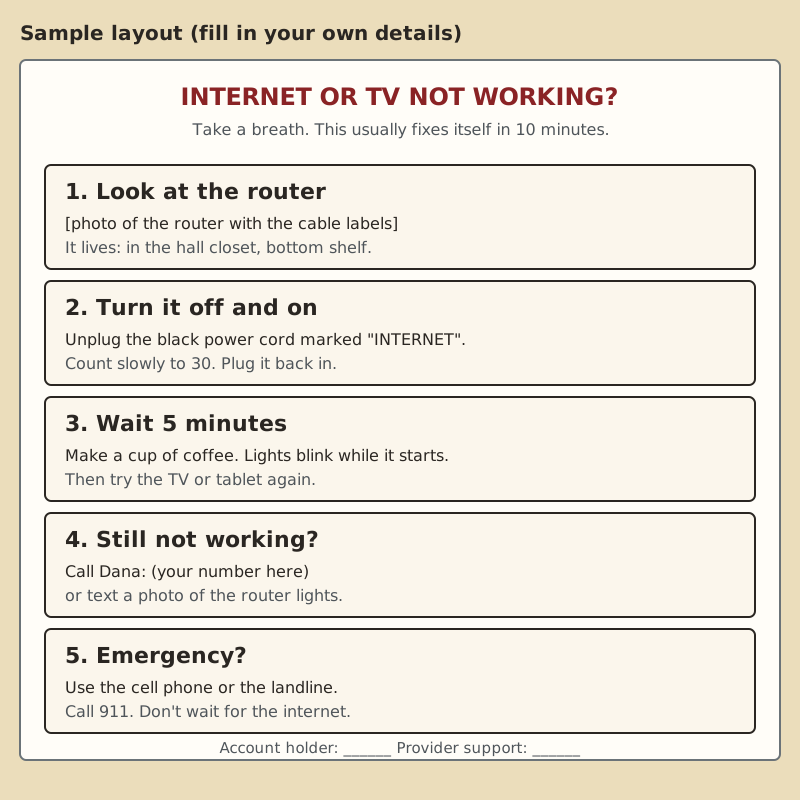
Design tips that make it usable:
- Big type. At least 18–20 point for the steps. Test it at arm’s length.
- High contrast. Black on white. No colored backgrounds.
- Numbered steps, one action each.
- Their words. If your mom calls it “the Wi-Fi box”, write “the Wi-Fi box”.
- Laminate it, or put it in a sheet protector, and stick it where they’d look first: the fridge, inside a cupboard door, next to the router.
- Date it, so you know which version is current.
Making it together
The sheet works best when your parent helps make it.
- Ask first. “Would a sheet like this help, or would you rather call me?” Some people want it, some don’t. Both are fine.
- Walk to the router together. Take the photo. Put the label on the plug.
- Practice once. Have them do steps 1–3 while you watch, at a time when nobody needs the internet. Time how long it takes to come back. Then put that number on the sheet (“about 4 minutes”).
- Write it in their words and print it big.
- Agree on step 4: when to call you, and that texting a photo of the lights is welcome.
Extra lines for a farm
A farm network often has more than one box. Add only what they’ll actually need:
- If the barn link has its own power supply (a bridge injector or switch), label it, and add a line: “Barn cameras down but house internet OK? Unplug the box labeled BARN, count to 30, plug back in.”
- If cameras are how you check in, say what they’ll see if the internet is out, and that it’s not an emergency by itself.
- After a thunderstorm: “If it’s still down after a storm, don’t touch anything that looks burnt. Call Dana.” The reasoning is in checking your network after a lightning strike.
If the router has spare LAN ports (Starlink’s Router 3 has 2 ports for Ethernet), don’t leave loose cables near them that invite “helpful” re-plugging. Tie off and label what’s in use.
The emergency line is not optional
Put it on every version, in bold: “Emergency? Use the cell phone or landline. Call 911. Don’t wait for the internet.” The FCC’s consumer guide warns that internet phone (VoIP) service may not work during a power outage or when the internet connection fails. If your parent’s home phone runs over the internet, that matters. Read if the internet is down, how does your parent call for help? before you finish the sheet.
A second sheet, for you
The fridge sheet stays simple. Everything else goes on a second page that you keep, and that a sibling or neighbor helper can use:
- Provider and account holder, and where the account login is stored safely. Not on paper by the router.
- Equipment list: router model, any switch, any barn link (bridge injector, media converter), cameras and which app they use.
- Where things are: the router, the barn link power supply, the breaker for each, with photos.
- What’s normal: what the router lights look like when everything works, and roughly how long a restart takes. You timed it during the practice run.
- Who has access: which family members can log into the provider account or camera apps, with your parent’s agreement.
- Local help: a neighbor who can check on things, and a local tech or electrician if you have one.
Update it every visit. Write the date on it, the same as the fridge sheet.
When the sheet isn’t enough
Some outages aren’t fixable with a restart: a provider outage, storm damage, a failed router. The sheet’s step 4 handles that: call the helper. Help your parent recognize the signs, in plain words on the sheet:
- “If it’s still down after two restarts, stop and call.”
- “If the router has no lights at all, check the plug, then call.”
- “If anything smells hot or looks burnt, don’t touch it. Call.”
That keeps them safe and avoids a lot of unplugging and replugging that won’t help.
Large print and accessibility tips
If your parent has trouble seeing or handling small parts, a few changes help:
- Color-coded tags on the cord to unplug, matching a colored box on the sheet. Red cord, red box.
- A power strip with a big switch for the router, mounted where they can reach it without bending behind furniture, if an electrician or you can set it up safely. Then step 2 becomes “flip the red switch off, count to 30, flip it on”.
- Photos, not diagrams. A photo of their own router beats a drawing.
- One instruction per line, and nothing printed smaller than the steps.
Common mistakes
- Too much on one page. Five steps. Everything else goes on a second sheet for you.
- Generic photos. Use their router, in their house.
- Labels on the sheet but not on the cords. Label both.
- Passwords on the fridge.
- No practice run. A step that’s never been tried is a step that gets skipped.
- Making it for them instead of with them.
What we don’t know
Every router and provider restarts a little differently, and how long it takes to come back varies, which is why we suggest timing it during your practice run. The site owner hasn’t made this sheet for a parent on a farm. It’s built from general guidance and the site’s research. Real families who share what worked will be credited if they agree.
Next step
On your next visit, take the photo, label the plug, make the sheet together, and practice once. The rest of the visit list (accounts, labels, and what to do when they call) is in helping your parents from far away. If cameras are part of how you check in, see camera check-ins for a parent. Start with consent.
Go deeper
This post answers one question. The full guide covers the rest: Helping your parents with their rural internet from far away (what to set up on your next visit, and how to help after).
Questions people ask
How can I help my elderly parent fix their internet from far away?
What should be on an internet troubleshooting sheet for seniors?
Should I put the Wi-Fi password on the fridge sheet?
How long should you unplug a router to reset it?
What if my parent doesn’t want help with their internet?
Sources
- FCC: VoIP and 911 Service (consumer guide), retrieved Oct 6, 2026
- Starlink Standard 4 X Specifications PDF, retrieved Oct 5, 2026
Prices on this page are US retail ranges for named example parts, checked on the date shown, before tax and shipping. They change often.
Independent · not affiliated with SpaceX or Starlink. Links to Starlink’s plan pages use the site owner’s own referral link (your price is the same); there are no affiliate links (how we make money). It is general information, not electrical advice: where code applies, use a licensed electrician. Found an error? Tell us.