Cloud cameras vs local-only cameras, in plain words
The real difference between camera types isn't the lens or the price. It's who the camera calls home to, and where your video sits when the internet goes down.
Research-based, not tested on a farmWorks with any internet provider at the house.
Key takeaways
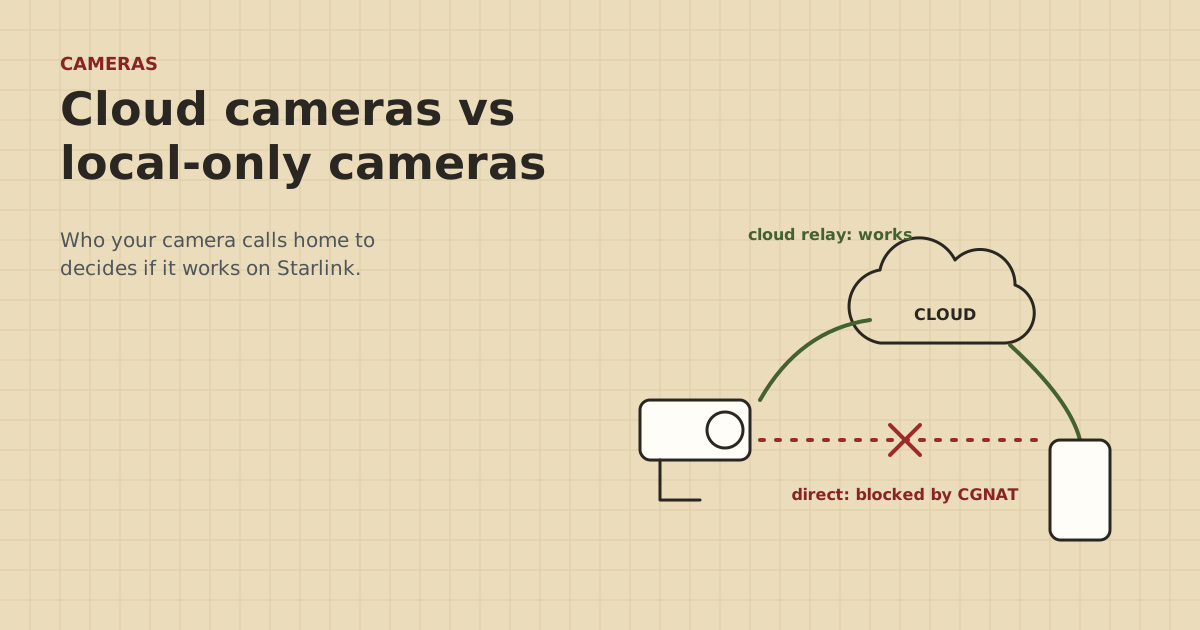
- Cloud and P2P app cameras call out to the maker's servers, so remote viewing works behind Starlink's CGNAT with no setup.
- Local-only cameras and NVRs wait for you to call in. CGNAT blocks that, so they need a fix such as a mesh VPN.
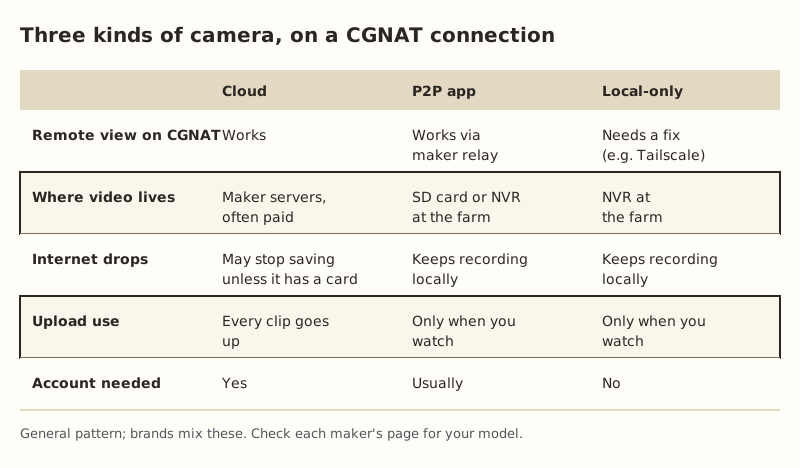
- Cloud cameras usually keep video on the maker's servers, often behind a subscription. P2P and local cameras keep it on a card or NVR at the farm.
- If the upload is slow or the internet drops a lot, local recording is the safer choice. The camera keeps recording when the link is down.
- Brands mix these types. Check the maker's support page for your exact model before you buy.
A cloud camera sends its video to the maker’s servers and you watch through the maker’s app. A local-only camera keeps its video at the farm, on a card or a recorder, and waits for you to connect to it. In between are P2P app cameras, which keep video at the farm but use the maker’s servers to connect your phone to them. On Starlink that difference decides everything: by default Starlink uses CGNAT, which blocks connections coming in from the internet. Cameras that call out (cloud and P2P) work remotely with no setup. Cameras that wait for you to call in (local-only, port forwarding, dynamic DNS) need a fix.
Below: how each type works, where your video lives, what happens when the internet drops, and how to pick for your farm.
The one idea behind all of this
Think of your farm’s internet connection like a farm gate that only opens from the inside.
- Anything on your farm can go out through the gate: your phone, a camera, a laptop. Replies come back through the same opening.
- Nothing from outside can open the gate and come in uninvited.
That’s what CGNAT (carrier-grade NAT) does. Starlink’s support page says the default IPv4 setup uses CGNAT, which blocks all inbound ports. The Starlink router also can’t forward ports, and public IPv4 addresses only come with the Local Priority and Global Priority plans.
So the question for any camera is simple: does it go out through the gate on its own, or does it wait for you to come in?
Type 1: Cloud cameras
How they work: the camera keeps a connection open to the maker’s servers. When it records a clip, it uploads it. When you open the app away from home, your phone talks to the maker’s servers too, and they pass the video along.
On Starlink: works. The camera starts the connection, so CGNAT never gets in the way.
Where video lives: on the maker’s servers. Many brands put saved video history behind a monthly plan. Without the plan, some only show live view or alerts.
When the internet drops: a cloud-only camera with no memory card may stop saving clips until the connection comes back. Some models have a card slot as a backup; check yours.
Upload use: every saved clip goes up. Ring’s own figures put per-device upload needs at 2 Mbps for 1080p up to 15 Mbps for 4K, and say to add them up for multiple devices. Arlo lists 1 to 3 Mbps per camera depending on model. Several cameras on a rural connection can use a real share of the upload.
Type 2: P2P app cameras
How they work: the camera records to a memory card or a recorder at your place. It also checks in with the maker’s servers. When you open the app away from home, the servers introduce your phone and the camera, and the video goes between them, directly if possible or through a relay.
Reolink’s UID system is a good example. Reolink says it allows remote viewing without port forwarding, and the router only has to allow outbound traffic. eufy goes further and tells customers not to open public ports at all; remote viewing goes through the eufy app or its web portal.
On Starlink: usually works out of the box, for the same reason as cloud cameras: the camera calls out.
Where video lives: on the card or recorder at the farm. Many work with no subscription.
When the internet drops: it keeps recording locally, as long as it has power. You just can’t watch remotely until the link is back.
Upload use: only when you’re watching remotely or an alert sends a snapshot or clip.
Type 3: Local-only cameras and NVRs
How they work: the camera or recorder sits on your home network and waits. To watch from town, you’re expected to reach in: forward ports on the router, set up dynamic DNS, or type in the farm’s public IP address. Hikvision, for example, says that without its Hik-Connect service, remote access needs port forwarding (HTTP 80, server 8000, RTSP 554) or DDNS. Lorex’s main option is its cloud app, but its advanced DDNS option needs forwarded ports.
On Starlink: remote viewing doesn’t work without a fix, because CGNAT blocks the way in. On the farm’s own Wi-Fi, viewing works fine.
The fixes, easiest first:
- Turn on the maker’s app or cloud mode if the recorder has one (many do). That turns it into a P2P system.
- Use a mesh VPN such as Tailscale. A small device at the farm (some NVRs, a computer, or a router that supports it) joins a private network with your phone. Tailscale uses NAT traversal and falls back to relays, so no port forwarding is needed.
- IPv6. Starlink hands out IPv6 on all its routers, which in theory lets you reach a camera directly. In practice it only helps if your camera, your app and the network you’re viewing from all support it well.
Step-by-step versions are on the remote viewing behind CGNAT page. Putting the Starlink router in bypass mode with your own router doesn’t remove CGNAT; see bypass mode and camera access.
Where video lives: on the NVR at the farm. No account needed with the camera maker.
When the internet drops: keeps recording.
Upload use: only when you watch.
What this means on a farm
Farms have a few things that tilt the choice:
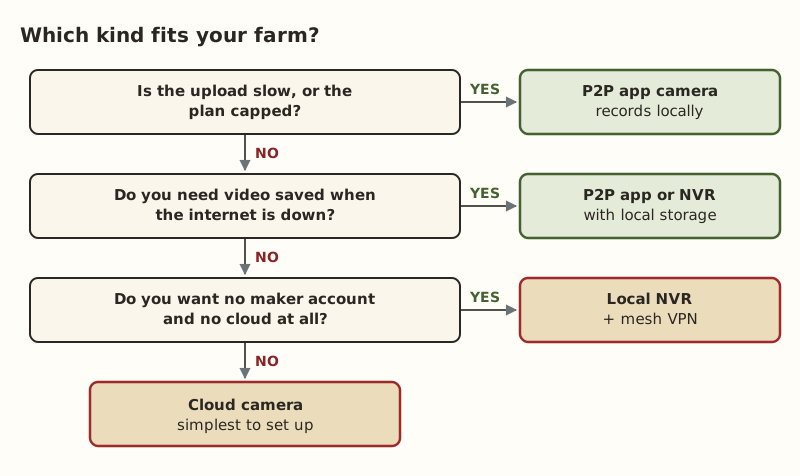
- Slow or capped upload. If the farm’s upload is limited, or you’re on a capped plan, cameras that upload every clip compete with everything else. Local recording with remote viewing on demand uses far less. Our camera upload guide shows how to add it up.
- Internet outages. If you want video of what happened while the link was down (a storm, a power blink at the house), you need local storage at the camera or an NVR.
- Cameras far from the house. A PoE camera on a long cable or behind a bridge to the barn works the same way as one by the back door. What matters is where it records and how it reaches you. A small PoE switch in the barn ($44.99–$63.66) can feed several cameras and an NVR.
- Cameras with no network nearby. At a far gate or well with no cable or bridge, an LTE camera with its own cellular plan and solar panel ($94.99–$279.99 (checked Oct 5, 2026)) skips the farm network entirely. These are cloud-style cameras on the cellular network.
Worked examples
Three cameras around the house and barn, decent upload. Cloud cameras are the simplest: plug in, add to the app, done. Pay attention to subscription costs and add up the upload. If a storm takes the internet out, check whether the models you pick have a card slot.
Eight cameras on a machine shed and a calving barn, upload is the bottleneck. A PoE NVR system with P2P app access: cameras record to the NVR around the clock, and you only use upload when you open the app. The NVR keeps recording through outages.
An existing local-only NVR that worked on the old DSL line. It stopped working remotely after the switch to Starlink. Look for a P2P or cloud setting in the NVR menu first. If there isn’t one, put Tailscale on a small computer or a supported router at the farm. Don’t buy a new router hoping it fixes it.
Common mistakes
- Buying on specs alone. Resolution and night vision don’t tell you how the camera connects. Read the remote-access section of the maker’s support page.
- Assuming “works with an app” means no subscription. It often means video history costs extra.
- Following a port-forwarding guide on Starlink. It can’t work on standard plans; see why port forwarding doesn’t work.
- Forgetting to test away from the farm. Turn off Wi-Fi on your phone and use cell data to check remote viewing before you leave.
- Mixing brands without a plan. Several apps, several subscriptions, several ways to fail. One NVR system or one cloud brand is easier to live with.
What we don’t know
Brands change how their apps connect, their storage plans and which models support which mode. The descriptions above come from each maker’s support pages as quoted in our data, and they apply to the models those pages cover. We haven’t confirmed every model. Ring’s and Arlo’s support pages don’t say outright that port forwarding isn’t needed, though their cloud design suggests it. The site owner plans to test two or three cameras behind their own Starlink CGNAT at home; results will go on the gear tests page, labeled “owner-run test at home, not on a farm”.
Next step
Check your camera’s type on the which cameras work page, then use the remote viewing fixes if yours is local-only. If cameras are going on a barn or shed, plan the link to that building with the Outbuilding Link Planner.
Go deeper
This post answers one question. The full guide covers the rest: Which security cameras work with Starlink? Camera types vs CGNAT, upload needs and our own tests.
Questions people ask
Do security cameras work with Starlink?
What is the difference between a cloud camera and a local camera?
What is a P2P camera?
Will my cameras keep recording if the internet goes down?
Do I need a subscription for farm security cameras?
Which type of camera uses less of my internet upload?
Sources
- Starlink Help: What IP address does Starlink provide?, retrieved Oct 6, 2026
- Reolink Support: How to Enable UID for Reolink Products, retrieved Oct 6, 2026
- Starlink Help: Can I port forward with the Starlink router?, retrieved Oct 5, 2026
- eufy: How to Remotely View Security Cameras on App or Web, retrieved Oct 5, 2026
- Hikvision USA: What options do I have for remote access, other than Hik-Connect?, retrieved Oct 5, 2026
- Lorex NR900X manual: DDNS Setup (Advanced), retrieved Oct 5, 2026
- Tailscale Docs: Connection types, retrieved Oct 5, 2026
- Ring: Understanding wifi recommendations for Ring devices, retrieved Oct 5, 2026
- Arlo: What are the minimum requirements for installing and using an Arlo system?, retrieved Oct 5, 2026
- Reolink Go PT Plus, retrieved Oct 5, 2026
- TP-Link TL-SG1005P (4 PoE+ ports, 65 W), retrieved Oct 5, 2026
Prices on this page are US retail ranges for named example parts, checked on the date shown, before tax and shipping. They change often.
Independent · not affiliated with SpaceX or Starlink. Links to Starlink’s plan pages use the site owner’s own referral link (your price is the same); there are no affiliate links (how we make money). It is general information, not electrical advice: where code applies, use a licensed electrician. Found an error? Tell us.